wayground logo

Free Printable Worksheets

NEW

Font size

S
M
L
XL
Worksheets

Microsoft Word 2016

Total questions: 34

Worksheet time: 17mins

Name
Class
Date
1.

What area in Microsoft Word enables users to view document properties and update the properties information at any time while creating a document?

a)

File, Info, Properties

b)

File, Info, Inspect Document

c)

File, Info, Protect Document

d)

File, Info, Manage Document

2.

Which dialog box provides the user with the ability to replace text as it is typed?

a)

AutoFormat

b)

Find & Replace

c)

AutoCheck

d)

AutoCorrect

3.

Mrs. Perry has assigned the class to type a report. To maximize space, which option would one choose to display the content?

a)

Read Mode

b)

Outline

c)

Print Layout

d)

Web Layout

4.

To increase or decrease the size of the content in a Microsoft Word window, which item on the status bar should be used?

a)

Zoom slider

b)

View picker

c)

Next page control

d)

Previous page control

5.

Which tool on the Home tab lets a user search for text in a document by keying the word into a search box?

a)

Select

b)

Find

c)

Search

d)

Locate

6.
Lisa created a table. She wants the text in her rows to start at the top left. Which layout feature will she apply? 
a)
Cell Alignment 
b)
Text Direction 
c)
Cell Margins
d)
Distribute Rows 
7.
Table styles may be applied to a table in a Microsoft Word document from which ribbon? 
a)
Table Tools Design Ribbon 
b)
Table Tools Format Ribbon 
c)
Table Tools Layout Ribbon 
d)
Table Tools Edit Ribbon 
8.
Johanna wants to navigate across columns to the left in her table. Which option should she choose? 
a)
Tab
b)
Enter
c)
Left arrow key 
d)
Shift+Enter 
9.
Which command group in the Table Tools Layout Ribbon contains the command to modify the height or width of rows and columns in a table? 
a)
Editing 
b)
Cell Size
c)
Rows and Columns 
d)
Table Styles 
10.
Word tabs, such as the FILE and HOME tabs, are organized in groups on the __________.
a)
Ribbon
b)
title bar
c)
status bar
d)
Quick Access Toolbar
11.
Which Word feature causes red and green wavy lines to appear under words as you type?
a)
Screen Tips
b)
spelling and grammar checking
c)
AutoComplete
d)
AutoCorrect
12.
Which key is used to remove the character before the insertion point?
a)
TAB
b)
DELETE
c)
BACKSPACE
d)
ENTER
13.

What version of Word are we learning?

a)

2013

b)

2016

c)

2019

d)

2002

14.

If you click on the File Tab, it will take you where?

a)

Backstage View

b)

Backstage Menu

c)

File View

d)

File Menu

15.

What do you call File, Home, Insert, Design, Layout, References, Mailings, Review, and View?

a)

Tabs

b)

Groups

c)

Shortcut Menu

d)

Options

16.
The portion of the screen with tabs and buttons is call the...
a)
Banner
b)
Ribbon
c)
Shortcut Menu
d)
Title Bar
17.
What does this button allow you to do?
a)
Add buttons to the Quick Access toolbar
b)
Change the ribbon display options
c)
Minimize the document
d)
No one really knows
18.
Which command from the file menu will allow you to change the name or location of a file?
a)
Save
b)
Save As
c)
Print 
d)
New
19.
What is the blinking vertical line in your document that indicates where you can enter text on the page.
a)
insertion point
b)
typing place
c)
starting point
d)
blinkie thing
20.
Before you can format text you must first...
a)
Exit Word
b)
Save your work
c)
Select the text
d)
Rename your document
21.
a)
Font size
b)
Increase Font
c)
Font color
d)
Font Name
22.
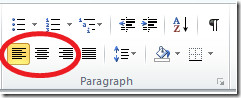
a)
Bold
b)
Underline
c)
Italic
d)
Font name
23.
a)
Undo
b)
Underline
c)
Center
d)
Bold
24.
a)
Left align
b)
Font size
c)
Font name
d)
Save
25.
a)
Center align
b)
Font name
c)
Increase font
d)
Underline
26.
a)
Font color
b)
Font name
c)
Increase font
d)
Bold
27.
Microsoft Word and Google Docs are examples of what?
a)
Word processors
b)
Spreadsheets
c)
Presentations
d)
Databases
28.

Table styles may be applied to a table in a Microsoft Word document from which tab?

a)

Table Tools - Design tab

b)

Table Tools - Format tab

c)

Table Tools - Layout tab

d)

Table Tools - Edit tab

29.
If you wanted to maximize the document viewing area and only see the menu headings which option would you choose?
a)
Auto-hide Ribbon
b)
Show Tabs
c)
Show Tabs and Commands
d)
None of the other choices
30.
โปรแกรม Microsoft Word จัดเป็นโปรแกรมประเภทใด?
a)
พิมพ์เอกสาร
b)
คำนวณ
c)
วาดรูปภาพ
d)
จัดรูปแบบเอกสาร
31.
โปรแกรม Microsoft Word ที่นักเรียนใช้เรียนในห้องเรียนคอมพิวเตอร์เป็นเวอร์ชั่นไหน ?
a)
 Microsoft Word 2007
b)
Microsoft Word 2000
c)
Microsoft Word 2010
d)
Microsoft Word 2013
32.
การลบข้อความในเอกสาร จะต้องใช้ปุ่มใดบนคีย์บอร์ด?
a)
 Ctrl
b)
 Alt
c)
 Insert
d)
Delete
33.

สัญลักษณ์ในภาพคือ คำสั่งใด

a)

ลำดับเลข

b)

หัวข้อย่อย

c)

รายการหลายระดับ

d)

การย่อหน้า

34.
ข้อใดเป็นขั้นตอนการคัดลอกข้อมูลอย่างถูกต้อง?
a)
ระบายข้อความที่ต้องการ - คำสั่งคัดลอก - คำสั่งวาง 
b)
ระบายข้อความที่ต้องการ - คำสั่งวาง - คำสั่งคัดลอก
c)
คำลั่งคัดลอก - ระบายข้อความที่ต้องการ - คำสั่งวาง
d)
คำสั่งคัดลอก - คำสั่งวาง - ระบายข้อความที่ต้องการ