wayground logo

Free Printable Worksheets

Font size

S
M
L
XL
Worksheets

Study Computer with Vincent

Total questions: 55

Worksheet time: 1hrs 1mins

Name
Class
Date
1.

What is the website of Google Classroom?

a)

www.googleclassroom.com

b)

www.classroomgoogle.com

c)

www.classroom.google.com

d)

www.classroom.com

2.

What is the Website of WhatsApp?

(a)  

3.

What is the blog creator name?

(a)  

4.

What is PowerDirector?

a)

An Animator

b)

An Aplication to make Video

c)

A Volcano

5.

Tell me an aplication to make video.

(a)  

6.

What is this?

a)

This is a computer.

b)

This is a keyboard

c)

This is a monitor

d)

This is a CPU

7.
Who is the father of Computer?
a)
Mike Brown
b)
Charles Babbage
c)
Tim cook
d)
Bell
8.
Microsoft word is used for?
a)
Painting
b)
Drawing
c)
Typing
d)
Hunting
9.
Which of the following is a presentation program?
a)
MS Word
b)
MS Excel
c)
MS PowerPoint
d)
None  of the above
10.
This computer is small enough to fit on your lap and is very portable.
a)
Laptop
b)
Tower
c)
  Computer
d)
Motherboard
11.

A ______________ is the logic circuitry that

responds to and processes the basic instructions that drive a

computer.

a)

Transistor

b)

Processor

c)

RAM

12.
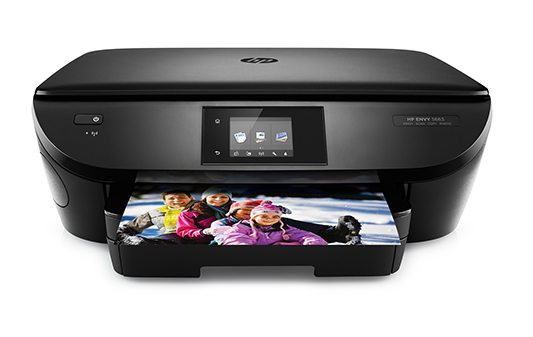
How do we call this?
a)
scanner
b)
smartphone
c)
games console
d)
printer
13.
How do we call this?
a)
USB memory
b)
folder
c)
mouse
d)
router
14.
How do we call this?
a)
router
b)
mouse mat
c)
memory stick
d)
printer
15.
How do we call this?
a)
folder
b)
memory stick
c)
tablet
d)
mouse mat
16.
How do we call this?
a)
tablet
b)
folder
c)
laptop
d)
smartphone
17.
How do we call this?
a)
laptop
b)
folder
c)
games console
d)
mouse
18.

Computer or Not A Computer?

a)

Computer

b)

Not a Computer

19.

Computer or Not A Computer?

a)

Computer

b)

Not a Computer

20.

Charles Babbage invented the first computer in the year...

a)

1922

b)

1943

c)

1822

d)

1943

21.

Who built one of the first modern computers?

a)

Lenovo

b)

Mac

c)

HP

d)

IBM

22.

Smart phones are like mini computers?

a)

True

b)

False

23.

This symbol on a device represents

a)

Internet

b)

Bluetooth

c)

WiFi

d)

Ethernet

24.

Using this type of technology allows you to connect your device without wires

a)

USB

b)

MP3

c)

Bluetooth

d)

Browser

25.

A printer and speakers are both examples of

a)

input devices

b)

output devices

c)

storage devices

d)

processing devices

26.
DVD stands for
a)
Digital Versatile Disc
b)
Digital Video Disc
c)
Digitised Video Disc 
d)
Digital Virtual Drive 
27.
What part of the computer do you use to type?
a)
Desktop
b)
Keyboard
c)
Mouse
d)
Cursor
28.
What is this called?
a)
CPU
b)
Screen
c)
Mouse
d)
Box
29.
What is this used for?
a)
Close a tab
b)
Open a window
c)
Close all windows
d)
Use the mouse
30.
What is this called?
a)
Tool
b)
Cursor
c)
Mouse
d)
Window
31.
What part of the computer is this?
a)
Screen
b)
TV
c)
Desktop
d)
Monitor
32.

If you are sending an email from your school email account, you are using...

a)

Gmail

b)

Google Docs

c)

Google Sheets

d)

Google Slides

33.

Which Google application is best to write an essay or story?

a)

Google Sheets

b)

Google Slides

c)

Google Drawings

d)

Google Docs

34.
 Behavior in the classroom should
a)
Include running and horseplay
b)
Not include running and horseplay
c)
Be according to students' preference
35.
You should never turn your computer off.
a)
True
b)
False
36.

A _______ is an electronic device that manipulates information, or data.

a)

Software

b)

Hardware

c)

Keyboard

d)

Computer

37.

The _____ works with a video card, located inside the computer case, to display images and text on the screen.

a)

Monitor

b)

Computer Case

c)

Keyboard

d)

Mouse

38.

A ________ is a general term for any type of handheld computer.

a)

Device Mobile

b)

Mobile Device

c)

Laptop

d)

Toplap

39.
Which one is an input device?
a)
printer
b)
mouse
c)
monitor
d)
speakers
40.
A hand-operated device that allows control of the cursor on a computer screen.
a)
Mouse
b)
Keyboard
c)
Printer
d)
Hardware
41.
Which one is an output device?
a)
monitor
b)
speaker
c)
printer
d)
all of them
42.

Word Processing in Microsoft Word or Google Docs is the application you should use to

a)

Write a letter to a friend

b)

Calculate a monthly budget

c)

Make a poster or flyer

d)

Create a slideshow presentation

43.

A spreadsheet in Microsoft Excel or Google Sheets would be the best application to use to

a)

Make a calendar

b)

Write a paper for English class

c)

Create a greeting card

d)

Create a bar chart

44.

If you were creating a flyer to advertise for a dance you should use

a)

Microsoft Excel

b)

Microsoft PowerPoint

c)

Microsoft Publisher

d)

Microsoft Flyer Maker

45.

What program would you use to create a slideshow presentation

a)

Microsoft Excel or Google Sheet

b)

Microsoft PowerPoint or Google Slides

c)

Microsoft Word or Google Docs

d)

Microsoft Shmicrosoft or Google Shmoogle

46.
What does the acronym RAM stand for?
a)
Random Alignment Memory
b)
Read Access Memory
c)
Random Access Memory
d)
Read All Memory
47.
Why is Virtual Memory needed or used by a computer?
a)
When RAM becomes full because of too many programs running at once
b)
When ROM is too small and struggles to store the Operating System
c)
When users wish to store data on an external server such as 'the cloud'
d)
When chosen by the user or computer administrator
48.
What is the average size of RAM in a PC or laptop computer?
a)
512 MB
b)
1 - 2 GB
c)
8 - 16 GB
d)
32 - 64 GB
49.
The blinking symbol on the screen
a)
cursor
b)
pointer
c)
mouse
d)
bug
50.
disk used to store information
a)
cd-rom
b)
cassette
c)
drive
d)
floppy
51.
portable device for storing information
a)
flash drive
b)

hard drive

c)
long drive
d)
quick drive
52.
_______ is how we write code
a)
Syntax
b)
Loops
c)
Variables
d)
Functions
53.
__________ are actions an object can do
a)
Value
b)
Syntax
c)
Objects
d)
Functions
54.
Which of these is most similar to a computer program?
a)
Science Book 
b)
Encyclopedia 
c)
Blue Print 
d)
Dictionary 
55.
What are these?
a)
Tower
b)
Motherboard
c)
Harddrive
d)
RAM memory