
 Worksheets
Parts of a computer
Total questions: 16
Worksheet time: 8mins
Name
Class
Date
1.
This component visually displays information generated by the computer...
a)
Monitor
b)
Motherboard
c)
CPU
d)
Operating System
2.
Carries out the instructions of a computer program, performs basic input/output operations of the system
a)
Software
b)
Central Processing Unit
c)
Operating System
d)
Motherboard
3.
Controls a computer's tasks and manages system resources to optimize performance...
a)
Software
b)
Software
c)
Operating System
d)
Central Processing Unit
4.
Responsible for turning the CPU on and off, the only way a computer should ever be powered down.
a)
Mouse
b)
Monitor
c)
CPU
d)
Power button
5.
Portable digital storage that allows the user to view and alter documents.
a)
Cloud storage
b)
Hard Drive
c)
USB Flash Drive
d)
Network Drive
6.
Programs or instructions that tell the computer what to do.
a)
Operating system
b)
Software
c)
CPU
d)
Motherboard
7.
This component allows users to enter text, numbers, and other information
a)
Mouse
b)
Keyboard
c)
Monitor
d)
CPU
8.
Input device which communicates commands to the CPU; allows users to select, highlight, and control options on the monitor
a)
Mouse
b)
Keyboard
c)
Monitor
d)
Software
9.
The main circuit board which contains sockets and accepts additional boards.
a)
CPU
b)
Motherboard
c)
Operating system
d)
software
10.
If my computer is frozen, and I cannot safely shut it down, the best thing to do is...
a)
Unplug it
b)
Hold in the power button
c)
Tell the teacher
d)
Go Crazy!!!!
11.

a)
Mouse
b)
CPU
c)
Speaker
d)
Keyboard
12.

a)
Fax
b)
Printer
c)
Paper
d)
Copier
13.

a)
Monitor
b)
PC
c)
CPU
d)
Power button
14.
A computer can (a) a large amount of information.
15.
A monitor is also known as (a) .
16.
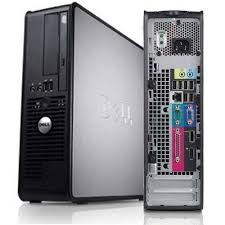
What part of the computer is this?
a)
Central Processing Unit
b)
Computer
c)
Tower
d)
Box
100 %

