
 Worksheets
CLASS 2 (ch 1, 2 & 3)
Total questions: 35
Worksheet time: 18mins
According to the video, all computers do these same four things...
Input, output, CPU, and RAM
Crash, burn, hang, and virus
Input, store, randomize, and print information
Input, store, process, and output information
According to the video, INPUT DEVICES do what?
Calculates information
Convert physical input to binary information
Store information
Converts information to physical output
Select all of the things that are INPUT devices of your computer.
Mouse
Printer
Keyboard
Monitor
Your cat
Select all of the OUTPUT devices.
Printer
Keyboard
Monitor
Speakers
Your cat
What type of work does a computer help with?
Thinking work
Artwork
Programming work
Manual labour
What controls all parts of a computer?
CPU
keyboard
operating system
humans
An example of input is:
looking at a picture
printing a document
listening to music
typing on a keyboard

What is this type of computer?
Desktop
Laptop
Tablet
Games Console

What is this type of computer?
Desktop
Laptop
Tablet
Games Console

What is this type of computer?
Desktop
Laptop
Tablet
Games Console
Which part of the computer shows you information from the computer?
Monitor
Mouse
Keyboard
Camera
It is known as the brain and heart of the computer.
Monitor
Keyboard
Central Processing Unit
Camera
1. Which computer part can you point and click with?
Monitor
Keyboard
Mouse
Camera
1. Which of the following is an example of an output device?
Keyboard
Mouse
Speaker
Microphone
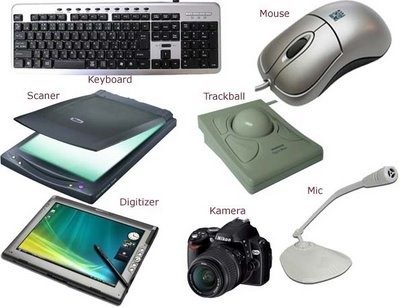
The pictures shown are example of
Output
Input
Software
Peopleware
Which part of the computer is used to type in information into the computer?
Mouse
Keyboard
Laptop
Monitor
Which of the following is an example of an input device?
Keyboard
Speaker
Printer
Monitor


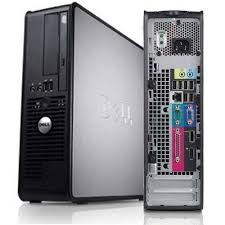






TICK THE PLACES WHERE COMPUTERS ARE USED.
HOME
SCHOOL
RESTROOM
AIRPORT
COMPUTER CAN BE USED AT HOME TO
STUDY
GIVE FOOD
PLAY GAMES
COMPUTER CAN BE USED AT SCHOOL FOR
TEACHING
LEARNING
CLEANING
COMPUTERS CAN BE USED AT BANK TO
DEPOSIT MONEY
COOK FOOD
WITHDRAW MONEY
COMPUTERS CAN BE USED AT AIRPORT FOR BOOKING TICKETS.
TRUE
FALSE
COMPUTERS CAN BE USED AT OFFICE TO DO OFFICE WORK.
TRUE
FALSE

