wayground logo

Free Printable Worksheets

NEW

Font size

S
M
L
XL
Worksheets

Scratch Coding Assessment

Total questions: 40

Worksheet time: 21mins

Name
Class
Date
1.
What do you call the list of commands in Scratch? 
a)
Sprite
b)
Script
c)
Scratch
d)
Help
2.
What do you call the changes in the characters in Scratch? 
a)
Next Sprite
b)
Next Script
c)
Next Costume
d)
Character change
3.

Where do you find the background images to insert in Scratch?

a)

Costumes

b)

Backdrops

c)

Gallery

d)

Script

4.

What does this block do?

a)

It writes notes for you

b)

It plays a musical note

c)

It beats the drum

5.

What does this block do?

a)

It allows sprites to talk to each other

b)

It plays music on the radio

c)

It writes a message in a bottle

6.

What is the variable in this code?

a)

keep score

b)

random position

c)

edge

7.

What does this code do?

a)

It clicks the sprite forever

b)

It allows you to draw shapes

c)

It generates sprites forever

8.

What does this block do?

a)

Repeat the code forever

b)

Repeat the code 2 times

c)

Repeat the code until touching the sprite

9.
What block will you use to have the sprite say something?
a)
Looks
b)
Sounds
c)
Pen
d)
Data
10.
What do you call a character in Scratch?
a)
Sprite
b)
Thing
c)
Anime
d)
Block
11.
Will the Sprite move from his position after this code ?
a)
Yes
b)
No
12.
To change the appearance of a sprite we can give it a different..?
a)
Costume
b)
Look
c)
Style
d)
Stage
13.
What is the name for the area where your project displays when active?
a)
Screen
b)
Window
c)
Output
d)
Stage
14.
When you add a picture or image as a background to your project, it is a...
a)
Backdrop
b)
Scene
c)
World
d)
View
15.
The name for a list of instructions in Scratch
a)
Script
b)
Program
c)
Story
d)
Output
16.
What do we use to build our programs in Scratch?
a)
Bricks
b)
Blocks
c)
Commands
d)
Decisions
17.
When you want a sprite to change appearance, you can add more
a)
Clothes
b)
Costumes
c)
Looks
d)
Characters
18.
a)
b)
c)
d)
19.

Which of the following sections of code will make the script follow the mouse pointer around the screen?

a)
b)
c)
d)
20.
What kind of block do I use to make my sprite move around?
a)
Motion
b)
Sound
c)
Sensing
d)
Control
21.

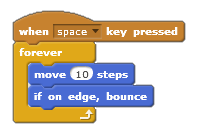
Which of these blocks can be identified as Iteration.

a)

When Space key pressed

b)

Forever

c)

Move 10 Steps

d)

If on edge, bounce

22.

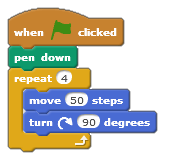
What shape will this code draw?

a)

Circle

b)

Square

c)

Triangle

d)

Rectangle

23.

What shape will this code draw?

a)

Circle

b)

Square

c)

Triangle

d)

Rectangle

24.
How can you upload a new sprite to Scratch?
a)
Searching for an image, saving and clicking on the folder to upload.
b)
Stand up, dance around, cross your fingers and upload the image.
c)
Ask your neigbor to upload a sprite for you?
d)
Call your mom for help?
25.
What are these blocks use for?
a)
To make sound
b)
To make cookies
c)
To make art
d)
To make the sprite jump
26.
Will sprite move from his position after this code ?
a)
Yes
b)
No
27.

The area where you play a game or run a project. This area is where you see the actions of your coding.

a)

Stage

b)

Block

c)

Sprite

d)

Costume

28.
This stack block will make the sprite:
a)
jump
b)
turn
c)
move forward
d)
turn sound down
29.
The Default Sprite is the 
a)
Cow
b)
Kitten
c)
Kangaroo
d)
Cat
30.

scratch is -----------

a)

programming Language

b)

Computer project

c)

A computer screen

d)

A website

31.

What happens when the green flag is clicked is Scratch program?

a)

The program stops

b)

the program starts

c)

the program Freeze

d)

the program is deleted

32.

What you will use to change the location of the scratch ?

a)

Costume tab

b)

Coordinates

c)

Stage Information

d)

File Menu

33.

Scratch is----------

a)

Text-base Programming

b)

Block-Base Visual programming Language

34.

The Scratch interface three main sections is ?

a)

Stage, character & sprite List

b)

Sprite , help and sprite

c)

Stage, Script & blocks palette

35.

by Sensing the sprite can

a)

Controls the visuals

b)

interact with the surroundings

c)

Plays audio files and effects

36.

we use ------------- for Event handlers

a)

Sensing

b)

Control

c)

Variables

d)

Event

37.

Operators in scratch is used for ---------

a)

Moves sprites

b)

change location

c)

Sprite interaction

d)

Mathematical operators

38.

we can Controls the visuals of the sprite by

a)

Looks

b)

Event

c)

sensing

d)

Data

39.

With Scratch, you can program your own interactive stories

a)

Yes

b)

No

40.

when you create a game in scratch you can keep the score in

a)

event

b)

Variable