
NEW
Font size
 Worksheets
Parts of Excel Screen
Total questions: 10
Worksheet time: 5mins
The part of the screen that contains the worksheet, cell pointer, and sheet tab bar.
sizing buttons
worksheet area
zoom slider
The part of the excel screen that displays the cell address of the active cell.
formula bar
title bar
name box
The set of buttons that are used to change the size of the window, hide the window, and close the window.
close button
sizing buttons
menu bar
A tabbed bar that contains all commands, controls, and options for creating, editing, and formatting a workbook.
zoom slider
ribbon
menu bar
It is used to switch from one workbook view to another. These buttons are named as Normal, Page Lay-out, and Page Break Preview.
zoom slider
status bar
View buttons
The part of the excel screen that is used for entering and editing data and formulas.
formula bar
view buttons
sizing buttons
The tab that is used to display the Backstage view.
File
status bar
View buttons
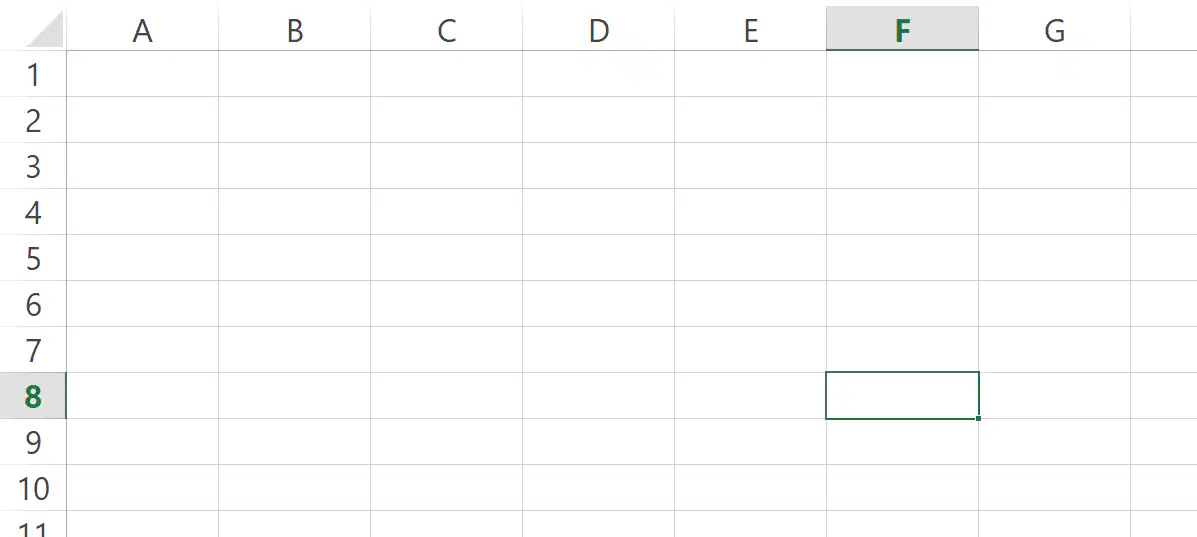
Give the cell address of the active cell.
8F
F8
F88
F9
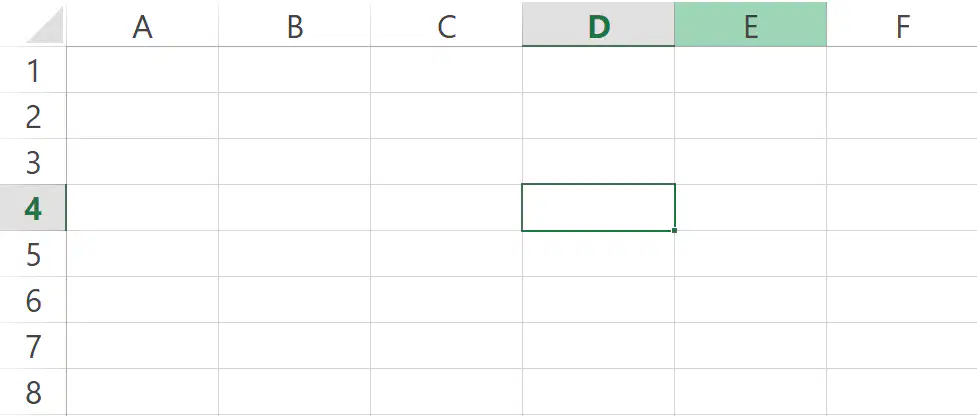
Give the cell address of the active cell.
D4
D44
D5
D1

Give the cell address of the active cell.
10C
C10
C11
C12

