wayground logo

Free Printable Worksheets

NEW

Font size

S
M
L
XL
Worksheets

PLTW Newsom Nest GAFE Certification Exam

Total questions: 41

Worksheet time: 23mins

Name
Class
Date
1.
True or False:
Google Classroom automatically creates calendar entries for assignments.
a)
True
b)
False
2.
True or False: 
Any email account can be used to sign up for Google Classroom.
a)
True
b)
False
3.
What is the correct Google Classroom url?
a)
classroom.google.com
b)
classroom.com
c)
lotusnotes.k12.hi.us
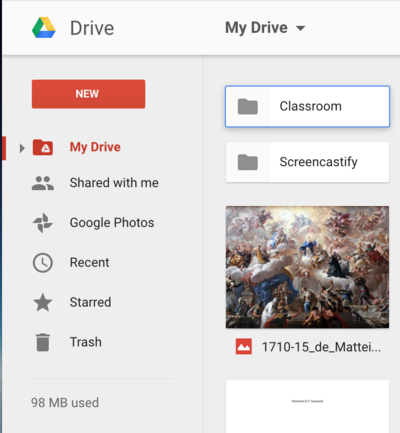
d)
googleclassroom.com
4.
What do I click to see assignments and announcements in Google Classroom?
a)
ABOUT
b)
STREAM
c)
GAFE
d)
In the "Menu"
5.
What does the acronym "GAFE" mean?
a)
Good Applications for Entertainment
b)
Google Always Frustrates Everyone
c)
Google Apps for Education
d)
Grupo Aeromóvil de Fuerzas Especiales
6.
You must be logged in to your GAFE account in order to use Google Classroom.
a)
True
b)
False
7.
You can use Google Drive to create...
a)
Documents
b)
Spreadsheets
c)
Slideshows
d)
All of the above 
8.
a)
apps square
b)
9-square
c)
tic-tac-toe
d)
waffle
9.
These are known as ...
a)
Google Aps
b)
GAFEs
c)
hot buttons
d)
pngs
10.
True or False:
I can use Google Apps for ANY teacher's class assignment, not just for this class.
a)
True
b)
False
11.
Used to create presentations
a)
Docs 
b)
Slides
c)
Sheets
d)
Forms
12.
Which App will let you change the font of a character?
a)
Docs
b)
Sheets
c)
Slides
d)
All the Above
13.
You must have a flashdrive to save all you documents on Google Docs.
a)
True
b)
False
14.
Where can you find ALL of your stored work?
a)
Google Classroom
b)
Google Drive
c)
Google Docs
d)
Google Search
15.
Used to create documents like letters, essays, tables, ect.
a)
Docs
b)
Sheets
c)
Slides
d)
Forms
16.
Files saved to Drive can be opened on a different computer or a smartphone.
a)
True
b)
False
17.
How do you create a new folder?
a)
Click "New"
b)
Click "Drive" (Left)
c)
Click "Drive" (Upper Center)
d)
Click "Trash
18.
What is the best browser for Google Drive?
a)
Internet Explorer
b)
Safari
c)
Chrome
d)
Netscape
19.
What is this icon/button for?
a)
Adjust Line Spacing
b)
Searching Text
c)
Centering Text
d)
Adjust Settings for Form
20.
Click this app to 
a)
create a document
b)
create a slideshow presentation
c)
draw boxes
d)
I don't know?!
21.
Chromebook Keyboard misses what common key?
a)
Enter
b)
Caps Lock
c)
Esc
d)
Backspace
22.
If you share a Google Doc with someone, they can change it.
a)
Yes, if you give them edit rights.
b)
Yes, always.
c)
Yes, sharing is caring.
d)
No, it's all mine.
23.

What is "cloud computing"

a)

A new environmentally friendly way of computing

b)

Storing files online

c)

Apple's latest computer operating system

d)

All of the above

24.

What do you need to download before using Google Apps?

a)

I need to download the Google Apps application

b)

My computer should have Microsoft Word, Excel, and PowerPoint

c)

There's nothing to download. Just go online.

d)

Google

25.

What does collaborating in real time mean?

a)

It means being able to edit the document from our own computers via the Internet.

b)

It means being able to collaborate on a document in a shorter amount of time.

c)

It means being able to see the edits being made as they are being made, without having to refresh the page.

d)

All of the above.

26.

What are all of the available features of Google Docs?

a)

Comments (allows you to post a comment in the sidebar on an item in the document)

b)

Chat (allows you to chat with collaborators as you are simultaneously working on the document.

c)

Access from multiple devices (allows you to access your document from any device with an Internet connection)

d)

Web browser access (allows you to access your document directly from your web browser, without having to download any extra software.

e)

All of the above

27.

Storage in Google Drive is limited so you must delete unnecessary documents regularly.

a)

True

b)

False

28.

You can use Google Drive to create

a)

documents

b)

spreadsheets

c)

slideshows

d)

all of the above

29.
What is the keyboard shortcut for paste?
a)
Ctrl+Z
b)
Ctrl+P
c)
Ctrl+C 
d)
Ctrl+V
30.
Montel is looking for a job, and is ready to begin work on his resume. What application should he use?
a)
Google Slides
b)
Google Docs
c)
 Google Sheets
31.
What is a template? 
a)
A pre-designed document.
b)
A customized document. 
c)
A document outline. 
d)
An empty document.
32.
The soccer club is considering using a new field, but want to make sure it can offer enough seating. What application is the best for tracking game attendance?
a)
Google Docs 
b)
Google Slides
c)
Google Sheets
33.
What is the keyboard shortcut for undo?
a)
Ctrl+C 
b)
Ctrl+Z
c)
Ctrl+V
d)
Ctrl+P 
34.
Miguel received a Microsoft Word document in an email from his partner on a class project. Miguel is using a Chromebook, and doesn't have access to Microsoft Word. What would be the best thing for Miguel to do next?
a)
View and convert the Microsoft Word document file using Google Drive. 
b)
Reply to his partner and ask him to email the file as a Google Docs file type.
c)
Wait until he can use a school computer with Microsoft Office to open the file. 
d)
Ask his partner to paste the text into an email. Then copy and paste the text into Google Drive.
35.

Which App icon is this?

a)

This is the Google Forms icon.

b)

This is the Google Slides icon.

c)

This is the Google Docs icon.

d)

This is the Google Sheets icon.

36.

This is the menu where you can access Google Apps.

a)

True

b)

False

37.
a)
This is the Google Drive screen.
b)
This is a blurry computer image.
c)
This is how someone who works for Google drives.
d)
This is a mess.
38.

These options allow you to do what to your text?

a)

Right-align, center-align, left align your text

b)

Highlight your text

c)

Change the color of your text

d)

Change the size of your text

39.

These options in Google docs, slides, and drawings allow you to do what to your text?

a)

bold, italics, underline

b)

font color and highlight color

c)

better, in between, understand, alphabetize

d)

bold, italics, underline, font color and highlight color

40.

These options on Google doc, slides, and drawings allows you to do what to you text?

a)

change the font type, size and color

b)

change the font type and size

c)

change the color of the font

d)

change the alignment of your text

41.

Looking at this image, what word would you click on to make something new in your drive?

a)

my drive

b)

quick access

c)

new

d)

recent