
 Worksheets
Excel - Unit 7
Total questions: 33
Worksheet time: 19mins
Name
Class
Date
1.
Microsoft Excel is what type of software?
a)
Word Processing
b)
Spreadsheet
c)
Presentation
d)
Drawing
2.
Rows are which of the following:
a)
vertical
b)
horizontal
3.
What does every formula or function start with?
a)
!
b)
@
c)
#
d)
=
4.

An excel file with one or more worksheets
a)
Workbook
b)
Worksheet
c)
Formula
d)
Row
5.
What does this symbol do:
/
/
a)
Multiply
b)
Add
c)
Divide
d)
Minus
6.
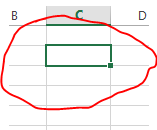
What do you call the blank boxes on a spreadsheet?
a)
cells
b)
info
c)
squares
d)
spots
7.
A3 is an example of a cell's address
a)
true
b)
false
8.
The cell in a worksheet that has been selected. It will have bolder gridlines around it.
a)
Active cell
b)
Cell address
c)
Specific cell
9.
How many worksheets does a new Excel workbook open with?
a)
one
b)
two
c)
three
d)
four
10.
Press Ctrl + Home to go to cell A1.
a)
true
b)
false
11.
The columns in a worksheet are identified by numbers.
a)
true
b)
false
12.
The feature to center text across several cells is called:
a)
Wrap Text
b)
Merge and Center
c)
Shrink to Fit
d)
Number Formatting
13.

This icon is called the what?
a)
Arrow
b)
Fill handle
c)
Pointer
14.
What instructs the software to perform a calculation?
a)
value
b)
label
c)
formula
15.
For which of the following tasks would you use the fill handle?
a)
to apply shading
b)
to apply a border
c)
to copy a formula from cell A2 to cell A3
16.

Which feature enables you to preview headers and footers, page breaks, and other features that will print?
a)
Print Layout
b)
Page Layout
c)
ScreenTips
d)
Split Windows
17.

Which of the following indicates a proper cell address?
a)
3A
b)
:A3
c)
A3
d)
@A3
18.

Which of the following is the intersection of a row and column?
a)
range
b)
tab
c)
bar chart
d)
cell
19.

Which of the following is the proper format for a range?
a)
A1-D10
b)
A1:D10
c)
A1thruD10
d)
A1&D10
20.
Which of the following is the selection pointer?
a)
b)
c)
21.
How do you select an entire column?
a)
Select Edit > Select > Column from the menu
b)
Click the column heading letter
c)
Hold down the shift key as you click anywhere in the column.
d)
Hold down the Ctrl key as you click anywhere in the column
22.
True or False. If you choose a larger font size, the height of the row is automatically made taller.
a)
True
b)
False
23.
What are lines that can be applied around worksheet cells or objects?
a)
Gridlines
b)
Borders
c)
Underlines
d)
Boundaries
24.
_______ allows you to set a column's width to fit its content automatically.
a)
Auto Fill
b)
Resize
c)
Fill Handle
d)
Auto Fit
25.
To insert a new row, select the row heading _______ where you want the new row to appear.
a)
Above
b)
Below
26.
To insert a new column, select the column heading to the _______ of where you want the new column to appear.
a)
Left
b)
Right
27.
_____________ will automatically modify a cell's row height.
a)
Wrapping Text
b)
Adjusting Column Height
28.
To copy a worksheet: Right-click the worksheet you want to copy, then select _______ or _________ from the worksheet menu.
a)
Copy, Move
b)
Copy, Select
29.
To rename a worksheet: Right-click the worksheet you want to rename, then select __________ from the worksheet menu.
a)
Rename
b)
Open
30.
At times, you may want to compare certain rows or columns without changing the organization of your worksheet. To do this you can __________ columns and rows.
a)
Cut
b)
Organize
c)
View side by side
d)
Hide
31.
_______ allows you to set a column's width to fit its content automatically.
a)
Auto Fill
b)
Resize
c)
Fill Handle
d)
Auto Fit
32.
To change the font, font size, color, or style: Select the ________ you want to modify.
a)
Column Headings
b)
Cells
33.
Enter your Name and Admission Number:
4 lines
100 %

