
 Worksheets
Parts of a Computer
Total questions: 55
Worksheet time: 33mins


Central Processing Unit (CPU)
Speakers
Keyboard
Hard Drive


If a computer were a person, what is the brain?
Optical Storage
Central Processing Unit
Application Software
Read Only Memory
What does ROM stand for
Read Only Memory
Random Only Memory
Random On Memory
Read On Memory
A mouse has _______ buttons.
1
2
3
We use the mouse to move the _________ on the screen.
key
cursor
car

What do you call this key?
Enter key
Shift key
Space bar

It is part of a mouse. What is it?
Left button
Small tire
Scroll wheel
Which one of these devices is the brain of the computer?


Which part of a computer is used for typing
Monitor
C.P.U.
Mouse
Keyboard
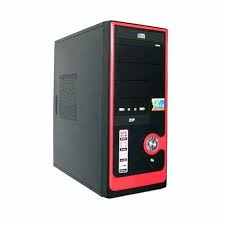
This is the most important part of a computer, it is called ...
monitor
CPU
keyboard
The computer can work without the CPU
TRUE
FALSE
It is known as the brain of the computer?
Mouse
CPU
The 'monitor' is also called___________
CPU
Screen


The central processing unit is like the _______ of the computer.
feet
brain
legs
arms
Which part of a computer is like the brain of the computer, and performs the computers main functions?
CPU
Fan
USB Port
Hard Drive
Which part of a computer is a disk that stores computer data?
CPU
Fan
USB Port
Hard Drive
_____ is a series of slots on the side of the computer that allows other devices to connect.
Fan
USB Port
RAM
ROM
_____ (a heat sink) keeps the computer from overheating.
Fan
USB Port
RAM
ROM
What is the type of memory stores info that CANNOT be changed (like the computers serial number)?
USB Port
RAM
ROM
Hard Drive
What is the type of memory stores info that is TEMPORARY for running games or files?
USB Port
RAM
ROM
Hard Drive
Do you feel like you learned a little more about computers and their parts?
I knew all this already!
I learned somethings, but I also knew some things.
I learned a little bit.
I learned a lot!
The _________________________ looks like a TV screen and lets you see your work and your files.
CPU
monitor
mouse
hard drive
The _________________________ lets you point to objects on your screen, click on them, and even move them.
monitor
webcam
mouse
hard drive
The holds the main components of the computer
touchpad
mouse
monitor
computer case
What can replace a traditional mouse?
touchpad
keyboard
monitor
ergonomic keyboard
Also known as the working memory.
Motherboard
Central Processing Unit
Power Supply Unit
RAM

What is the large main circuit board of a computer called?
Central Processing Unit
Power Supply
Motherboard
Random Access Memory
If a computer were a person, what is the brain?
OStorage
CPU
Application Software
Read Only Memory
What does CPU stand for?
Critical Patch Update
Computer Parts United
Central Processing Unit
Computer Power User
What does RAM stand for?
Random Access Memory
Retired Accessible Memes
Remote Access Mouse
Read and Modify
RAM is...
long-term memory
short-term memory
mid-term memory
permanent memory
The is long-term storage and keeps data, even when the computer is turned off.
CPU
motherboard
hard drive
heatsink
Which of the following is NOT a type of expansion slot card you can use?
video card
wireless card
printer card
The __________ draws heat________from the CPU.
monitor, away
heatsink, away
heatsink, towards
RAM, away

Which port is this?
USB Type B
Power Socket
Ethernet
HDMI

Which port is this?
VGA
USB Type A
Ethernet
HDMI

Which port is this?
Ethernet Port
Printer Port
Serial Port
eSATA Port

Which port is this?
Headphone port
Speaker port
Monitor Port
Ethernet port

Which port is this?
VGA Port
Ethernet Port
USB port
DVI Port
What is the hardware device that PRINTS a document?
font
keyboard
printer
flashdrive
What is a small device that plugs into the computer for you to STORE or SAVE information on?
flashdrive
monitor
mouse pad
cursor

What computer device do you see in the picture?
printers
speakers
keyboards
home keys

