
 Worksheets
Microsoft Word Lists
Total questions: 34
Worksheet time: 19mins
What group on the Home Ribbon is the Show/Hide button in?
Clipboard
Font
Paragraph
Styles

This is a picture of the ___ button
Change Case
Decrease Font Size
Increase Font Size
Text Effects and Topography
The title bar displays which of the following?
A quick way to find where commands are located in the application
Commands to manage work in documents
The name of the active location in the the document
The name of the current, active file

The Watermark button is located on the ____ Ribbon.
Design
Home
Insert
Layout
A set of commands and command groups at the top of the document window that you can minimize or hide.
Button
Group
Ribbon
Tab

What group is the Margins button in on the Layout Tab?
Arrange
Page Setup
Paragraph
Size
The blank space around the boundaries of the document content.
Border
Indentation
Margin
Spacing
Click the ___ launcher to adjust the Before/After Spacing.
Font
Page Setup
Paragraph
Styles
Keyboard Shortcut for New Document
CTRL + C
CTRL + D
CTRL + ENTER
CTRL + N
What action does CTRL + F perform?
Find Text
Font
Footer
Format
_____ removes a selection of content and transfers it to the Clipboard for pasting later.
Check Accessibility
Clear All Formatting
Copy
Cut
A formatting symbol is a hidden character that indicates formatting within a document such as an indentation, space, or carriage return.
True
False


Which tab would you click to change the page to landscape?
Home
Format
View
Page Layout
What is the opposite of landscape?
Horizontal
Vertical
Portrait
Upright

Letter A on this Table image is referring to a...
Column
Table

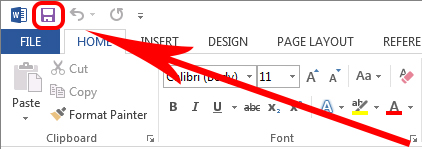
What does the box with the red arrow pointing at means?
Font Style
Text Color
Bold
Font Size
The blank space around the boundaries of the document content.
Border
Indentation
Margin
Spacing


What is this a picture of?
Smart Art
Backstage View
GROUP
Contextual Tab

What is circled in Red?
TABS
GROUPS
Backstage View
Contextual Tab
This tab allows you to look at the document in Read Mode, Print Layout, or Web Layout.
File Tab
Home Tab
View Tab
Design Tab
When you select File - New, you are able to view
Backstage View
Templates
Read Mode
Layout Mode
The part of the interface that shows tabs and buttons.
Title Bar
Ribbon
Status Bar
Screen Tips
What is format Painter?
Never heard of this before
To copy a format which is used in the document
Used to paint
To change the font

