wayground logo

Free Printable Worksheets

NEW

Font size

S
M
L
XL
Worksheets

Introduction to google apps

Total questions: 35

Worksheet time: 20mins

Name
Class
Date
1.
Used to create presentations
a)
Docs 
b)
Slides
c)
Sheets
d)
Forms
2.
Used to collect data and charts
a)
Docs
b)
Slides
c)
Sheets
d)
Forms
3.
I need to create a pie chart to show the percentages of students who passed my class. What app do I use?
a)
Docs
b)
Sheets
c)
Slides
d)
Docs and Forms
4.
Where can you find ALL of your stored work?
a)
Google Classroom
b)
Google Drive
c)
Google Docs
d)
Google Search
5.
True or False: You must always remember to hit the "save" button before closing a Google Doc.
a)
True
b)
False
6.
Files saved to Drive can be opened on a different computer or a smartphone.
a)
True
b)
False
7.
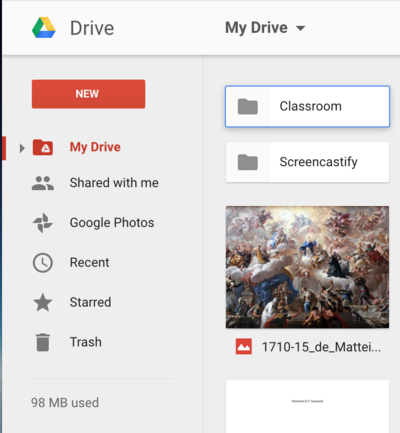
How do you create a new folder?
a)
Click "New"
b)
Click "Drive" (Left)
c)
Click "Drive" (Upper Center)
d)
Click "Trash
8.
What is the best browser for Google Drive?
a)
Internet Explorer
b)
Safari
c)
Chrome
d)
Netscape
9.
Why is there no Save button for your files?
a)
No changes are ever saved.
b)
Google Drive uses autosave, which automatically and immediately saves your files as you edit them.
c)
The Save button is in the “File” submenu.
d)
You “Right-Click” to get the Save function. 
10.
Where can you find ALL of your work?
a)
Google Classroom
b)
Google Drive
11.
Where do you turn in class work?
a)
Google Drive
b)
Google Classroom
12.
Used to create documents like letters, essays, tables, ect.
a)
Docs
b)
Sheets
c)
Slides
d)
Forms
13.
Miguel received a Microsoft Word document in an email from his partner on a class project. Miguel is using a Chromebook, and doesn't have access to Microsoft Word. What would be the best thing for Miguel to do next?
a)
View and convert the Microsoft Word document file using Google Drive. 
b)
Reply to his partner and ask him to email the file as a Google Docs file type.
c)
Wait until he can use a school computer with Microsoft Office to open the file. 
d)
Ask his partner to paste the text into an email. Then copy and paste the text into Google Drive.
14.
What application is used for word processing?
a)
Google Drive
b)
Google Slides
c)
Google Sheets
d)
Google Docs
15.
What is the keyboard shortcut for undo?
a)
Ctrl+C 
b)
Ctrl+Z
c)
Ctrl+V
d)
Ctrl+P 
16.
The soccer club is considering using a new field, but want to make sure it can offer enough seating. What application is the best for tracking game attendance?
a)
Google Docs 
b)
Google Slides
c)
Google Sheets
17.
What do the tabs contain?
a)
Un-related commands. 
b)
The most frequently used commands. 
c)
Commands that are obscure. 
d)
D. Related commands.
18.
Which of the following is an example of an application:
a)
Microsoft Windows
b)
Chromebook
c)
iPhone
d)
Google Docs
19.
Google Drive ________ be used to convert Microsoft Word files to Google Docs files.
a)
cannot
b)
can
20.
What is the name of the Google Drive location where you store the files you create or upload?
a)
BC21 Folder
b)
BC21 Work
c)
My Drive
d)
Your Drive 
21.

What is "cloud computing"

a)

A new environmentally friendly way of computing

b)

Storing files online

c)

Apple's latest computer operating system

d)

All of the above

22.

What do you need to download before using Google Apps?

a)

I need to download the Google Apps application

b)

My computer should have Microsoft Word, Excel, and PowerPoint

c)

There's nothing to download. Just go online.

d)

Google

23.

What are all of the available features of Google Docs?

a)

Comments (allows you to post a comment in the sidebar on an item in the document)

b)

Chat (allows you to chat with collaborators as you are simultaneously working on the document.

c)

Access from multiple devices (allows you to access your document from any device with an Internet connection)

d)

Web browser access (allows you to access your document directly from your web browser, without having to download any extra software.

e)

All of the above

24.

When signed into Chrome, your bookmarks will be available

a)

Only on the one device

b)

On any device you sign into

c)

Only on school owned devices

d)

Only in the same zip code

25.

You can sign into your school Google Account with

a)

the same login you use for the school computer

b)

firstinitiallastname@franklinschool.org

c)

firstinitiallastname@franklintownshipschool.org

d)

firstinitiallastnamefts

26.

You can use Google Drive to create

a)

documents

b)

spreadsheets

c)

slideshows

d)

all of the above

27.

You can use Google Drive to create

a)

documents

b)

spreadsheets

c)

slideshows

d)

all of the above

28.

Google Docs is _____ program that allows a user to create and edit documents.

a)

drawing

b)

word processing

c)

database

d)

spreadsheet

29.
This is the image for  Google_______.
a)
Drive
b)
Sheets
c)
Docs
d)
Sites
30.
What is Google Drive?
a)
A free service from Google that allows you to store files online and access them anywhere using the cloud. 
b)
The street that Google's main headquarters building is located on.
c)
A special program for controlling an automobile.
d)
A very expensive golf club.
31.
If you share a Google Doc with someone, they can change it.
a)
Yes, if you give them edit rights.
b)
Yes, always.
c)
Yes, sharing is caring.
d)
No, it's all mine.
32.

What name does Google call this icon?

a)

Waffle

b)

Options

c)

Menu

33.

Which toolbar button is used to change the border color of a shape in a Google App?

a)
b)
c)
34.

Which icon represents Settings when using a Google App?

a)
b)
c)
35.

This is the menu where you can access Google Apps.

a)

True

b)

False