
Font size
 Worksheets
AVA Spring DIT Quiz Assessment
Total questions: 86
Worksheet time: 42mins
What is the use of Gantt Chart?
to show the profit in a system
to show data analysis
to show the progress of tasks for a project
to show data calculation of a project
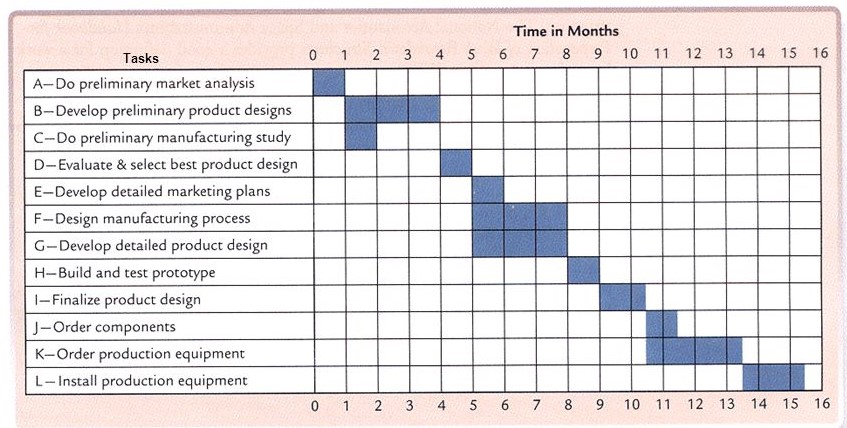
What type of diagram is this?
PERT
Dataflow diagram
Bar Chart
Gantt Chart
How long does it take to complete task F?
1 Month
3 Months
6 Months
8 Months
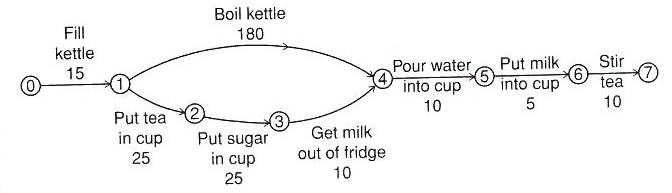
Identify the longest task?
Fill Kettle
Boil Kettle
Put tea in cup
Put sugar in cup
Get milk out of fridge
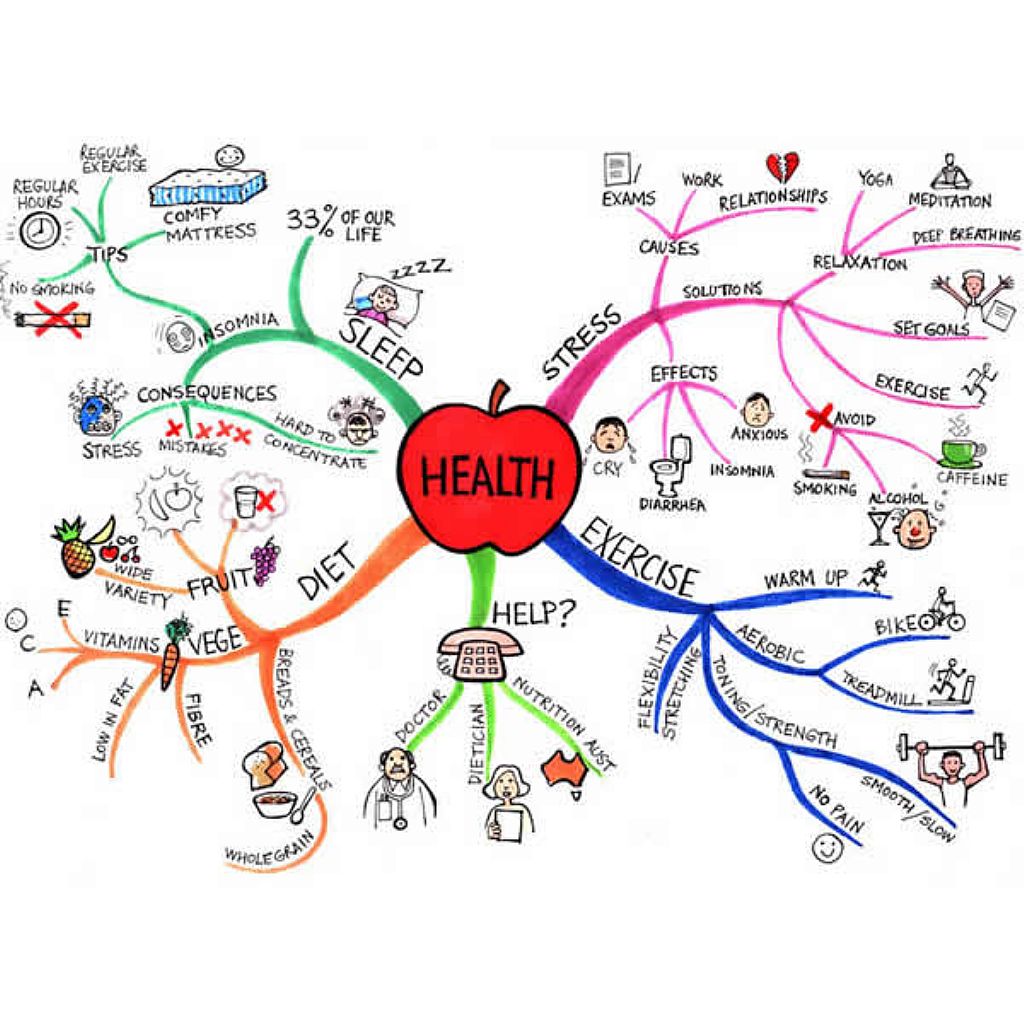

Which document is this?
Moodboard
Mind Map
Storyboard
Script
Work Plan
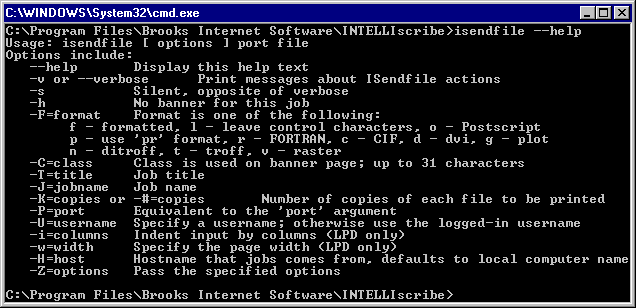
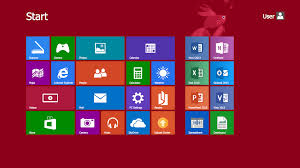
Choose the disadvantage
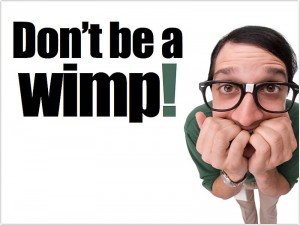
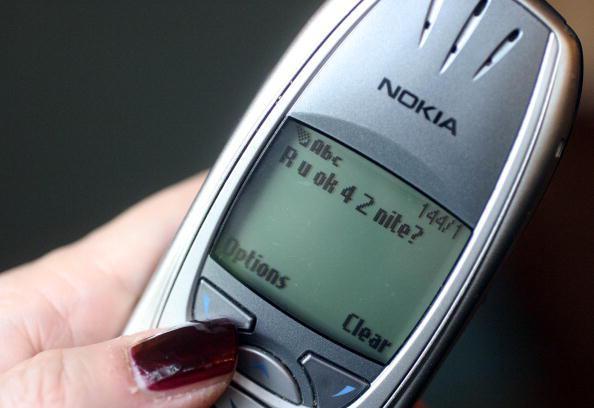
GUI stands for Good User Interface
true
false
In a project life cycle, which stage comes after the design stage?
Testing
Implementation
Specification requirements
Evaluation
In a project, at which phase is the actual code written?
Testing
Implementation
Analysis
Design
In a project life cycle, which stage comes after the design stage?
Testing
Implementation
Specification requirements
Evaluation
The word accessibility means...
The design of a product for users who experience disabilities
The design of a product for users who don't have disabilities
The design of a product to not help anyone
What is one advantage of a Command Line Interface?
It uses less processing power, so is quicker
It is easy for a beginner to use
It is accessible to people with visual disabilities
There are a lot of accessibility functions
Amazon Alexa is an example of which type of interface?
Speech and sound
Command Line
GUI
Menu
What type of interface would only suit an expert user?
Menu Driven
GUI - Graphical User Interface
WIMP - Windows Icon Menu Pointer
Command Driven
How does a UI grab attention? (Multiple answers)
Pop-up Messages
Flashing Graphics
Sound
Animations
All of the answers
Which term is used to describe the fact that software should be able to be used by ALL types of users?
Accessibility
Useability
Optimisation
How many main colours should a user interface have (maximum)?
1
3
4
5

Which type of font should you use on your user interface?
Serif
San-Serif
White space is...
How much white is on the screen
How cluttered or sparse the screen is
Having too much on the screen
Having too little on the screen
Which of the following will help people specifically with motor needs?
Having large buttons
Having larger text
Using less than 5 colours
Having text read out through a speaker
Which of the following will help people specifically with low vision?
Having large buttons
Having larger text
Using less than 5 colours
Having text read out through a speaker
When designing a user interface for someone on the autistic spectrum, you should avoid...
Using idioms
Using few colours
Using larger buttons
Having information be read out
Language on a user interface should be...
Appropriate for age
Appropriate for skill
Appropriate for the time of day
As simple as possible
Consistency helps users by...
Having similar elements that work in a similar manner everytime
Having clearly labeled elements
Using images to back up written text
Using sound to read out text on the screen
Having too many colours on screen can...
Make the user interface look more attractive for the user
Make the user interface hard to focus on and read
Make the user interface easier to focus on and read
Make the user interface better for dyslexic users
Having too many colours on screen can...
Make the user interface look more attractive for the user
Make the user interface hard to focus on and read
Make the user interface easier to focus on and read
Make the user interface better for dyslexic users
Text should have high contrast or luminance- what does this mean?
The text and the background have sufficient difference in colour and lightness that it can be easily read
The text is large enough that it can be easily read on any background
The text is a similar colour to the background so that it matches the overall colour scheme
The text is in a font that can be easily read and understood on any background
What type of project requirement is the following?
Include a zoom facility to allow the user to make parts of the screen bigger
User Requirement
Output Requirement
Input Requirement
User accessibility Requirement
What type of project requirement is the following?
The user should be able to use the touch screen to choose an option
User Requirement
Output Requirement
Input Requirement
User accessibility Requirement
What type of project requirement is the following?
The user interface should use the methods of interaction found on smartphones
User Requirement
Output Requirement
Input Requirement
User accessibility Requirement
What type of project requirement is the following?
The user interface should display the user account information on the screen
User Requirement
Output Requirement
Input Requirement
User accessibility Requirement
What type of project requirement is the following?
The user interface should list games that are currently high in demand
User Requirement
Output Requirement
Input Requirement
User accessibility Requirement
What type of project requirement is the following?
The user interface should display a list of games that meet the user's search criteria on the screen.
User Requirement
Output Requirement
Input Requirement
User accessibility Requirement
What type of project requirement is the following?
The user should use their on screen keyboard to enter the name of the game they want to search
User Requirement
Output Requirement
Input Requirement
User accessibility Requirement
What type of project requirement is the following?
Make the focus area of the buttons big so they can be easily selected
User Requirement
Output Requirement
Input Requirement
User accessibility Requirement
What type of project requirement is the following?
The user interface should use the company house style colours.
User Requirement
Output Requirement
Input Requirement
User accessibility Requirement
What type of project requirement is the following?
The user interface should confirm when a user has successfully set up an account on the screen
User Requirement
Output Requirement
Input Requirement
User accessibility Requirement
Which type of user interface does not need a screen at all?
Form Interface
Text Interface
Speech Interface
Menu Interface
A text based user interface is usually easy to use but requires a lot of storage space and memory.
True
False
In which type of user interface is the user restricted to the specific options given?
Menu user interface.
Sensor user interface.
Graphical user interface.
Text based user interface.


Choose the disadvantage
Which of these is the purpose of the Operating System?
It is software that controls the whole operation of the computer system
It is hardware that is central to every PC and is the "brain" of the computer
It stores the files that the device has open.
It is a collection of numbers or text that is stored and processed by computer systems.
Below are 2 advantages and 1 disadvantage for Speech User Interfaces.
Choose the disadvantage
Suitable for disabled users
Requires very little training
May have difficulty understanding accents
Which of these describes the Central Processing Unit?
It is software that controls the whole operation of the computer system
It is hardware that is central to every PC and is the "brain" of the computer
It stores the files that the device has open.
It is a collection of numbers or text that is stored and processed by computer systems.
Which interface only works through keyboard input
text based user interface
speech based user interface
menu based user interface
graphical user interface
What is a user interface?
It’s the computer’s brain and without it a PC cannot function.
It is the name given to the computer (hardware) and operating system (software) on which applications can be run.
It is software that allows users to interact with their devices
It's an application or program that allows users to complete tasks or create something.

What interface is this?
Menu
GUI
Forms
Speech
People could only communicate with computers in the early days via
Morse code
Learning complicated computer programming languages
Semaphore
Binary
Which Interface is this an example of?
Text interface
Graphical Interface
Speech interface
Form interface
Which Interface uses spoken instructions?
Text based interface
Graphical interface
Speech interface
Form interface
Which type of user interface responds to environmental phenomena?
Form Interface
Text Interface
Menu Interface
Sensor Interface
A graphical user interface is usually easy to use but requires a lot of storage space and memory.
True
False
Which of the following describes Form controls?
It is central to every PC and device. It’s the computer’s brain and without it a PC cannot function.
It includes buttons, tick boxes and option boxes to enable the user the enter information
They detect and respond to the environment around them. They can be responsive to heat, light, sound, movement or patterns
It stores the files that the device has open and stores the information from any applications in use.
Which of the following describes a sensor?
It is central to every PC and device. It’s the computer’s brain and without it a PC cannot function.
It includes buttons, tick boxes and option boxes to enable the user the enter information
They detect and respond to the environment around them. They can be responsive to heat, light, sound, movement or patterns
It stores the files that the device has open and stores the information from any applications in use.
What word describes the smallest dots that make up the screen on our devices.
form controls
pixels
bugs
distributed data
Control the whole operation of a computer system including systems such as mobile phones or tablet computers
User interface
Keyboard shortcuts
Random Access Memory
Operating Systems
Which of the following describes a sensor?
It is central to every PC and device. It’s the computer’s brain and without it a PC cannot function.
It includes buttons, tick boxes and option boxes to enable the user the enter information
They detect and respond to the environment around them. They can be responsive to heat, light, sound, movement or patterns
It stores the files that the device has open and stores the information from any applications in use.
Which of the following describes Random Access Memory (RAM)?
It is central to every PC and device. It’s the computer’s brain and without it a PC cannot function.
It includes buttons, tick boxes and option boxes to enable the user the enter information
They detect and respond to the environment around them. They can be responsive to heat, light, sound, movement or patterns
It stores the files that the device has open and stores the information from any applications in use.
Which of the following describes the Central Processing Unit (CPU)?
It is central to every PC and device. It’s the computer’s brain and without it a PC cannot function.
It includes buttons, tick boxes and option boxes to enable the user the enter information
They detect and respond to the environment around them. They can be responsive to heat, light, sound, movement or patterns
It stores the files that the device has open and stores the information from any applications in use.
Which of the following describes Form controls?
It is central to every PC and device. It’s the computer’s brain and without it a PC cannot function.
It includes buttons, tick boxes and option boxes to enable the user the enter information
They detect and respond to the environment around them. They can be responsive to heat, light, sound, movement or patterns
It stores the files that the device has open and stores the information from any applications in use.
Which term is the name given to the computer (hardware) and operating system (software) on which applications can be run?
Motherboard
Platform
Central Processing Unit (CPU)
Dashboard
What term describes a user interface that a user is able to understand and interact with instinctively
Productivity
Accessibility
Intuitive
Error reduction
Which word describes how a user works their way around the software.
Navigation
Accessibility
Productivity
Software
Name Two Project Planning Methodologies
Mindmaps
Waterfall
Flowcharts
Agile
Why do we need to use a methodology to help us with our project planning?
We need a dependable structure to help us achieve the project goals
Makes it easier
Breaks things down
Too hard to do things without
Fill in the blank: Once a stage in the (a) model is complete we can't return to it.
Which of these are two key features of the Waterfall model?
Simple to follow
Easy steps
Distinct Stages
One after the other
The waterfall model has some disadvantages. one of those it's (a) makes it impractical for many projects. (steps // flexibility // inflexibility)
Two stages of the waterfall model are?
Design
check it
Analysis
Make it
The Agile model is an example of an (a) process (easier // iterative// repetitive
Which of these are components of the Agile model? chose 3
initally the overall goals are identified by the client
The team completes a process of planning, executing and evaluation repeatedly
At the end of each process the client provides feedback and the process can start again if needed
Its cost effective
Which of these are components of the Agile model? chose 3
initally the overall goals are identified by the client
The team completes a process of planning, executing and evaluation repeatedly
At the end of each process the client provides feedback and the process can start again if needed
Its cost effective
In a project life cycle, which stage comes after the design stage?
Testing
Implementation
Specification requirements
Evaluation
"The user interface will have different screens" Is this a SMART objective?
Yes
No
What is the use of Gantt Chart?
to show the profit in a system
to show data analysis
to show the progress of tasks for a project
to show data calculation of a project
Monitor is a peripheral device
true
false
Keyboards are a peripheral device
true
false
It is important to check if the software you are going to use will work with the other devices
false
True
controller is a type of
software
hardware
peripheral

