wayground logo

Free Printable Worksheets

NEW

Font size

S
M
L
XL
Worksheets

Word Processing

Total questions: 35

Worksheet time: 21mins

Name
Class
Date
1.
What word processing feature compares every word with an electronic dictionary?
a)
Spell Check
b)
Help
c)
Thesaurus
d)
Word Count
2.
What type of application would be best to use when typing a letter?
a)
Microsoft Access (Database)
b)
Microsoft Excel (Spreadsheet)
c)
Microsoft Word (Word Processing)
d)
Microsoft Outlook (Email)
3.
What is the standard font size in word processing documents?
a)
12
b)
15
c)
14
d)
18
4.

Which key is used to start a new line?

a)

Shift

b)

Caps Lock

c)

Enter

d)

Space bar

5.

Font means _____________________.

a)

size of letters

b)

type style of letters

c)

bold letters

d)

italic letters

6.

Which of the following is the alignment option?

a)

Center align

b)

Right align

c)

Left align

d)

All of the above

7.

Which tab is used to put an image in your document?

a)

Home

b)

View

c)

Insert

d)

Review

8.

Times New Roman, Arial, and Helvetica Neue are examples of _____________?

a)

Fonts

b)

Writings

c)

Spacing

d)

Alignment

9.
What is the word processing feature that checks your document for incorrectly spelled words, similar to an electronic dictionary?
a)
Grammar Check
b)
Dictionary
c)
Spell Check
d)
Right Align
10.

Microsoft Word software program creates files with the _______ file extension.

a)

.doc

b)

.txt

c)

.odt

d)

.word

11.

Which style makes the text look slanted?

a)

bold

b)

italic

c)

underline

d)

strike through

12.
Microsoft Word and Google Docs are examples of what?
a)
Word processors
b)
Spreadsheets
c)
Presentations
d)
Databases
13.
What is the recommended font to use when keying a research report?
a)
Times New Roman 12
b)
Keyboardist Choice
c)
Arial 12
d)
Time New Roman 10
14.

To change the contents of a document.

a)

Rewrite

b)

Delete

c)

Overwrite

d)

Edit

15.

File

a)

The icon that looks like a eraser

b)

A list of commands

c)

A collection of related data stored on a lasting medium such as a hard disk, a CD, or a diskette.

d)

Collective data

16.

Rulers

a)

Located at the top and left side of the document window and contains markers used for formatting text.

b)

Symbols that do not appear on paper when printed.

c)

Used to scroll a document going up, down and side to side.

d)

Icons

17.

The process of creating a file of what is currently in the computer's memory.

a)

A list of commands

b)

The process in which the words move to the next line

c)

Closing a file

d)

Saving a document

18.

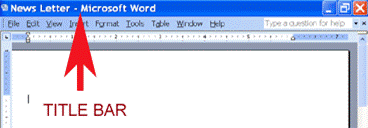
A horizontal bar that displays the name and type of document

a)

Status bar

b)

Scroll bar

c)

Title bar

d)

Ribbon bar

19.

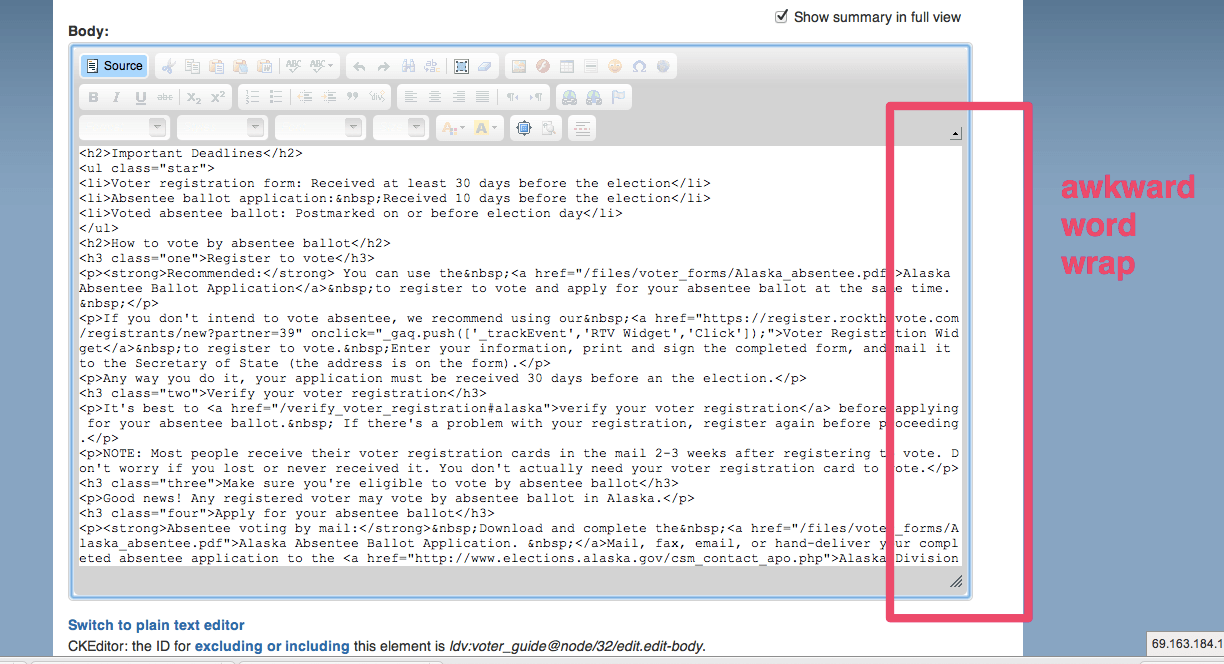
Word wrap

a)

The process of removing Word from the computers memory

b)

The process of transferring file into the computers memory and giving it a name

c)

The box that appears when you highlight and give a command

d)

The process MS Word uses to determine if the next word will fit on te the end of the current line or if it must go to the next line.

20.
In most word-processing programs, what should you select in order to add a table to a document? *
a)
File | Print
b)
Insert | Table 
c)
Format | Lists
d)
View | Print Layout
21.
Which layout option will make the text flow around the image? 
a)
 Inline
b)
 Wrap Text
c)
 Break Text
d)
Position Text
22.
What is the keyboard shortcut for paste? 
a)
 CTRL+Z
b)
 CTRL+C
c)
 CTRL+P
d)
 CTRL+V
23.
Under which tab on the Microsoft Word ribbon can you change the orientation of the document to landscape?
a)
 File 
b)
Page Layout
c)
Insert
d)
Home
24.
Google Docs or Microsoft Word allows you to:
a)
create, edit, share and store forms for user input.
b)
create, edit, share and store webpages and sites.
c)
create, edit, share and store spreadsheet documents.
d)
create, edit, share and store word-processing documents.
25.

Which tab do you click to start a mail merge operation?

a)

View

b)

Home

c)

Page Layout

d)

Mailings

26.

Mail Merge is a feature provided by ?

a)

MS Excel

b)

MS PPT

c)

MS Word

d)

MS Access

27.

The final document is called___document

a)

mini

b)

main

c)

merged

d)

mine

28.

To create a list of recipients ,we select________

a)

Use an existing list

b)

Select from Outlook contact

c)

Type a new list

d)

Any one

29.
The Main document is the word document or letter that contains the mail information you want to send to customers.
a)
True
b)
False
30.

If I want to add a certain part like <<First Name>> or <<Last Name>> where would I need to click?

a)

Insert Merge Field

b)

Click Greeting Line and add First Name to the block

c)

Click Finish and Merge

d)

Click the Start mail merge and click add and then click your desired choice

31.
After you have selected the recipients, you need to add ___ into your document so Word knows where to put the data.
a)
Merge Fields
b)
Records
c)
Characters
d)
Text
32.

A Merge Field appears as:

a)

<<Firstname>>

b)

@Firstname@

c)

Firstname

d)

^Firstname^

33.
What is a shortcut to copy highlighted text?
a)
CTRL+Z
b)
CTRL+P
c)
CTRL+C
d)
CTRL+Y
34.
What is a shortcut to undo your last action?
a)
CTRL+V
b)
CTRL+X
c)
CTRL+U
d)
CTRL+Z
35.
What is a shortcut to print a document?
a)
CTRL+Y
b)
CTRL+X
c)
CTRL+C
d)
CTRL+P