wayground logo

Free Printable Worksheets

NEW

Font size

S
M
L
XL
Worksheets

Entry Level 3 Using ICT Skills in the Workplace

Total questions: 66

Worksheet time: 58mins

Name
Class
Date
1.

Orientation where the long side of the page runs vertical

a)

Landscape Orientation

b)

Portrait Orientation

2.

Aligns text to run evenly between the left and right margins

a)

Center alignment

b)

Right alignment

c)

Left alignment

d)

Justified alignment

3.

True or False: Grammar Check is an editing tool which reviews documents for grammatical errors.

a)

True

b)

False

4.

tool which automatically corrects misspellings and common typos

a)

Hyperlink

b)

Macro

c)

Auto Correct

d)

Overtype Mode

5.

temporary storage area for items which have been cut or copied in a program prior to being pasted in another location

a)

Watermark

b)

Hyperlink

c)

Keyboard Shortcut

d)

Clip Board

6.

Act of creating, editing and producing a text document.

a)

Word Wrapping

b)

Thesaurus

c)

Word Processing

d)

Overtype Mode

7.
To enter a blank line in a document you ____________.
a)
press the ENTER key without typing any text on the line
b)
press the INSERT key twice
c)
press the TAB key
d)
right-click, and select insert new line on the shortcut menu
8.
True or False: A bulleted paragraph is a paragraph that begins with a dot or other symbol.
a)
True 
b)
False 
9.
Which command would you use to shade text?
a)
C
b)
D
c)
E
d)
G
10.
Which command would allow you to change the font color of text?
a)
A
b)
B
c)
E
d)
G
11.
Which command would allow you to center?
a)
C
b)
D
c)
F
d)
G
12.
Which command would allow you to center?
a)
C
b)
D
c)
F
d)
G
13.
Which command would allow you to center?
a)
C
b)
D
c)
F
d)
G
14.

Allows you to sort text from Z to A or largest to smallest

a)

Split Sort

b)

Ascending Sort

c)

Descending Sort

d)

Merge Sort

15.

The feature that combines or joins cells together in a table.

a)

Split Cells

b)

Merge Cells

c)

Distribute Rows

d)

Distribute Columns

16.

A set of data values, all of a single type; Appear vertically in a table.

a)

row

b)

column

c)

cell

17.
On your mouse which button gives you options? Left or Right?
Like Copying, Pasting
a)
Left 
b)
Right
18.

Which is the correct way to save a Word document and name it Report_Wright?

a)

Hit the save icon

b)

Hit the save icon and Type Report_Wright

c)

File > Save as > Type Report_Wright

d)

File > Save

19.

What is this button?

a)

Save

b)

Undo

c)

Return

d)

Print

20.
a)
Font size
b)
Increase Font
c)
Font color
d)
Font Name
21.
a)
Bold
b)
Underline
c)
Italic
d)
Font name
22.
a)
Italic
b)
Bold
c)
Underline
d)
Center align
23.
a)

clip art or pictures

b)

none

c)

saving your file

d)

both

24.

The Tab to use to change Table Styles, Shading, and Borders

a)

Home Tab

b)

Insert Tab

c)

LayoutTab

d)

Design Tab

25.
By default, Microsoft Excel automatically saves a copy of your spreadsheet every 10 minutes.
a)
True
b)
False
26.
Any changes made to an Excel document can be tracked in a separate worksheet.
a)
True
b)
False
27.
The Subtotals command adds numbers in a designated column.
a)
True
b)
False
28.
Luisa is creating a worksheet tracking her company’s spending on a project. However, when viewing her document, she has noticed that some of the cells contain pound signs like in the example below.


Which of the following suggestions would help Luisa?
a)
Make the cell wider
b)
Change the number formatting in the cell
c)
Change the font format in the cell
d)
Delete the data and re-type it
29.
Lauren currently has each month’s sales entered into a spreadsheet. She wants to know what she will need to sell in the month of June in order to meet her quarterly average sales goal of $40,000.Which of the following features will allow her to easily calculate what she would need to make in June?
a)
Average
b)
GoalSeek
c)
Sparklines
d)
PivotTables
30.
What is an advantage, if any, to using cell references instead of just typing in values?
a)
It will automatically create a sparkline in the next cell
b)
It will allow you to format your spreadsheet quicker
c)
If the cell is changed, your formula will automatically update
d)
There is no advantage
31.
Petra placed all of her grades from her science class into a worksheet. She wants to highlight all of the failing grades with red. Which of the following is quick way for her to do this? 
a)
Conditional Formatting
b)
Page Layout
c)
Quick Format
d)
Cell Alignment
32.
Jun is the director of a summer camp. This spreadsheet contains campers’ names, information, and their counselors.


Which two features will help him sort the list by counselor, and then print out a list containing only the campers’ and counselors’ names?
a)
Sort and Track Changes
b)
Format and Hide Columns
c)
Custom Sorting and Formatting
d)
Custom Sorting and Hide Columns
33.
Alex needs to add three cells and then divide the sum by 4. Which of the following is an example of the correct formula to do this? 
a)
=(A1+A2+A3)/4
b)
A1+A2+A3/4
c)
=A1+A2+A3^4
d)
(A1+A2) + A3/4
34.
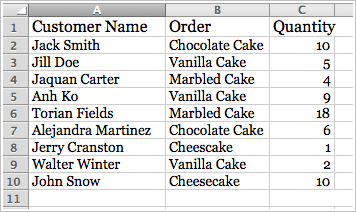
Minh wanted to find the average of all of her grades, but can not get her function work. Her spreadsheet is below. What error is Min making?
a)
She has the incorrect arguments
b)
She has the wrong function name
c)
She is missing an equal sign at the beginning of her formula
d)
The colon should be replaced with a dash (-)
35.
Gerilynn wanted to find the total amount of vanilla cakes ordered. Which of the following formulas should she use?
a)
=(C3+C5+C9)/3
b)
=SUM(C2:C10)
c)
=AVERAGE(C2:C10)
d)
=(C3+C5+C9)
36.
When creating a table in Excel, what will clicking the drop down arrows in the headings allow you to do?
a)
Fill the column with color
b)
Filter the data
c)
Format the cells
d)
Hide the column
37.

Microsoft Excel is what kind of software?

a)

Word Processing Software

b)

Spreadsheet Software

c)

Database Software

d)

Presentation Software

38.

An Excel file format extension is

a)

doc

b)

xls

c)

txt

d)

mp3

39.

When creating a chart in Excel, what is the first thing you need to do?

a)

Select the data to be graphed.

b)

Select the Insert Tab

c)

Choose a chart from the ribbon

d)

Double click the active cell

40.

What function adds all of the numbers in a range of cells?

a)

Calculate

b)

Compute

c)

Sum

d)

Max

41.

To sort data in Excel, go to the __________ ribbon.

a)

Home

b)

Data

c)

Insert

d)

View

42.

If I want to find an average of cells A1 through A25, which formula would I use?

a)

=average(A1:A25)

b)

=avg(A1:A25)

c)

=average(A1-A25)

d)

=avg(A1-A25)

43.
Alex needs to add three cells and then divide the sum by 4. Which of the following is an example of the correct formula to do this? 
a)
=(A1+A2+A3)/4
b)
A1+A2+A3/4
c)
=A1+A2+A3^4
d)
(A1+A2) + A3/4
44.

The function that lets you add up a range of cells or values

a)

SUM

b)

AVERAGE

c)

MIN

d)

MAX

45.

To sort names in a worksheet, we can use this button.

a)
b)
c)
d)
46.

The cell in your worksheet that has been selected. It will have bolder gridlines around it.

a)

Active Cell

b)

Formula

c)

Cell

d)

Cell address

47.

A combination of numbers and symbols used to express a calculation.

a)

Active Cell

b)

Label

c)

Formula Bar

d)

Formula

48.
What software program is this?
a)
Power Point
b)
Excel
c)
Word
d)
One Note
49.
What software program is this?
a)
Word
b)
Excel
c)
Power Point
d)
Outlook
50.
What software program is this?
a)
Word
Word
b)
Excel
c)
One Note
d)
Power Point
51.
What does this allow you to do in Microsoft Word?
a)
Change the font
b)
Change the line spacing
c)
Move the text
d)
Delete the text
52.
In Excel what does double clicking between the columns do?
a)
Make the column to the size of largest cell in the column?
b)
Moves the cells to the bottom.
c)
Changes the font of all of the cells in the column.
d)
Removes the lines in the column.
53.
What is the first thing you should do when starting a new document?
a)
Start typing the text.
b)
Change the font.
c)
Underline the title of the document.
d)
Save the document.
54.
In Power Point this icon will allow you to
a)
Insert a new slide
b)
Change the order of the slides
c)
Delete a slide
d)
Change the theme of the slides
55.
In Microsoft Word this icon will allow you to 
a)
Highlight the text
b)
Move the text
c)
Make the text bigger
d)
Bold the text
56.

Which of the following is an ADVANTAGE of email

a)

Messages can be sent and read at any time

b)

Many people don't have email

c)

Email might contain viruses

d)

Emails with large attachments take a long time to send

57.

Which of these is a disadvantage of email?

a)

It is faster than normal post

b)

You can instantly share ideas

c)

After the cost of internet, it is limitless and free

d)

You cannot expect to get an immediate response (like with instant messages)

58.

What do you call the place in Outlook where new messages arrive?

a)

Inbox

b)

Outbox

c)

Draft

d)

Sent Items

59.

What does CC stand for?

a)

Carry Cheese

b)

Complete Caption

c)

Carbon Copy

d)

Close Capture

60.

What is the best way to send a picture in an email?

a)

You cannot send pictures in email

b)

As an attached file

c)

Put it on a website and send a link

d)

Post a usb stick with it on

61.

If you do not want the recipients of your message to see the others you also sent the message to, you should use the _________________ feature.

a)

Cc

b)

Flag

c)

Hide

d)

Bcc

62.

Used to keep and track appointments

a)

Tasks

b)

Notes

c)

Mail

d)

Calendar

63.

Use to manage a to-do list

a)

Tasks

b)

Notes

c)

Mail

d)

Calendar

64.

If you have a weekly meeting, create a(n) _________________.

a)

recurring event

b)

appointment reminder

c)

event that lasts 24 hours or more

d)

seven-day event

65.

Set a ____________ when you enter an appointment in the Calendar and you want to invite others.

a)

date

b)

flag

c)

note

d)

meeting

66.

If you want to be alerted when a task is due, you should set and use a _______________.

a)

category

b)

reminder

c)

flag

d)

signal