
 Worksheets
Photopea Review Quiz
Total questions: 18
Worksheet time: 9mins

Name this tool
Rectangle Shape Tool
Rectangle Selection Tool
Lasso Tool
Magic Wand Tool

Identify the area of the Photopea interface shown in the image.
main toolbar
menu bar
options bar
palettes
workspace

Identify the area of the Photopea interface shown in the image.
main toolbar
menu bar
options bar
palettes
workspace

Identify the area of the Photopea interface shown in the image.
main toolbar
menu bar
options bar
palettes
workspace

Identify the area of the Photopea interface shown in the image.
main toolbar
menu bar
options bar
palettes
workspace
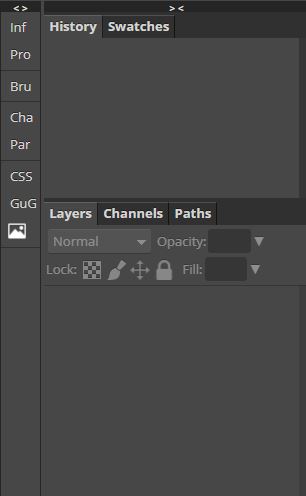
Identify the area of the Photopea interface shown in the image.
main toolbar
menu bar
options bar
palettes
workspace
If you wanted to change how a tool works, which area of the Photopea interface would you access?
main toolbar
menu bar
options bar
palettes
workspace
What format is used when you would like to come back to working on a project?
PNG
PSD
JPG
GIF
Which format(s) would you use to save your project that is ready to be turned in? (choose any that may apply)
PNG
PSD
JPG
GIF
TIFF
Which icon allows you to make a New Layer?


How do you remove a selection? What button is pressed on the keyboard?
Backspace
Spacebar
CTRL
Shift
What keyboard combination do you use to copy something?
CTRL + C
CTRL + D
CTRL + V
CTRL + Shift + C
Magic wand tool
Automatically selects areas of similar color
Lets you quickly "paint" a selection using an adjustable round brush tip.
Allows you to create a variety of pre-set objects
Allows you to select rectangular areas

Identify the tool that would be best to select the background of this photo.
magic wand
lasso select
magnetic lasso
rectangular select
What would you use to resize or rotate a layer?
Flip horizontal
Free transform
Layers
Adjustments
Identify the shortcut to deselect a selection
ALT+ Del
Backspace
CTRL + D
Space+click

Identify what this tool does.
allows you to choose a color for some of your tools
allows you to create text in a certain color
creates a color shape
selects by color

Identify this icon you might use when creating a selection
allows you to subtract from your selection
allows you to add to your selection
allows you to create a new selection
allows you to delete a selection

