wayground logo

Free Printable Worksheets

NEW

Font size

S
M
L
XL
Worksheets

UJIAN PENILAIAN ICTL TINGKATAN 3

Total questions: 65

Worksheet time: 34mins

Name
Class
Date
1.
Any type of motion or movement that occurs in your presentation is called?
a)
slide
b)
place holder
c)
animation
d)
movement
2.
The window is divided into three panes: the Slides/Outline pane, the Slide pane, and the Notes pane this is called?
a)
Normal view
b)
Notes page view
c)
Notes pane
d)
Slide
3.
This active slide displays at the top of the document, and an area for entering notes displays at the bottom of the document.
a)
Normal view
b)
Notes page view
c)
Outline view
d)
Presentation
4.
Displays the location on a slide for text or other content.
a)
TRANSITION
b)
SLIDE
c)
PRESENTATION
d)
PLACE HOLDER
5.
The arrangement or order of slides as presented to the viewing audience.
a)
PLACE HOLDER
b)
TEXT BOX
c)
TITLE SLIDE
d)
PRESENTATION
6.
The individual page that includes any combination of text, graphics, images, video, or sound.
a)
SLIDE
b)
TEXT BOX
c)
PLACE HOLDER
d)
WORD ART
7.
The individual page that includes any combination of text, graphics, images, video, or sound.
a)
SLIDE
b)
TEXT BOX
c)
PLACE HOLDER
d)
WORD ART
8.
Contains placeholders for text, videos, pictures, charts, shapes, clip art, a background, and more, and they also contain the formatting, such as theme colors, fonts, and effects, for those objects.
a)
SLIDE
b)
SLIDE LAYOUT
c)
PLACE HOLDER
d)
ANIMATION
9.
Displays the slides in the presentation numbered and on one screen as a set of thumbnails.
a)
SLIDE NOTES VIEW
b)
SLIDE SHOW
c)
SLIDE SHOW SORTER VIEW
d)
PLACEHOLDER
10.
A set of coordinated design elements, such as fonts, graphics, and colors, that provide a consistent look for your presentation.
a)
THEME
b)
TITLE
c)
CONTENT SLIDE
d)
PLACE HOLDER
11.
The first slide in the presentation; frequently contains special formatting so that it is easily distinguishable.
a)
CONCLUSION SLIDE
b)
TITLE SLIDE
c)
TEXT BOX
d)
PRESENTATION
12.
An animation effect that occurs when a presentation moves from slide to slide in Slide Show view.
a)
ANIMATION
b)
SLIDE SHOW 
c)
DESIGN
d)
TRANSITION
13.
Can I put a specific picture inside a shape?
a)
Yes
b)
No
14.
Which command is used to specify the length of the transition effect for each slide in a presentation?
a)
rehearse 
b)
preview 
c)
timing 
d)
duration
15.

What is this icon?

a)

CUT

b)

COPY

c)

PASTE

d)

CROP

16.
NAME THE ICON
a)
Clip Art
b)
Word Art
c)
Smart Art
d)
Shape
17.

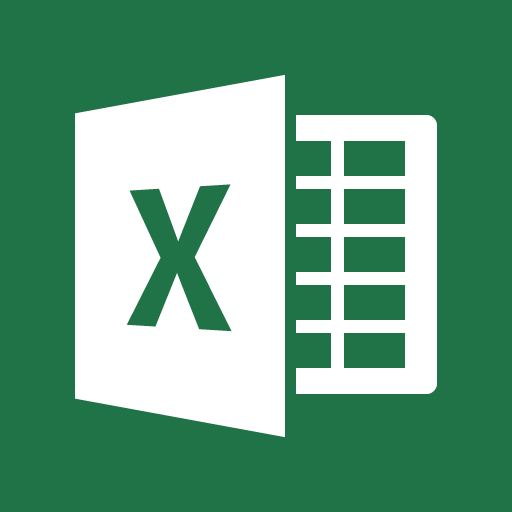
Which icon represents Power Point?
a)
b)
c)
d)
18.
What is Microsoft Power Point used to create?
a)
Slide Show
b)
Pictures
c)
Tables
d)
Spread Sheets
19.
How you you save your Power Point?
a)
Go to Save As and Press Save
b)
Go to Save As / Name your Powerpoint / Save
c)
Go to Save As / go to your student # / Name your document / Save
d)
Go to Student # / Save As
20.
When you want to make a Power Point and you want to design it yourself you should?
a)
Open Powerpoint - Click Blank Presentation
b)
Open Powerpoint - Click Gallery
c)
Open Powerpoint - Click ION
d)
Open Powerpoint and 
21.
What tab would you find online pictures on?
a)
Home
b)
Insert
c)
Transitions
d)
Animations
22.
Slides can have
a)
title, text, graphs
b)
drawn objects, shapes
c)
clipart, drawn art, visual
d)
any of the above
23.

Power point is used to present ideas

a)

True

b)

False

24.

3 important things to make a good presentation

a)

people , presenter , thoughts

b)

audience , presentation , presenter

25.

Pictures can be inserted in to presentation by

a)

Insert menu

b)

Enter menu

c)

File menu

26.

Transitions are done between slides

a)

True

b)

False

27.

Animations are done between slides

a)

True

b)

False

28.

Designs can be implemented by

a)

Insert Menu

b)

Design Menu

29.

New slide can be inserted by:

a)

Home Menu

b)

Insert Menu

30.

To delete a slide yo press backspace key from the keyboard

a)

True

b)

False

31.

To change the font we have to use

a)

Home Menu

b)

Insert Menu

32.

Can we insert pictures from the internet to our presentation ?

a)

Yes

b)

No

33.

Presentation software is primarily used to support a speech of present information to an audience in the form of a slide show.

a)

True

b)

False

34.

Presentation software essentially helps the speaker with visual access to their ideas, and helps the audience with visual illustrations and information which complements the ______________.

a)

teacher

b)

audience

c)

business

d)

speaker

35.

Using online presentation software, such as Google ___________ allows users to work with other people in a collaborative manner.

a)

Sheets

b)

Docs

c)

Slides

d)

Presents

36.

Microsoft PowerPoint was launched in _________, and is available on both Windows and Macintosh operating systems.

a)

1970

b)

1980

c)

1990

d)

2000

37.

_________________ is a free web-based presentation application in which slide shows can be created, edited, and stored online. It was released to the public in 2007 and integrated with Google Drive.

a)

Microsoft PowerPoint

b)

Keynote

c)

Google Slides

d)

Presentations

38.

________________ is an effect where text can be modified through shadows, outlines, gradients, and 3D effects

a)

Bold

b)

Italic

c)

Shadow

d)

WordArt

39.

Besides text, the most common element on a slide is a _____________.

a)

picture

b)

slide

c)

graphic

d)

hyperlink

40.

Some special __________ includes transitions, sound effects, videos, and animations.

a)

pictures

b)

slides

c)

graphics

d)

effects

41.

In Sites, the text in a text box can be changed to which type of style:

a)

Title

b)

Subtitle

c)

Heading

d)

All of the above

42.

The first page that google sites loads is called

a)

Home page

b)

load page

c)

site page

d)

first page

43.

Where can you find the New Google Sites?

a)

On your desktop

b)

In google docs

c)

In google drive

d)

In the dictionary

44.

How do you add a new page?

a)

From the home page, click on the plus sign

b)

From the pages page, click on the plus sign

45.

Allows you to add, edit, or rearrange the pages of your google site

a)

Publish

b)

Pages

c)

Preview

d)

CCS

46.

How to create a "subpage"

a)

Copy one page

b)

Use the three little dots (more option) menu and add

c)

Download another page

47.

To remove pages from a site, go to the pages menu and click

a)

Delete

b)

Click the Page>More>Delete

c)

Open page>Click trashcan

d)

Go to file>delete

48.

Whenever you update something in google sites, it will automatically update what everyone else sees on the website.

a)

True

b)

False

49.
The main method of moving through the site in Google Sites is by using the _____.
a)
ladder panel
b)
sub pages list
c)
view tab
d)
navigation panel
50.

In Google Sites, the ____ option allows the user to see the content of the site without making it visible to the audience.

a)

Preview

b)

Settings

c)

Publish

d)

Pages

51.

The _______ section is displayed at the top of each page and should contain the names of all pages, the title of the site, and a logo.

a)

navigation tab

b)

margin notes

c)

header

d)

footer

52.

The ________ impacts the font style and color as well as the overall color scheme of the site.

a)

format

b)

theme

c)

style

d)

layout

53.

A user should be sure of the ___ and ___ of the site before customizing its composition.

a)

publishers and sponsors

b)

header and footer

c)

theme and layout

d)

topic and audience

54.

Use the _____ menu to add content to your site.

a)

Insert

b)

Pages

c)

Theme

55.

You can drag the content where you want it to organize your site.

a)

True

b)

False

56.

You can add collaborators to your site.

a)

True

b)

False

57.
A template and a theme are the same thing.
a)
True
b)
False
58.
You can embed a live Google Doc into your site.
a)
True
b)
False
59.
Horizontal and Bottom Navigation are both layout styles.
a)
True
b)
False
60.
Your site can be made private or public.
a)
True
b)
False
61.
Google Sites auto-saves for you.
a)
True
b)
False
62.
The Format Menu is where you will can change between 1, 2 or 3 columns.
a)
True
b)
False
63.
Inserting a Calendar, Recent Posts or HTML Box are all types of gadgets.
a)
True
b)
False
64.
The option to place a Custom Logo is found in the Header Menu.
a)
True
b)
False
65.
It is possible for me to share editing privileges to my site with others.
a)
True
b)
False