
 Worksheets
ICT Grade 4
Total questions: 100
Worksheet time: 50mins

Which option is clicked here to view this?
Login button
Menu button
Start button
Automatically it appears

Identify this icon -
Networking
Drive
My Computer
Input Messenger

A computer works at a very high ...............................
Temperature
Speed
Diligence
....................means raw facts or figures
Information
Data
Output
.............................is the result of processed data
Output
Input
Data

Computers are used in hospitals for various purposes. Select correct options.
Keeping a record of money.
Preparing medical reports.
Diagnosing the disease.
Keeping a record of patients.
In school, computers is used for preparing _________.
result
withdraw money
In banks, computers are used to withdraw money.
True
False
Computer is used for booking ticket at ____
Hospital
Bank
Airport
We use computers to attend our virtual classes.
True
False
Select the work which you cannot do on a computer.
Play games
Draw cartoons
Swim
Play music

Cpu is also called _______ of a computer.
Brain
Friend
Remote

Input device
Output device

Input device
Output device
Input devices allow us to __________________to the computer.
Send information
Receive information
___________ gives us voice output.


Output device allow us to ___________ from the computer.
Send information
receive information
A computer use ___________ device to show us something.
Input
Output
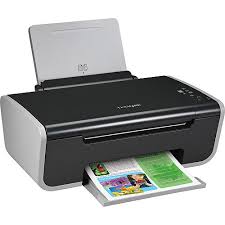
Is this device Input or Output?
Printer
Input
Output

What is the device shown in the picture?
A keyboard
A monitor
A mouse
A printer
A mouse is an __________ device.
input
output
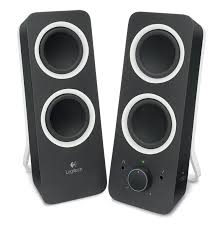
Speaker
_______ controls all the connected input and output devices.
CPU
Mouse
Keyboard
Monitor
Input device
Output device
Input devices allow us to __________________to the computer.
Send information
Receive information
Is this device Input or Output?
Printer
Input
Output
What is the device shown in the picture?
A keyboard
A monitor
A mouse
A printer
A mouse is an __________ device.
input
output
What is the definition for?
Allows the user to see/hear data coming out of the computer
Input Device
Output Device
What is the definition for?
Allows the user to put data into the computer
Input Device
Output Device
Speaker
CPU stands for ____________.
Central Program Unit
Control Processing Unit
Central Processing Unit
Control Program Unit

Is it an input or output device?
Input
Output
Input and output
I don't know

Is it an input or output device?
Input
Output
Input and output
I don't know

Is it an input or output device?
Input
Output
Input and output
I don't know

Is it an input or output device?
Input
Output
Input and Output
I don't know

Is it an input or output device?
Input
Output
Input and Output
I don't know

Is it an input or output device?
Input
Output
Input and output
I don't know


What kind of computer device shown?
input device
output device
storage device

What kind of computer device shown?
input device
output device
storage device

What kind of computer device shown?
input device
output device
storage device

What kind of computer device shown?
input device
output device
storage device

What kind of computer device shown?
input device
output device
storage device

What is this?
ROM
RAM
Hard disk
Primary storage in a computer is the ______________ memory that holds information temporarily.
Internal
External
ROM stands for__________________
Random Only Memory
Read Only Memory
Access Only Memory
Which one stores the data temporarily?
RAM
ROM
Which is placed inside the system permanently?
Hard disk
RAM
ROM
CD ROM
The __________ is the main memory of the CPU.
Primary Storage
Secondary Storage
Tertiary Storage
Off-line Storage
The Secondary Storage is usually called the C:drive.
TRUE
FALSE
ROM is an example of a Primary Storage device. What does ROM mean?
(a)

Name this example of Secondary Storage Device.
Magnetic Tape
Paper Tape
Punched Cards
Which of these sentences are CORRECT about ROM (Read Only Memory)?
(CLICK 3)
It can store data only when the computer is ON.
It directs the computer on what to do with the files.
It makes changes with the data and information.
It reads the commands or tasks given.
A __________ is secondary storage that is coated with a magnetic metal and can store data until they are erased.
Hard Disk
Compact Disc
Zip Drive
RAM disks
A DVD is a secondary and offline storage device. What does DVD mean?
Digital Versatile Disk
Digital Video Drive
When a data is processed, organised and presented in a meaningful way it is called______
Data
Information

Identify the type of primary memory?
ROM (Read Only Memory)
RAM (Random Access Memory)
Which memory is also called Permanent memory?
RAM (Random Access Memory)
ROM (Read Only Memory)
Secondary Memory
Which of these is Secondary storage devices?


Name the following data storage device.
DVD
USB
HDD

Name the following data storage device.
Floppy disc
HDD
CD

Name the following data storage device.
HDD
DVD
CD

Name the following data storage device.
Hard drive disc
compact disc
Floppy disk
CD stand for Compact Disc
True
False
HDD stand for hard drive disc
True
False
Data means information.
True
False

A data storage device is a device for recording (storing) information (data).
True
False
USB stand for what?
Universal series bus
Universal serial bus
Universal serial data

Identify the name of the storage device.
Hard disk
Floppy disk
Compact disk
Video disk

A ______ is the main storage device in your computer.
Pen drive
CD
Hard disk
Memory card

Idenify the name of the storage device.
Hard disk
Sim card
Memory card
Pan card
Idenify the types of various units of memory.
KB stands for _______.
Kilo Byte
Kilo Gram
Idenify the types of various units of memory.
MB stands for ______.
Milli Meter
Mega Byte
Idenify the types of various units of memory.
GB stands for ________.
Kilo Gram
Giga Byte

What type of device is this? USB or flash memory stick
Capture
Storage
What storage device comes with the computer?
Internal Hard Drive
USB Flash Drive
Memory Card
External Hard drive
Which of these is NOT a Storage Device?
USB Flash Drive
CD-R
Digital Camera
Floppy Disk
Which of these is NOT secondary storage?
USB
Google Drive
RAM
DVD
Why is secondary storage needed?
It is non-volatile
It is volatile
It is quicker
It is online
What is primary storage?
The hard drive
Memory
Network server
Cloud storage
What do the letters RAM stand for?
(a)
Which type of memory is non-volatile?
ROM
RAM
What is the advantage of an SSD?
Cheaper
Smaller
Bigger
Faster
Which is a primary storage?
Hard Disk Drive
Compact Disk
Random Access Memory
Thumb Drive

Identify the item in the picture.
RAM
ROM
SDD
HDD
Can you start up a computer without a working hard disk?
Yes
No
Raw facts and figures are known as _______________.
Data
Information
Memory
Data gets erased when the computer is switched off.
ROM
Memory Card
RAM
Blu - Ray

