
 Worksheets
Microsoft Word Quiz
Total questions: 23
Worksheet time: 12mins
Name
Class
Date
1.
If you make a mistake you can do what?
a)
press control U
b)
delete your work and start over
c)
click the undo button at the top of the page
2.
A formatting option that makes selected words print darker than normal.
a)
Bold
b)
Italics
c)
Underline
d)
Subscript
3.

a)
Bold
b)
Font
c)
Body
d)
Front
4.

a)
Color
b)
Letter Color
c)
Font color
d)
Word
5.

a)
Color
b)
Text effect
c)
Underline
d)
Text highlight color
6.

What is the name of this menu?
a)
Toolbar
b)
Word bar
c)
Tab bar
d)
estatus bar
7.

What is the name of this option?
a)
Typeface
b)
Watermark
c)
Borders and shading
d)
Toolbar
e)
Ribbon tab
8.

What does the box with the red arrow pointing at means?
a)
Text Style
b)
Text Color
c)
Bold
d)
Size
9.
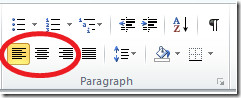
a)
Left align
b)
Font size
c)
Font name
d)
Save
10.

Which icon do you click on to get to Microsoft Word?
a)
Orange
b)
Green
c)
Blue
11.

This icon lets you........
a)
add a picture
b)
take a picture
c)
send picture
d)
draw a picture
12.

a)
copy
b)
paste
c)
undo
d)
print
13.
Which tool shows cut
a)
b)
c)
d)
14.
On your mouse which button gives you options? Left or Right?
Like Copying, Pasting
Like Copying, Pasting
a)
Left
b)
Right
15.
What do we use Microsoft Word to create?
a)
Presentations
b)
Text Documents
c)
Spreadsheets
d)
Posters
16.

What is this called?
a)
text box
b)
insert
c)
table
d)
pictures
17.

What will happen if you click this icon?
a)
Your document will be deleted
b)
Your document will open
c)
Nothing
d)
Your document will be saved
18.
True or False: It is not possible to change the shape of a text box.
a)
True
b)
False
19.
If you make a mistake you can do what?
a)
press control U
b)
delete your work and start over
c)
click the undo button at the top of the page
20.

What is this icon?
a)
Margins
b)
Page Orientation
c)
Page Size
d)
Spell Check
21.

What is this icon?
a)
Margins
b)
Page Orientation
c)
Page Size
d)
Spell Check
22.
Footer is the section at the top of a document.
a)
True
b)
False
23.
A keyboard shortcut is:
a)
a mouse-click used to generate a keystroke.
b)
a single or combination of keystrokes used to access a menu command.
c)
a quick tapping of a key on the keyboard
d)
a keystroke that generates a number.
100 %

