
 Worksheets
IPT101 - (Scratch)
Total questions: 51
Worksheet time: 33mins
What happens to a sprite's script if this sprite was deleted?
The script will be saved if you decided to use this sprite later
You can't delete a sprite before deleting the script written in it.
The script will be deleted with the sprite
Which sprite has the most available costume options?


A blocks that hold value and can be changed
Operational Blocks
Event Blocks
Sensing Blocks
Variable Blocks
In scratch, this is the place where we see all the possible commands for our project. Includes movement, control, events and other options.
Stage
Sprites
Blocks
Scripts
A costume is...
a code block
a motion
a sound
a different way a sprite looks
Scratch is _________
a programming language
a gaming application
video editing software
sound editing software
Can we add any variable in the motion block?
True
False

These blocks are different examples of what?
motion
events
controls
sound
Variables are used to hold data that cannot change.
True
False
A completed program in scratch is called
Scratch
Volume
Project
Document
What is the purpose of implementing game logic in Scratch programming?
To make the code more complicated and difficult to understand.
To slow down the performance of the game and make it frustrating for users.
To create interactive and engaging games for users to play and enjoy.
To create boring and uninteresting games that no one wants to play.
Which block is used to start the game in Scratch programming?
after green flag clicked
while green flag clicked
when green flag clicked
if red flag clicked
How can you make a character move in a simple game using Scratch programming?
Use the 'shrink' block and specify the size for the movement.
Use the 'spin' block and specify the angle for the movement.
Use the 'move' block and specify the direction and distance for the movement.
Use the 'jump' block and specify the height for the movement.
What block is used to detect if two sprites are touching in Scratch programming?
touching
connecting
intersecting
overlapping
What is the function of the 'forever' block in game logic implementation in Scratch programming?
To continuously repeat a set of instructions
To execute the instructions only once
To pause the game
To randomly select instructions to execute
What is the purpose of using variables in game logic implementation in Scratch programming?
To confuse the player
To slow down the game
To store and manipulate data such as score, health, and position of game objects.
To make the game more colorful
How can you add sound effects to a simple game in Scratch programming?
By using the 'Sensing' blocks in the 'Control' category
By using the 'Motion' blocks in the 'Looks' category
By using the 'Sound' blocks in the 'Events' category
By using the 'Pen' blocks in the 'Drawing' category
What is the role of the 'if-then' block in game logic implementation in Scratch programming?
It is used to display the game over message
It is used to play sound effects in the game
It is used to create conditional statements that control the flow of the game.
It is used to change the background color of the game
How can you create a scoring system in a simple game using Scratch programming?
Use the backdrop to display the score
Use variables to keep track of the score and update the score when certain actions are performed
Use the sound effects to indicate the score
Create a new sprite for the score display
How can you add a timer to a game created using Scratch programming?
Use the 'wait' block and specify the time for the timer
Use the 'broadcast' block to send a message for the timer
Use the 'timer' block and specify the duration for the timer
Use the 'control' block and specify the conditions for the timer
What is the purpose of using the 'repeat' block in game development using Scratch programming?
To execute a set of instructions a specific number of times
To skip certain instructions in the game
To reverse the order of instructions in the game
To randomly select instructions to execute
How can you create a game over screen in a game developed using Scratch programming?
Use the 'stop' block to end the game and display a game over message
Use the 'broadcast' block to send a game over message
Use the 'game over' block and specify the conditions for the game over screen
Use the 'control' block and specify the conditions for the game over screen
Which command use to let the sprite walk?
Go
Walk
Run
Move
What do you call the list of commands in Scratch?
Costume
Sprite
Sprite Scripts
Script
What is Algorithm?
A motion block
A Variable
A loop statement
A set of instructions
Code blocks where you can find Repeat command.
Motion
Control
Variable
Looks
Code blocks where you can change the value.
Motion
Control
Variable
Looks
Which blocks you can set the sprite coordinates.
Motion
Control
Variable
Looks
A __________ coordinate sets how far up or down the screen a point is.
X
Y
Z
Sprite

What is this icon used for in scratch?
choose a size
choose a backdrop
choose a sprite
costume

What is this icon used for in scratch?
save
upload
copy
cut

What is this icon used for in scratch?
ungroup
group
flip vertical
flip horizontal
You can paint a new costume for a sprite in scratch?
True
False

What will happen when the green flag is clicked?
Make the character spin
Add a sprite
Start the game
Make the ball bounce
What is another name for your background in Scratch?
Back
Background 1
Sprite
Backdrop

Which categories does this command blocks belong to?
Motion
Events
Looks
Control

Which categories does this command blocks belong to?
Looks
Sensing
Sound
Motion

we can use variable to store
Data
operations
movement
control
What is a loop?
Allows something to be repeated
Ending the program
Programs running
Starting a program
Which of the following is OUTPUT area in scratch programming?
Stage area
Sprite Area
Script Area
Block Palette

What happens when you click this?
Run
Stop
Edit
what are the two axis in scratch
x and y
n and t
j and w
k and somethig
what is scratch?
a block-based programming language
some application
an educational application
a text-based programming language
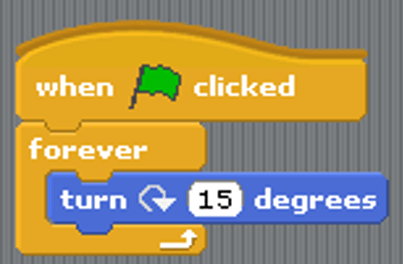

Which construct is shown here?
Fixed loop
Conditional Statement
Conditional Loop
To make character pause or slow in scratch, control that is added to script is
Forever
Repeat
Wait
Next costume

What will the cat say when this script is run?
Have a nice day. (only)
Here's some fruit. (only)
Here's some fruit. Have a nice day.
You can't have any. Have a nice day.
These blocks are different examples of what?
motion
events
controls
sound

