
 Worksheets
comp 1
Total questions: 53
Worksheet time: 27mins
An ___________ is used to withdraw money.
Mobile
ATM
None of these
What can you do on computer ?


How do you use computers at railway stations?
We book the tickets.
We sleep at the station.
A computer cannot be used for booking tickets online.
True
False
_______ use computers in preparing medical reports.
Teachers
Scientists
Doctors
We can use computer to clean the house.
Right
Wrong
Select the work which you cannot do on a computer.
Play games
Draw cartoons
Swim
Play music
Computers are used in a _________ to store information about the books.
Railway Station
Library
Banks
Resorts
How do you use computers at railway stations?
We book the tickets.
We sleep at the station.
_______uses computer in preparing X-ray reports.


_______uses computer in preparing X-ray reports.

Identify the above place where computers are used.
Bank
Office
Airport
School

Identify the above place where computers are used.
Bank
Shop
Home
Restaurant

Identify the above place where computers are used.
Mall
Hospital
Bank
School

Look at the picture, this is a place where computers can be used.
Hospital
Bank
Library

Look at the picture, this is a place where computers can be used.
Bank
Shop
Railway
In what activities can computer be useful? (You can tick more than one answer)


In what activities can computer be useful? (You can tick more than one answer)


Tom is eating a lollipop. Can computer be useful for eating the lollipop?
Yes
No

Rima is blowing a balloon. Can a computer be used for blowing balloons?
No
Yes
How many arrow keys are there on the keyboard?
Two
Three
Four
Where is the numeric keypad located on the keyboard?
Top Left Corner
Left Side
Right Side
Which key is used to erase anything typed on the left of the cursor?
Caps lock
Space bar
Backspace
What type of keyboards are used in laptops and desktops?
A to Z
0 to 9
QWERTY
Which key is used to move the cursor to the beginning of the next line?
Caps lock
Enter
Backspace
Which of the following is not a special key?
Enter
Shift
F4
SHIFT + 2 will give?
@
&
#
How many shift keys are there on the keyboard?
Two
Three
One
Which is the longest key on the keyboard?
Delete
Caps lock
Space bar
How many Delete keys are there on the keyboard?
Three
Two
One
Which key is used to erase characters to the right of the cursor?
Tab Key
Backspace Key
Delete Key
How many Function Keys are there on the keyboard?
12
13
14
How many Enter Keys on the keyboard?
1
2
3


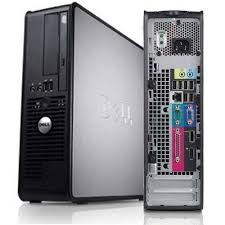



What is the purpose of a camera?
It takes picture.
It can see you.
It records.
It can see videos.

What is the purpose of the speaker?
It allows the user to see what is on the computer.
It allows the user to type.
It allows the user to take pictures.
It allows all the people to hear the sounds of the computer.

What is the purpose of the screen?
It takes pictures.
It lets the user type.
It shows what is on the computer.
It moves on the computer.

What is the purpose of the mouse?
It moves things around.
It takes pictures.
It lets the user type.
It clicks on things on the computer.
It can type words, numbers and symbols
Printer
Keyboard
Speaker
Microphone
It prints the results of your work from the computer screen on a sheet of paper
Printer
Photocopier
Scanner
CPU
Which of the pictures below is the CPU?


Which is correct in taking care of the computer?
Shut down the computer after using it.
Press the keyboard as hard as you can.
Clean the computer with any cloth.


