Wayground logo

Free Printable Worksheets

Font size

S
M
L
XL
Worksheets

Scratch - Coding

Total questions: 30

Worksheet time: 16mins

Name
Class
Date
1.

What does this block do?

a)

It allows sprites to talk to each other

b)

It plays music on the radio

c)

It writes a message in a bottle

2.

What does this code do?

a)

It clicks the sprite forever

b)

It allows you to draw shapes

c)

It generates sprites forever

3.
What block will you use to have the sprite say something?
a)
Looks
b)
Sounds
c)
Pen
d)
Data
4.
What is the name for the area where your project displays when active?
a)
Screen
b)
Window
c)
Output
d)
Stage
5.

Which of the following sections of code will make the script follow the mouse pointer around the screen?

a)
b)
c)
d)
6.

Study the script above which has been set up for your sprite. Which direction will your sprite move in if you press the up arrow?

a)

Up

b)

Down

c)

Left

d)

Right

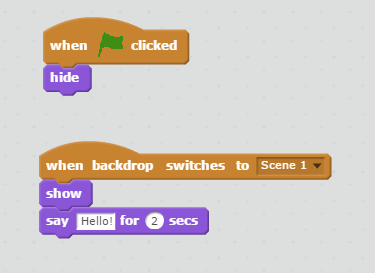
7.
According to the image, when you click on the green flag, this sprite will....
a)
Show and when the backdrop changes, it will hide and say "Hi!"
b)
Hide and when the backdrop changes, it will show and say "Hello!"
c)
Show and when the backdrop changes, it will  change the backdrop again
d)
hide and show the Tittle
8.

What does this block to do the sprite?

a)

Nothing

b)

Changes it's size

c)

Changes it's colour

d)

I don't know

9.

Which block can I use to change costume?

a)
b)
c)
d)

None of these

10.
You are driving a car left to right and you want other cars to come from opposite direction. Which of the following code block could be used for a car coming from right side of the stage?
a)
1
b)
2
c)
3
11.
The above  script is added to a sprite. According to the script what do you expect to happen?
a)
If “y position” of the sprite is less than -175 it goes to first a random position then glides to the top of the stage
b)
If “y position” of the sprite is less than -175 it goes to intersection of a random position on the “X axis” and top of the stage
c)
If “y position” of the sprite is greater than -175 it goes to a random position on the stage
12.
The above script is added to a sprite. What happens to “Oranges” when the sprite touches to “Bowl” object?
a)
The position of “Oranges” sprite goes up 1
b)
The number of “Oranges” sprite increases 1
c)
The number of “Oranges” sprite collected is incremented 1
13.
The above script is added to a sprite. What object is hidden when the sprite touches to “Bowl” sprite?
a)
The sprite that this script is inserted to
b)
Bowl sprite that is controlled by the player
c)
Backdrop the sprite is located
14.
You want to test an interaction between two sprites. In which color you would look at?
a)
Motion
b)
Events
c)
Sensing
15.
You are creating a number guess game and want to give 7 chances to the player to guess the number correctly. Which control statement you would use?
a)
1
b)
2
c)
3
16.
How do you test if a sprite is at the very bottom of the screen?
a)
1
b)
2
c)
3
17.
What is the function of “point in direction” in the following script?
a)
It allows the sprite to point to the direction desired to move
b)
It allows to rotate the sprite by the selected amount
c)
It allows the sprite move 10 steps and turns 90 degrees
18.
You can ask a question to the player using the “ask” command. The player then responds to your question. Which of the following is used to receive the player’s response?
a)
1
b)
2
c)
3
19.

These blocks turn their sprite the specified amount of degrees clockwise or counter-clockwise (depending on which block is used); this changes the direction the sprite is facing.

a)
b)
c)
d)
20.

What will the sprite say after reading this script?

a)

141

b)

142

c)

131

d)

174

21.

What will happen when you run this code?

a)

Change color

b)

Grow and shrink

c)

Spin

d)

Bounce

22.

What will happen when you run this code?

a)

Change color

b)

Grow and shrink

c)

Spin

d)

Bounce

23.

What will happen when you run this code?

a)

Change color

b)

Grow and shrink

c)

Spin

d)

Bounce

24.

What will happen when you run this code?

a)

Bounce everywhere

b)

Add background music

c)

Change scene

d)

Play a beat

e)

Say something

25.

What will happen when you run this code?

a)

Bounce everywhere

b)

Add background music

c)

Change scene

d)

Play a beat

e)

Say something

26.
The above  script is added to a sprite. According to the script what do you expect to happen?
a)
If “y position” of the sprite is less than -175 it goes to first a random position then glides to the top of the stage
b)
If “y position” of the sprite is less than -175 it goes to intersection of a random position on the “X axis” and top of the stage
c)
If “y position” of the sprite is greater than -175 it goes to a random position on the stage
27.
You used a random number generator. Which of the following number you do not expect to come up from the random number generator?
a)
-3
b)
-8
c)
8
28.
At some part of your script you want your sprite character change to next costume when it touches to color “red”. Which of the script would do that?
a)
1
b)
2
c)
3
29.

Where do you click to add a new sprite (or character)?

a)
b)
c)
d)
30.

Which code below can program this?

a)
b)
c)
d)
e)