
 Worksheets
Quiz for Grade-2
Total questions: 103
Worksheet time: 52mins
1. Click on the start button
2. Type Notepad
3. Press the enter key
These are the steps to switch ON the computer.
These are the steps to open notepad program.
These are the steps to shut down.
There is no title bar in a notepad program.
True
False
Keyboard shortcut for UNDO is
Ctrl + Z
Ctrl + U
Ctrl + X
Ctrl + O
Keyboard shortcut for CUT is
Ctrl + C
Ctrl + T
Ctrl + X
Ctrl + S
Keyboard shortcut for COPY is
Ctrl + P
Ctrl + E
Ctrl + O
Ctrl + C
Keyboard shortcut for PASTE is
Ctrl + E
Ctrl + V
Ctrl + W
Ctrl + P
Keyboard shortcut for FIND is
Ctrl + F
Ctrl + D
Ctrl + B
Ctrl + N
Keyboard shortcut for REPLACE is
Ctrl + E
Ctrl + P
Ctrl + H
Ctrl + R
The editing options can be used quickly through keyboard shortcuts.
TRUE
FALSE
______________ is the software that can be used for typing text on the computer.
Paint
Notepad
______________________ is a small, blinking line on the monitor that shows the position of the next letter or number to be entered.
Mouse
Cursor
The _________________ feature ,moves a word to the next line in the Notepad.
word wrap
new file
The horizontal scroll bar is at the _________________ of the Notepad window.
top
bottom
Horizontal scroll bar in the Notepad can be moved_________________ and __________ to read the full story.
left, right
up, down
If you will deselect the _________________ the entire text will be shown in one line
word wrap
font
How we can create a new document in the Notepad.........
File-New
Format- Word wrap
How we can enable the Word Wrap feature in Notepad......
File-New
format- word wrap
Notepad is used for _____________ on the computer.
drawing
typing text
CPU stands for ___________________.
Central Pointing Unit
Central Processing Unit
The program used for creating text files
Drawing program
Text editor
Word Processor
It is the format of the file created in Notepad
.txt
text file
text
This is the command that is used to open a file
File > Open
Edit > Open
View > Open
It is the area in the Notepad windows where you type the text.
Typing Area
Insertion Point
Cursor
It displays the name of the file.


Identify the part of the notepad.
Menu Bar
Scroll Bar
Sizing Button

Identify the part of the notepad.
Menu Bar
Scroll Bar
Sizing Button
The button that shuts down the notepad you are using.


It is used to hide and change the size of your Notepad.
Sizing buttons
Close button
Scroll bar
Microsoft Notepad is a........
text editor
document
program
Notepad runs in Microsoft Windows OS
True
False
OS full form is........
Open source
Operating system
Organized system
The screen which is appearing first in the Monitor is called.....
Screen
Display
Desktop
How many steps are there to launch Notepad?
Four
Five
Three
Start-Programs-Accessories-Notepad
True
False
File name is appearing in the........
title bar
menu bar
tool bar

Identify the button name of the image
Minimize
Close
Maximize
Find the symbol of Maximize


______________________ is a small, blinking line on the monitor that shows the position of the next letter or number to be entered.
Mouse
Cursor

The given icon is of which application?
Calculator
Paint
Notepad
Should we save our notepad document after completing our work?
Yes
No

The Keyboard has alphabet keys and number keys.
Right.
Wrong.

The enter key is used to:
write capital letters.
go to the next line.
delete a letter.

The backspace key is used to
write a capital letter.
go to the next line.
delete a letter.

The caps lock key is used to
write a capital letter.
go to the next line.
delete a letter.
To open notepad you will open start menu first.
Right.
Wrong.
The notepad is a program like a white paper.
Right.
Wrong.

The space key is used to
write a capital letter.
make a space better letters or words.
delete a letter.
Notepad is a program that allows you to draw a picture.
Right.
Wrong.
You can not save a notepad file.
Right.
Wrong.
In notepad you can insert a picture.
Right.
Wrong.
The icon of notepad is


To save a file you have to click on file then save.
Right.
Wrong.
Notepad is a good program.
Right.
Wrong.
Which one of the following should be clicked to save the existing notepad window?
Edit
Save
Format
Which of the following need to be clicked to change the size of the words in the notepad application?
Font
Edit
View

The given option is opened after clicking on a menu while working with the notepad application.
Edit
File
Format
Which item is not there in Notepad menu bar:
File
Edit
Insert
What should be clicked to open a previously saved file while working with the Notepad application?
Open
File
Save
There is no title bar in a notepad program.
True
False

What is this ?
Tab Button
Space Bar
Start Button
Enter Button
A computer works very _________________.
Slow
Fast
Normal Speed
Too slow
Computers do not have any _________________________.
Painting
Writing
Feelings
Playing
Human have made wonderful machine called________________.
Computer
Cup
Cap
Cartoon
________________ can take their own decision.
Computer
Palmtop
Laptop
Humans
PC stands for ____________________________
Paint Computer
Personal Calculator
Personal Computer
Pointer Computer
What is a Desktop?
last screen of a computer
Middle screen of a computer
First screen appears once the computer is switched on
None of the above
Find input device...?


Find Output Device...?


Activity that you can do using a computer
Walking
Planting Tress
Running
Solving Sums
Computer runs on ______________________
Instruction
Electricity
Food
Water


How should I enter the computer lab?
Walking
No talking
Running and pushing
singing and dancing

Once I sit down at my computer I should...
tell my friend what game I want to play
Spin around in my chair
Log in quietly
Bounce up and down in excitement

If I have a question I should yell it out!
True
False

Before I leave the computer lab I should...
Log off the computer
Clean up my area
Put headphones away, tuck in chair
All the above
- Computer can be seen in:
Schools
Banks
Hospitals
All of the above
2.A computer saves our------------
Time
Food
Water
Electricity
3.A computer works very ------------
Fast
Slow
Medium
Very fast
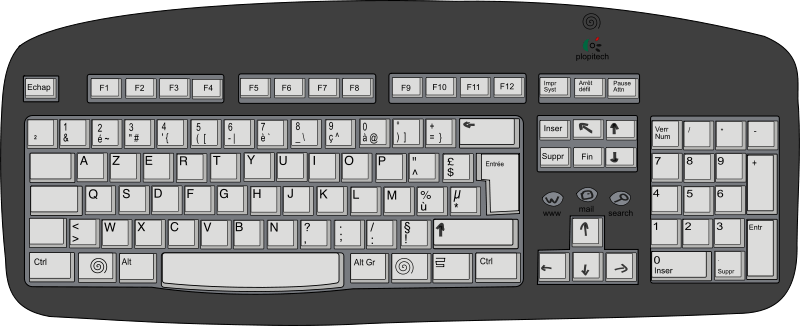
4.Which of the following spelling is correct
Keyboard
Keybord
Keysboard
All the above
5.A computer never makes ------------
Food
Mistakes
Juice
Bread
6.Which of the following machine helps us to wash clothes?
Television
Scooter
Washing machine
Computer
7.Which of the following is a smart machine?
Mixer
Refrigerator
Computer
Bicycle
8.Which of the following machine helps us to move from one place to another?
Car
Air cooler
Television
Juicer
9.Which of the following statement is correct?
Computer is a smart machine
Computer works faster
Computer never gets tired.
All the above
10.Machines are ----------
God made things
Man made things
Living things
All the above
Which type of device is a mouse
Pointing device
Output device
Which is called the brain of computer
Mouse
CPU
The process of switching on the computer is called
Booting
Shut Down
Small pictures on the window desktop are called
Icons
File
The process of switching off the computer is called
Hanging
ShutDown
U P S stands for
Uninterrupted power supply
Upper power supply
Monitor looks like a
Television
Mouse
_______ is used to play video game
Joystick
Speaker
The first screen that appears after switching on the computer is called
Desktop
Printer
CPU has a number of button on it
False
True
We can see cartoon films on monitor
True
False
Buttons of the keyboard called
Keys
Mouse
_____ is used for typing letters and numbers
Keyboard
Mouse
Who controls all the function of a computer
CPU
Mouse

