
 Worksheets
CKQG_Scratch 02. Blocks
Total questions: 40
Worksheet time: 40mins
Which blocks will make the sprite move on the stage
Looks blocks
Motion blocks
Sound blocks
Control blocks
Which set of blocks are in pink color?
(a)
What is the backdrop of a project called?
Script
Stage
Scratch
Sprite
A collection or stack of blocks that all interlock with one another is called?
Sprite
Scratch
Script
Stage

The code blocks below are an example of what type of action?
Pen
.
Events
Looks
Control

Chose the correct answer.
This block gives a sort of thought, the block can be used whenever a character thinks something (such as in an animation).
The block displays a speech bubble with the specified text for the sprite that runs it, which appears on the screen for the specified amount of seconds.
The block gives its sprite a speech bubble with the specified text.

Choose the correct answer.
The block changes its sprite's costume to the next one in the costumes pane.
The Next Backdrop block is a Looks block and a Stack block.
This block is one of the most commonly used blocks; it is used whenever a sprite must switch to a specific costume.
The block sets its sprite's size to the specified amount.
Repeat until
Set size to
Change size by
This block waits for scripts under any __________to () blocks to finish.
Next backdrop
Switches backdrop to and wait
Switches to next costume
What color represents motion blocks?
Green
Red
Orange
Blue
None of the above
Which of the following is NOT true?
Move blocks can sometimes increase the x position of a sprite
Reducing the y position of a sprite makes it go lower
The change x blocks always increases the x position of a sprite
You use blocks to code in scratch
The glide block always sends the sprite forward
Which block will start drawing?


Which block will stop drawing?
Which block will slow down the program?


What does this block do?
Move forward 15 steps
Turn left 15 degrees
Wait 15 seconds
Turn right 15 degrees

What are the parts of Scratch screen?
1Stage, 2.Script Area, 3.Block Palette
1Stage, 2. Block Palette, 3. Script Area
1Script Area, 2. Block Palette, 3. Stage
1Block Palette, 2. Script Area, 3. Stage
Blocks that allows you to repeat scripts multiple times.
repeating blocks
script
volume
Select ALL the repeating blocks.


Select the ALL the Motion blocks.
glide 1 sec to x:12 y :20
if on edge, bounce
when this sprite is clicked
say hello
Select ALL the Control blocks.
move 10 steps
wait 1 sec
say Hello
forever
WHICH ONE OF THE FOLLOWING BLOCKS IS NOT A REPETITION LOOP.


what is the color of the control blockes ?
blue
green
light yellow
i don`t know !
what are the two axis in scratch
x and y
n and t
j and w
k and somethig
Displays the location of your X and Y positions.
stage
coordinates
volume
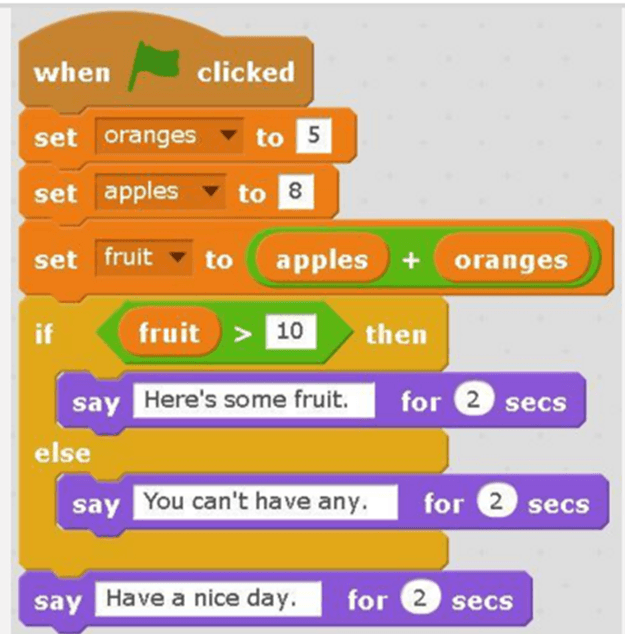
What does block allow users to input text or number?


How to assigned a = 2?


How to print the value of a +b?


How to stop the script?
Stop all
Stop
When the green flag is clicked


Which block is in the SOUND category?
stop
clear look
broadcast
Wait until

