
 Worksheets
Unit 2 CMU
Total questions: 71
Worksheet time: 53mins
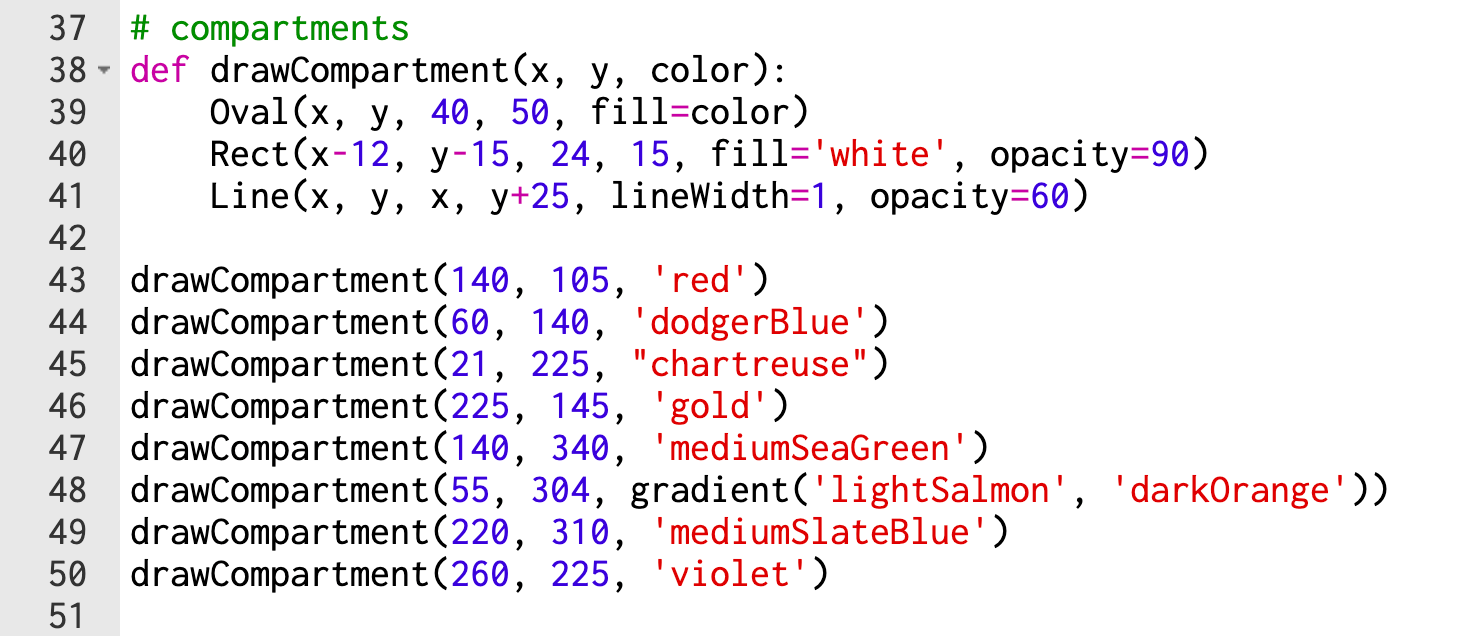
What are the line #'s of the function definition?
38
39
40
41
43
What are the line #'s of the function body?
38
39
40
41
43
What are the line #'s of the function call?
38
39
40
41
43
Select the function parameters
x
y
color
140
'red'
Select the function arguments
x
y
color
140
'red'
What is the function name?
def drawCompartment(x, y, color):
def drawCompartment
drawCompartment
drawCompartment(140, 105, 'red')
The function body must be indented.
True
False
How many times is line 39 executed?
1
8
9
Depends

What is the value of s.radius after the mouse click?
20
30
50
70
What is the value of s.points after the mouse click?
1
9
10
11
What is the value of s.roundness after the mouse click?
4
14
40
100

If the user clicks the mouse at (100, 200). What value is printed for mouseY?
mouseY = 100
mouseY = 101
mouseY = 200
mouseY = 201
If the user clicks the mouse at (100, 200). What value is printed for sky.height?
sky.height = 100
sky.height = 101
sky.height = 200
sky.height = 201

What value is printed for counter.value after the user clicks the mouse?
counter.value = 1
counter.value = 15
counter.value = 16
There is a runtime error
Which of following correctly adds and updates the value of a label 'counter' by 3?
counter.value=counter.value+3
counter.value+=3
counter.value+3
counter.value=3
counter.value=+3
What is the value of s.radius after the mouse click?
20
30
50
70
What is the value of s.points after the mouse click?
1
9
10
11
What is the value of s.roundness after the mouse click?
4
14
40
100
If the user clicks the mouse at (100, 200). What value is printed for mouseY?
mouseY = 100
mouseY = 101
mouseY = 200
mouseY = 201
If the user clicks the mouse at (100, 200). What value is printed for sky.height?
sky.height = 100
sky.height = 101
sky.height = 200
sky.height = 201
What value is printed for counter.value after the user clicks the mouse?
counter.value = 1
counter.value = 15
counter.value = 16
There is a runtime error

What value is printed for counter.value after the user clicks the mouse?
counter.value = 1
counter.value = 15
counter.value = 16
There is a runtime error

What value is printed for counter.value after the user clicks the mouse?
counter.value = 1
counter.value = 15
counter.value = 16
There is a runtime error
Which of following correctly adds and updates the value of a label 'counter' by 3?
counter.value=counter.value+3
counter.value+=3
counter.value+3
counter.value=3
counter.value=+3
Boolean expression: an expression that evaluates to either true or false.
(3 > 2) is
True
False
Boolean expression: an expression that evaluates to either true or false.
(3 < 2) is
True
False
Boolean expression: an expression that evaluates to either true or false.
(3 == 2) is
True
False
Boolean expression: an expression that evaluates to either true or false.
(3 != 2) is
True
False
Boolean expression: an expression that evaluates to either true or false.
(3 >= 2) is
True
False
Boolean expression: an expression that evaluates to either true or false.
(3 <= 2) is
True
False
Boolean values are true or false. Which parameter is a boolean?
Rect(left, top, width, height, fill='black', opacity=100, visible=True)
left
fill
opacity
visible
Comparison operators: operators that compare values.
Boolean expessions contain comparison operators and return True or False.
If statements use boolean expression.
Which symbols are comparison operators?
<= (Less than or equal to)
>= (Greater than or equal to)
== (Equality / Testing 2 values are equal)
!= (Inequality / Testing 2 values are not equal)
= (In Python means setting a value)
A Boolean expression .....
Loops the programs to continue infinitely
Sets everything in it equal to eachother
Checks if something is True or False
Fixes any errors in the line of code
How many values does a Boolean variable have?
1
2
4
infinite
Why would you use a boolean expression?
To create a loop in the program
To locate a bug in the program
To execute the next line in the program
To activate a response with True or False
Which boolean expression can be used to check if someone is 18 years old or older?
age > 18
age < 18
age >= 18
age <= 18
Where can boolean expressions be found?
variables
If statements
By itself
assignment statement
Which numbers for x would cause the boolean expression x <= 14 to be True?
3, 17, 20
1, 11, 14
14, 18, 20
13, 14, 15
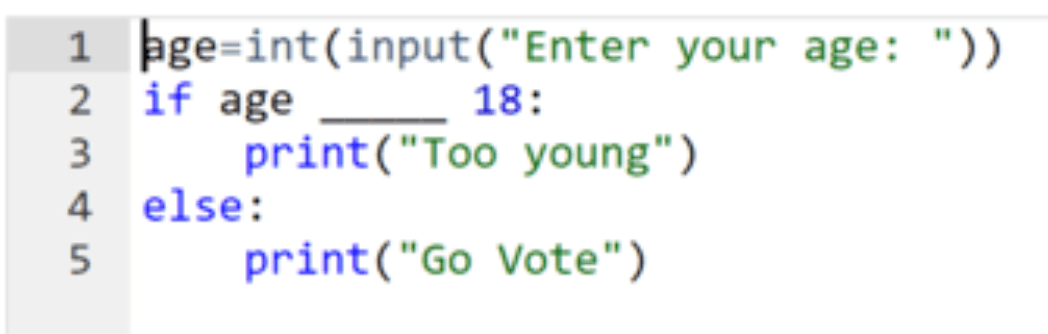
Fill in the blank so that people that are 18 years old and older are allowed to vote.
<
>
<=
>=

Where is x > 200 and y > 200?
blue
red
green
yellow
Where is x < 200 and y > 200?
blue
red
green
yellow
Where is x < 200 and y < 200?
blue
red
green
yellow
Where is x > 200 and y < 200?
blue
red
green
yellow

What shapes will be drawn with the call onMousePress(300, 300)?
rectangle
star
circle
oval
What shapes will be drawn with the call onMousePress(100, 100)?
rectangle
star
circle
oval

What shapes will be drawn with the call onMousePress(300, 100)?
rectangle
star
circle
oval

What shapes will be drawn with the call onMousePress(100, 300)?
rectangle
star
circle
oval

What shapes will be drawn with the call onMousePress(100, 300)?
rectangle
star
circle
oval
What shapes will be drawn with the call onMousePress(100, 100)?
rectangle
star
circle
oval

What shapes will be drawn with the call onMousePress(20, 300)?
rectangle
circle
star
oval
What shapes will be drawn with the call onMousePress(250, 100)?
rectangle
circle
star
oval

Which of the following is drawn when the mouse is released?
Two non-touching circles
red circle covering part of the blue circle
blue circle covering part of the red circle
blue circle covering the red circle
red circle covering the blue circle

Which of the following is drawn when the mouse is released?
Two non-touching circles
red circle covering part of the blue circle
blue circle covering part of the red circle
blue circle covering the red circle
red circle covering the blue circle

When the user clicks the mouse, where is Awesome printed?
Top Half of the Canvas
Bottom Half of the Canvas
Right Side of the Canvas
Left Side of the Canvas
When the user clicks the mouse, where is Wonderful printed?
Top Half of the Canvas
Bottom Half of the Canvas
Right Side of the Canvas
Left Side of the Canvas
When the user clicks the mouse, where is Fantastic printed?
Top Half of the Canvas
Bottom Half of the Canvas
Right Side of the Canvas
Left Side of the Canvas
When the user clicks the mouse, where is Amazing printed?
Top Half of the Canvas
Bottom Half of the Canvas
Right Side of the Canvas
Left Side of the Canvas

dotRed.centerX=
dotGreen.centerX
dotYellow.centerX
dotBlue.centerX
dotRed.centerY=
dotGreen.centerY
dotYellow.centerY
dotBlue.centerY
dotGreen.centerX=
400 - dotRed.centerX
400 - dotBlue.centerX
400 - dotRed.centerY
400 - dotBlue.centerY
dotGreen.centerY=
400 - dotRed.centerY
400 - dotBlue.centerY
400 - dotRed.centerX
400 - dotBlue.centerX
Which of the following is a valid function name?
None
1234
drawCircle
def

Given the function shown, which of the following would be a valid function call?
drawBigCircle(“purple”, 20, 300)
drawBigCircle(200, 200, “red”)
drawBigCircle(300, “blue”, 200)
Circle(200, 300, “green”)
Which of the following correctly uses the print function to print to the console?
print helloWorld
print(“hello world”)
print(helloWorld)
print “hello world”
Which of the following shapes does not have a radius property?
Circle
RegularPolygon
Star
Rect
Which of the following is not a fill or border property?
borderStyle
fill
dashes
borderWidth
What do you click to run all of the test cases given in the problem?
Run button
Reset
Test case 1
Autograder
Which of the following is false about global variables?
They should be used sparingly
They should be used all the time
They are used to refer to shapes
They can be used inside and outside of functions

Which of the following is l.value?
‘Hello’
200
20
Label
Which of the following is not a property of all shapes?
bottom
radius
visible
align

Which properties of the given RegularPolygon correspond to a value of 50 and 20 respectively?
s.centerX and s.centerY
s.centerX and s.radius
s.radius and s.centerX
s.centerY and s.radius

