
Font size
 Worksheets
HISTORICAL DEVELOPMENT OF COMPUTER
Total questions: 100
Worksheet time: 49mins
How many counting devices do we have?
6
8
4
2
All of these are examples of early counting devices except
Pebbles
Sticks
Computer
Fingers
Which of these is an example of the problems of early counting devices
They are reliable
They are not time consuming
They are unable to count large numbers
They have storage devices
Where was the abacus found?
500 BC
1456
1278
330 DC
Which of the 2 early counting device did the abacus replace
Fingers
Stones
Pebbles
Stones
Who designed the Slide rule?
Blaise Pascal
Schickard
William Oughtred
John Napier
Which of the 4 calculations did the slide rule perform
Multiplication
Trigonometry
Roots
Addition
Logarithms
Which of the following was the first manual calculating devices?
RAM
ABACUS
Slide Rule
What was the second invention of Babbage?
Difference Engine
Analytical Engine
IBM
Who was the funder of tabulating machine company?
Babbage
Hollerith
Pascal
Who was the father of Lady Ada?
Babbage
Pascal
Lord Byron
Which was the first commercial computer?
ENIAC
EDSAC
UNIVAC
In 1619 AD, John Napier developed he concept of logarithm.
F
T
Hollerith invented the punch card technology.
F
T
ABC is also named as the first digital computer.
T
F
EDSAC was developed by M.V Wilkes at Cambridge University in 2004 AD.
T
F
John Mauchly and J.Presper Eckret are the inventions of Analytical engine.
T
F
EDVAC used 6,000 vacuum tubes and 12,000 diodes which consumed 56 Kilowatt power.
T
F
A Scottish mathematician and politician John Napier developed a machine called Napier's Bone in 1617 AD.
F
T
Abacus has two parts. They are called (a) and earth.
Babbage is known as the (a) of the modern computer.
Analytical engine and (a) engine were the inventions of Babbage.
ENiAC was the first general- purpose electronic computer built in (a) AD.
What is the first general purpose electronic computer built in 1946 AC called? (a)
Which model of computer that was brought for the first time in Nepal? (a)
What is the first manual calculating device developed by Chinese?
(a)
What is the first machine invented by Charles Babbage? (a)
What is the physical components of computer system?
Hardware
Software
Peopleware
Malware
What does CPU stands for?
Command Processing Unit
Communication Processing Unit
Central Processing Unit
Center Processing Unit
It is commonly known as programs or applications, consists of all instructions that tell the hardware how to perform a task.
Hardware
Software
Peopleware
Malware
It is type of software that manages other software and device inside the computer.
Peopleware
Malware
Application Software
System Software
Refers to the people involved in the data processing operations such as the system administrator, office workers, students and others.
Hardware
Software
Peopleware
Malware
It is type of software that is designed to perform specific task that includes word processing and web browser.
Peopleware
Malware
Application Software
System Software
Which of the following is an example of hardware?
Monitor
Microsoft Word
Malware
The Operating System is a
System Software
Utility Software
Sending mail
Spreadsheet
The following are application software EXCEPT
Microsoft Office
Operating System
Which part of computer hardware is used to type in information into the computer?
Monitor
Mouse
Laptop
Keyboard


Where the operating system, programs and data are permanently stored is called what?
Primary Storage
Secondary Storage
Tertiary Storage
Backup
Which component of the computer, stores the data and programs which the computer is CURRENTLY using?
Primary Storage (RAM)
Secondary Storage (HDD/SSD)
CPU
Motherboard
What happens to the contents of the RAM when the computer is turned off?
It is deleted / lost
It is sent back to the secondary storage
It is processed by the CPU
It is stored until the computer is turned back on.
This component, executes the instructions from main (primary) memory. The speed it does this is measured in hertz (hz)
CPU
RAM
HDD
SSD
What is the speed of the processor measured in?
Hertz (hz)
Gigabytes (GB)
Megabytes (MB)
Miles Per Hour (MPH)
This component only executes instructions from the main (primary) memory which are to be displayed on the screen.
Graphics Card (GPU)
CPU
HDD
Motherboard


CPU

This mouse function allows you to select an item on the screen
Clicking
Double clicking
Dragging and Dropping
Right clicking
OCR
detects marks on a paper
detects unique ridges of a fingerprint
understands and converts hand written text
detects the shape of characters
This mouse function displays a list of commands or options on the screen depending on the application being used
Clicking
Double clicking
Dragging and Dropping
Right clicking
This option is often used to open a document on a computer
Clicking
Double Clicking
Dragging and dropping
Right clicking
Use this option to to move or copy an item to a flash drive or hard disk drive
Clicking
Double clicking
Dragging and dropping
Right clicking
Which of the following is a scanning device
Optical mark reader
Touch pad
Light pen
Remote control
Which of the following is not a pointing device
Mouse
Light pen
Keyboard
Joystick
A device mainly used for playing games
keyboard
OCR
Joystick
Scanner
Sensors can be used to measure all of the following except
Pulse
Temperature
MICR
Sound
Used mainly by designers
Mouse
Joystick
Touch screen
Graphics tablet
For Video conferencing over the internet, what input device would you use?
Graphics Tablet
Barcode reader
Touch screen
Webcam
This device converts photographs to digital images
MICR
Optical scanner
OMR
Printer
This device reads a series of thick and think black lines on an item
MICR
Barcode reader
OMR
Magnetic Strip Reader
Reads magnetic information at the bottom of cheques
MICR
OMR
OCR
Magnetic Strip Reader
Enters sound onto a computer
Microphone
Speakers
Touch Screen
Light pen
Input devices that measure body characteristics
Optical scanners
Touch screens
Biometric devices
Light pen
OMR
Detects marks on a paper
Detects the unique ridges of a fingerprint
Understands and converts hand written text
Detects the shape of characters

What is the device shown in the picture?
A keyboard
A monitor
A mouse
A printer
A mouse is an __________ device.
input
output
What is the definition for?
Allows the user to see/hear data coming out of the computer
Input Device
Output Device
What is the definition for?
Allows the user to put data into the computer
Input Device
Output Device
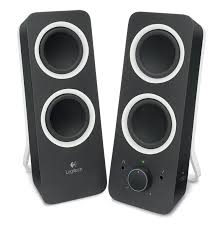
Speaker
CPU stands for ____________.
Central Program Unit
Control Processing Unit
Central Processing Unit
Control Program Unit
Every task in a computer follows an ______ cycle.
IPO
CPU
Memory
CU
IPO stands for ______________.
Internet Programs Output
Input Program Output
Intelligent Processing Output
Input Processing Output
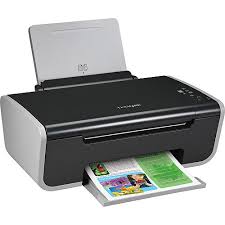
Is this device Input or Output?
Printer
Input
Output

Keyboard

Mouse
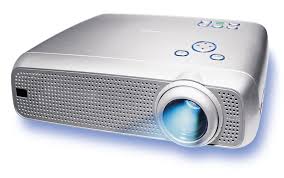
Projector


A microphone is a _____________ device.
input
output

What is the device shown in the picture?
Headphones
A game controller
A microphone
A barcode reader

What is the device shown in the picture?
A digital camera
A barcode reader
Earphones
A joystick
An input device used to operate another device from a distance, usually wirelessly, called?
Joystick
Touch screen
Remote control
Pointing device

