

wayground logo

Free Printable Worksheets

NEW

Font size

S
M
L
XL
Worksheets

Office Tools - Year 10

Total questions: 20

Worksheet time: 12mins
Name
Class
Date
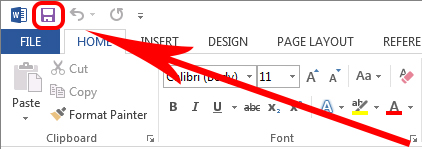
1.
a)
Save
b)
Undo
c)
Redo
d)
Underline
2.
Microsoft Word and Google Docs are examples of what?
a)
Word processors
b)
Spreadsheets
c)
Presentations
d)
Databases
3.
Google Docs or Microsoft Word allows to you to:
a)
create, edit, share and store forms for user input.
b)
create, edit, share and store webpages and sites
c)
create, edit, share and store spreadsheet documents
d)
create, edit, share and store word-processing documents.
4.
In Microsoft Word, what is a "menu"?
a)
a spreadsheet
b)

a list of options

c)

buttons on the screen

d)

list of food

5.
"Ctrl + x" is a shortcut that means to... 
a)
paste
b)
copy
c)
cut
6.
"Ctrl + v" is a shortcut that means to...
a)
cut
b)
copy
c)
paste
7.

Which tab would you need to click if you wanted to add a photograph to your document?

a)

Home

b)

Insert

c)

Format

d)

Page Layout

8.

What is the opposite of landscape?

a)

Horizontal

b)

Vertical

c)

Portrait

d)

Upright

9.

Saving your work regularly is not important in Google Docs.

a)

True

b)

False

10.

Letter "A" on this image is referring to a _______.

a)

Column

b)

Table

c)

Row

d)

Plank

11.
Which of the following commands appears in the Insert menu or tab?
a)
Table
b)
Undo/Redo
c)
Bold
d)
Line Spacing
12.
Left, Center, Right,and Justify are options for which tool located on the toolbar or ribbon?
a)
Zoom
b)
Line Spacing
c)
Bulleted Lists
d)
Text Alignment
13.
"Ctrl + c" is a shortcut that means to...
a)
copy
b)
paste
c)
cut
d)

crop

14.

Which tab would you need to click if you wanted to add a photograph to your document?

a)

Home

b)

Insert

c)

Format

d)

Page Layout

15.

Which tab would you click to change the page to landscape?

a)

Home

b)

Format

c)

View

d)

Page Layout

16.

What is the opposite of landscape?

a)

Horizontal

b)

Vertical

c)

Portrait

d)

Upright

17.

Calibri, Times New Roman, Comic Sans are all examples of...

a)

Header styles

b)

Font sizes

c)

Font Styles

18.

Which tab to you click to save ?

a)
Home
b)
Insert
c)
File
d)
View
19.

In PowerPoint, what do you call the effects used to introduce slides in a presentation?

a)

effects

b)

custom animations

c)

transitions

d)

present animations

20.

In Power Point, how can you stop a slide show ?

a)
press the right arrow 
b)
press escape
c)
press left arrow 
d)
press delete