
 Worksheets
V.P Editing Terms/V-Mix
Total questions: 14
Worksheet time: 14mins

What is the main use of the "T-Bar" on the X-Keys
Quickly switch to a camera
Hard cut to an image/video
Manually controlling the speed of a fade transition
Something we should never use while producing a video.

In V-Mix, the term preview means what and what color is associated with it?
What is live/ red
What is coming up next/ Green
What is live/ green
What is coming up next/ Red
In V-mix, the term program means what and what color is associated with it?
What is live/ green
What is coming up next / red
What is live/ red
What is coming up next/ green
In v-mix, a shortcut means...
Hard cut to the next scene
a quicker command to help your life easier
Something that automatically happens after a completion of a video
Have a button on the X-keys programmed to do a certain command

When your audio levels are blue....
Audio is on
You have zero audio
Audio is too high
Audio is capable but it is muted
When audio levels are green...
Audio is on
Audio is off
Audio is too loud
Audio is capable but muted
V-mix is...
The Hardware that switches from camera to camera and is programmable to use for overlays, short cuts and more.
mixing software, it allows users to switch inputs, mix audio, record outputs, and live stream cameras, videos files, audio, and more, in resolutions of up to 4K.
Orange keys on the X-Keys are for what...
Preview a camera
Put camera into program
A stinger
an overlay
The green keys on the x-keys do what function?
Display an Overlay
Put a camera into program
Put a camera into preview
Display a stinger
The Red Buttons on the X-Keys do what?
Put a camera into program
Put a camera into preview
Display an overlay
Execute a stinger
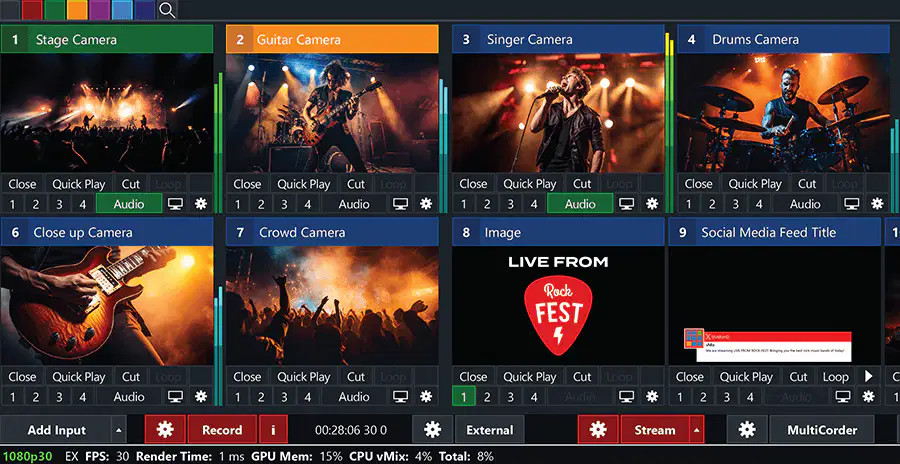
What are these called in V-Mix
Outputs
Programs
Inputs
Previews
a video layer incorporated on top of your original video
Program
Preview
Overlay
Input
is a combination of text and graphical elements placed in the lower area of the television screen to give the audience more information
Input
Program
Audio
Bottom 3rd
Transitions allow the use of an animation instead of a fade or cut when transition between Preview and Output.
Cut
Fade
Stinger
Input

