
NEW
Font size
 Worksheets
09 - BIM I - Word (2019)
Total questions: 33
Worksheet time: 17mins
A "reference document" is any ___ document organized so users can easily locate material and navigate through document.
multipage
single
A gutter margin ____ ___ ___ to the side, top, or inside margins of a document that you plan to bind (staple).
deducts extra space
adds extra space
A "caption" is ___ that identifies, titles, or explains an accompanying graphic, figure, or photo.
connection
caption
An ____ entry is an entry that lists terms and topics that are discussed in a document, along with pages they appear on.
index
icon
A ____ is a duplicate image of contents of the screen on your computer or active window.
supershot
screenshot
A ____ is a numbered label, such as "Figure 1", that you add to a figure, a table, equation, or object.
condition
caption
A ___ is code that serves as a placeholder for data that can change in a document.
filed
field
_____ space is space displayed in margins at top and bottom of pages and also space between pages.
white
black
____ is text that electronically refers reader to another part of the document, such as a heading, caption, or footnote.
Cross-resource
Cross-reference
"Go To" allows you to ____ to various different things from pages, lines, comments, and footnotes.
project
navigate

This is an example of ____.
insert caption
insert object

This is an example of _____.
Mark an Index Entry
Reference Entry

These are examples of ____.
sidebar
formatting marks
To "hide" formatting marks, click___button.
Show/Hide
Show/Show
A ___ is a text box that is positioned adjacent to body of document, running across top or bottom of a page or along right or left edge of page.
sidebox
sidebar

The following is an example of a ____.
Task bar
Navigation Pane
This is an example of a ____.
hyperlink
hiperlink
_____ pictures is a process applied to a graphics file to minimize its size in bytes without degrading image quality.
Constricting
Compressing
A ___ document is simply a document that contains links to one or more other documents, each of which is called a subdocument.
subdocument
master
A "master document" is a document that contains links to one or more documents, each is called a ____.
superdoucment
subdocument
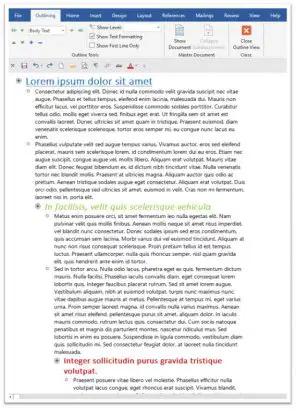
This is an example of _____.
outline view
read mode view
In order to show or hide ____, you need to press this key.
formatting marks
forwarding marks
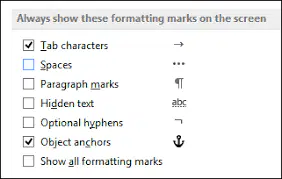
The picture is an example of _____.
formatting marks
forwarding marks
The following elements are common to reference documents.
Cover page, table of contents, table of fixtures, list of tables, and indez.
Cover page, table of contents, table of figures, list of tables, and index.
A ____ starts the "new" section on same page.
center text break
continuous section break
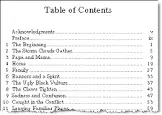
This is an example of ___.
Table of Contents
Glossary

This is an example of ____.
table of finances
table of figures

The picture is an example of an ____.
indent
index

Legal documents often include a _____.
"table of authorities"
"table of authors"
Which are examples of "odd" page numbers?
1, 3, 5
2, 4, 6
Which are examples of "even" page numbers?
2, 4, 6
1, 3, 5
______ allows you to see how your text will appear on paper..
Layout view
Draft view
Bookmark is a ____ location in a document that you name so that you can reference it later.
physical
mythical

