

wayground logo

Free Printable Worksheets

Font size

S
M
L
XL
Worksheets

Quiz Excel

Total questions: 40

Worksheet time: 22mins

Name
Class
Date
1.
What kind of software is Excel?
a)

Spreadsheet software

b)

Word Processing

c)

Drawing

2.
Excel is part of?
a)
Power Point
b)
Microsoft Office Suite
c)
Access
d)
Google
3.
What do you call the rectangles on a spreadsheet?
a)
Cell
b)
Button
c)
Sentence
4.

Excel allows you to work with?

a)

Sentences

b)

Paragraphs

c)

data

5.
Blank are vertical
a)
Columns
b)
Rows
6.
Blank are horizontal
a)
Rows
b)
Columns
7.

In Excel rows are labeled by

a)

Letters

b)

Numbers

8.
True or False: Spreadsheets can be used in everyday life by analyzing sports stats, grades, and creating a budget for expenses?
a)
false
b)
true
9.

In Excel, columns are labeled by?

a)

Numbers

b)

Letters

10.
How do you make a cell the active cell?
a)
Click the ACTIVE button
b)
Click INSERT CELL
c)
Click on the cell
d)
Cells are always active
11.
What is the name of this cell?
a)
B10
b)
5B
c)
B5
d)
A5
12.
Which tab in Excel has charts and tables?
a)
review
b)
home
c)
file
d)
insert
13.
A spreadsheet is a document that stores data in a grid of horizontal rows and vertical columns.
a)
Row
b)
Spreadsheet
c)
Minus
d)
Plus
14.
In Excel it means Add
a)
Plus sign
b)
sort 
c)
Forward slash 
d)
asterisk 
15.
2 or more cells that are selected to create a source to be used in a formula
a)
Range
b)
Max
c)
Filter
d)
Colums 
16.
In an excel formula, it means substract
a)
Add sign
b)
Minus sign
c)
Divide sign
d)
Average Sign 
17.
Horizontal line of cells
a)
Row
b)
Column
c)
Cell
d)
Spreadsheet
18.
A box that holds data
a)
Spreadsheet
b)
Cell
c)
Row
d)
Data
19.

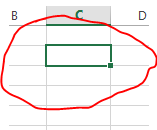
What is the "Active Cell" in Excel?

a)

The Bottom cell in a worksheet. It is indicated by a dark border onscreen.
b)

The current cell in a worksheet. It is indicated by a dark border onscreen.

c)

The top cell in a worksheet. It is indicated by a dark border onscreen.

d)

The past cell in a worksheet. It is indicated by a dark border onscreen.

20.
_____ are vertical. 
a)
Rows
b)
Columns
21.
________ are horizontal
a)
Rows
b)
Columns
22.
Excel allows you to
a)
read stories
b)
work with data
c)
invent ideas
23.
A3 is an example of a cell's address
a)
true
b)
false
24.
The cell in your worksheet that has been selected. It will have bolder gridlines around it.
a)
TRUE
b)
FALSE
25.
What do you call the blank boxes on a spreadsheet?
a)
cells
b)
info
c)
squares
d)
spots
26.
The feature to center text across several cells is called:
a)
Wrap Text
b)
Merge and Center
c)
Shrink to Fit
d)
Number Formatting
27.
Microsoft Excel is what type of software?
a)
Word Processing
b)
Spreadsheet
c)
Presentation
d)
Drawing
28.
Which of the following operators do you use to begin typing a formula?
a)
*
b)
+
c)
=
d)
/
29.
This icon is called the what?
a)
Arrow
b)
Fill handle
c)
Pointer
30.
What does this symbol do:
/
a)
Multiply
b)
Add
c)
Divide
d)
Minus
31.
In this diagram what does the selected area represent?
a)
a Row
b)
a Cell
c)
a Column
d)
a Chart
32.

What is "A1"?

a)

Cell address

b)

Cell letter

c)

Cell number

33.

What is the cell address of the red cell?

a)

A1

b)

1A

c)

C3

d)

3C

34.

What is the cell address of the red cell?

a)

F6

b)

6F

c)

E6

d)

F7

35.

What is the cell address of the red cell?

a)

D7

b)

7D

c)

E7

d)

D8

36.

What is the cell address of the red cell?

a)

G3

b)

3G

c)

H3

d)

G4

37.

What is the cell address of the red cell?

a)

B9

b)

9B

c)

C9

d)

B10

38.

The program that we use to create spreadsheets

a)

MS Word

b)

MS Paint

c)

MS Excel

39.

Untuk memberi bingkai pada sel, menu yang harus dipilih pada kotak dialog Format Cells adalah?

a)

Number

b)

Alignment

c)

Borders

d)

Button

40.

Shortcut menyimpan (SAVE) workbook pada excel adalah ….

a)

Ctrl+B

b)

Ctrl+P

c)

Ctrl+W

d)

Ctrl+S

