wayground logo

Free Printable Worksheets

Font size

S
M
L
XL
Worksheets

Microsoft Word Features

Total questions: 67

Worksheet time: 38mins

Name
Class
Date
1.
a)
Font size
b)
Increase Font
c)
Font color
d)
Font Name
2.
a)
Font name
b)
Font size
c)
Font color
d)
Save
3.
a)
Save
b)
Undo
c)
Redo
d)
Underline
4.
a)
Left align
b)
Font size
c)
Font name
d)
Save
5.
a)
Center align
b)
Font name
c)
Increase font
d)
Underline
6.

What tab would you click to insert an image?

a)

Home

b)

Insert

c)

Design

d)

Layout

7.

This icon lets you........

a)

add a picture

b)

take a picture

c)

send picture

d)

draw a picture

8.

which tool do you touch to CHANGE SIZE of your word ?

a)
b)
c)
9.

which tool do you touch to CHANGE COLOR of your word ?

a)
b)
c)
10.
In the red box what does the A with the red line under it mean?
a)
Bold
b)
Slant
c)
Font Style
d)
Font Color
11.
In the red box was does the black B mean? 
a)
Underline
b)
Font Style
c)
Bold 
d)
Text Size
12.
What does the little A in the red box mean? 
a)
Text Bigger
b)
Text Smaller 
c)
Underline
d)
Color
13.
What does the bigger A mean in the red box?
a)
Bigger Text
b)
Smaller Text
c)
Font Style
d)
Underline
14.
Which tab is clip art under? 
a)
Page Layout
b)
Insert 
c)
View
d)
Review
15.

Which one do we use click to be able to move your pictures?

a)

Copy

b)

Text Wrapping

c)

Hyperlink

d)

Change picture

16.
On your mouse which button gives you options? Left or Right?
Like Copying, Pasting
a)
Left 
b)
Right
17.
Which tab can you find shapes under? 
a)
Home
b)
View
c)
Insert
d)
Page Layout 
18.
Which button on your mouse let's you select/click things? Left or Right
a)
Right
b)
Left
19.
What does the box with the red arrow pointing at means? 
a)
Text Style
b)
Text Color
c)
Bold
d)
Size
20.
What does the tool in the red box means? 
a)
Highlighting 
b)
Text Size 
c)
Underline 
d)
Bold
21.
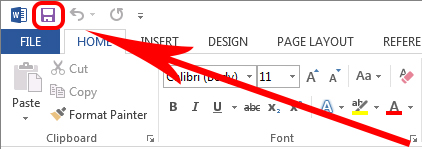
What does the small purple square mean in the upper left corner next to the circle?
a)
Not save
b)
Undo
c)
Save your work
d)
Text Style
22.
After we click on text wrapping what is our next step?
a)
Don't do anything
b)
Click in front of text
c)
Click sideways of the text
d)
Click behind of text
23.

MICROSOFT WORD IS A (a)   SOFTWARE

24.

THE WORD APPLICATION OPENS A BLANK DOCUMENT WITH THE TEMPORARY NAME (a)  

25.

THE (a)   CONTAINS COMMANDS THAT ARE ARRANGED INTO DIFFERENT GROUPS.

26.

__________ OPTION IS USED TO CREATE A NEW BLANK DOCUMENT.

a)

NEW

b)

SAVE

c)

CLOSE

27.

HOW MANY SCROLL BARS ARE THERE IN MS WORD?

a)

1

b)

4

c)

2

28.

THE SHORTCUT KEY TO SAVE A DOCUMENT IS _____

a)

CTRL+S

b)

CTRL+V

c)

CTRL+O

29.

THE SHORTCUT KEY TO PRINT A DOCUMENT IS

(a)  

30.
Google Docs or Microsoft Word allows to you to:
a)
create, edit, share and store forms for user input.
b)
create, edit, share and store webpages and sites
c)
create, edit, share and store spreadsheet documents
d)
create, edit, share and store word-processing documents.
31.
Which of the following commands appears in the Insert menu or tab?
a)
Table
b)
Undo/Redo
c)
Bold
d)
Line Spacing
32.
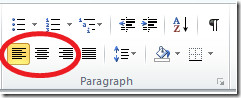
Left, Center, Right,and Justify are options for which tool located on the toolbar or ribbon?
a)
Zoom
b)
Line Spacing
c)
Bulleted Lists
d)
Text Alignment
33.
In Microsoft Word, what do you use to show a spreadsheet of data?
a)
Table
b)
menu
c)
toolbar
d)
copy
34.
In Microsoft Word, what is a "menu"?
a)
a spreadsheet
b)
a list of options available to a user
c)
row of buttons on a display screen with a variety of functions
35.
"Ctrl + c" is a shortcut that means to...
a)
copy
b)
paste
c)
cut
36.
"Ctrl + x" is a shortcut that means to... 
a)
paste
b)
copy
c)
cut
37.
"Ctrl + v" is a shortcut that means to...
a)
cut
b)
copy
c)
paste
38.

Which tab would you need to click if you wanted to add a photograph to your document?

a)

Home

b)

Insert

c)

Format

d)

Page Layout

39.

Which tab would you click to change the page to landscape?

a)

Home

b)

Format

c)

View

d)

Page Layout

40.

What is the opposite of landscape?

a)

Horizontal

b)

Vertical

c)

Portrait

d)

Upright

41.

Which of these buttons will let you change CAPITALS to lower case?

a)
b)
c)
d)
42.

Saving your work regularly is not really needed these days.

a)

True

b)

False

43.

Letter A on this Table image is referring to a...

a)

Column

b)

Table

44.
Columns run horizontally in tables, and rows run from left to right.
a)
True
b)
False
45.
Q12. Which tab to you click to save ?
a)
Home
b)
Insert
c)
File
d)
View
46.

……………… is when text is set to follow the outline of an image.

a)

Text style

b)

Text wrapping

c)

Header

d)

Page border

47.

To remove the parts that you do not want from an image.

a)

Cropping an image

b)

Resizing an image

c)

Text wrapping

d)

Page margin

48.

To change the size of an image

a)

Cropping an image

b)

Resizing an image

c)

Text wrapping

d)

Page margin

49.

Footer is the section at the top of a document.

a)

True

b)

False

50.

When added, a header and a footer will be displayed on every page of your document

a)

True

b)

False

51.

They are used to create a news article or feature.

a)

Page border

b)

Columns

c)

Page orientation

d)

Line spacing

52.

It is the amount of space that is set between each line of text within a document or a specified section or text.

a)

line spacing

b)

Page border

c)

Columns

d)

Header

53.

A line that can be placed around an image or a block of text.

a)

line spacing

b)

Page border

c)

Page margins

d)

Header

54.

You can add header and footer to your document, from the ………..Tab.

a)

Home

b)

Insert

c)

Design

d)

File

55.

We can change the page margins from the……………….tab

a)

Home

b)

Insert

c)

Design

d)

Layout

56.

What is circled in Red?

a)

TABS

b)

GROUPS

c)

Backstage View

d)

Contextual Tab

57.

What is this a picture of?

a)

Group

b)

Chart

c)

Table

d)

SmartArt

58.

What is this a picture of?

a)

SmartArt

b)

Chart

c)

Table

d)

WordArt

59.

Add some artistic flair to your document using this text box.

a)

WordArt

b)

Styles

c)

Table

d)

Chart

60.

This tab allows you to change the document theme, document formatting, and document color. It also allows you to add a watermark and page border.

a)

File Tab

b)

Home Tab

c)

Insert Tab

d)

Design Tab

61.

This tab allows you to change the margins, orientation, and size of the document.

a)

Home Tab

b)

View Tab

c)

Layout Tab

d)

Design Tab

62.

These help you to repeat content at the top of every page. They're useful for showcasing information, like title, author, and page number.

a)

Header

b)

Footer

c)

WordArt

d)

Textbox

63.

These help you repeat content at the bottom of every page. They're useful for showcasing information, like title, author, and page number.

a)

Page Break

b)

Footer

c)

Header

d)

Table

64.

The steps to insert table

a)
b)
c)
65.

In a Microsoft Word, a file is saved with an extension

a)

.doc

b)

.docx

c)

.pptx

d)

.jpg

66.

___ option places the selected text slightly above the baseline

a)

Superscript

b)

Subscript

c)

Manuscript

d)

playscript

67.

The shortcut key for Find is

a)

Ctrl+F

b)

Ctrl+H

c)

Ctrl+S