
 Worksheets
ICT SECOND TERM TEST CHALLENGE
Total questions: 101
Worksheet time: 55mins
I can share my name and address online?
YES I can share
NO It's not safe
Posting pictures of my family and I on the internet is safe?
No
Yes
Is it safe to share password and phone number online?
YES
NO
Making new friends online without parent's permission is safe?
YES
NO
Opening Email from someone you don’t know is?
Safe
Not safe
Asking grown up to help before playing games online?
YES
NO
Sharing your password with another person is safe
YES
NO
Spending too much time online is safe?
YES
NO
Sharing your home address with a stranger online is safe
Yes
No
What is connecting a computer to the Internet called?
Going online
Surfing the web
Browsing
Logged in
Choose 1 option which is NOT an example of a website.
Online blog
Online library
Social Media
Online news platform
Short form of WWW is:
World with web
World wide web
World wide watch
World what web
All of these are social media websites except one.
Yahoo
Which of these is not considered a type of Internet connection?
Wifi
Server
Cables
Mobile
Which of these is not an email service?
Gmail
AOL
Hotmail
Which of the following is NOT a way computer viruses can spread?
Emails
Pop up ads
Website links
Secure networks
Which of these is not a search engine?
Yahoo
Safari
Chrome
The company that provides you access to the internet is called your:
CPU
URL
ISP
IBM
Every Computer has a unique IP address on the network
No
Yes
Maybe
What is IP
What information should you share online?
Phone number
Address
School
None of the above
If I meet someone my age on the internet it is ok to give them my address and phone number
True
False
Telling a stranger your name and address is safe
True
False
A) Name
B) Address
C) Phone Number
D) None of the above
Which one of the following is NOT considered personal information?
Your school name
Your Pets name
Your name
Your parents name

Which of the following is NOT and example of personal information?
Your name, address and phone number
Your birthdate
Name of your school
Your favorite color

Who should you talk to if you feel uncomfortable about something on the internet?
My dog
My parents
A friend I love most

Share pictures to strangers on internet
Yes, like to share my pictures
No, I will not share
Sometimes if I wish

Is it okay to share password with your?
Parents
Teachers
My friends

Is it safe to download without permission?
Yes, because I know to download
No, it may contain VIRUS

I am online and I meet someone my age in a chat room. It is OK to give him or her my address or phone number so we can get together.
True
False

Which of the following should you not give out online?
Social Security Number
Full Name
Address
All Of The Above

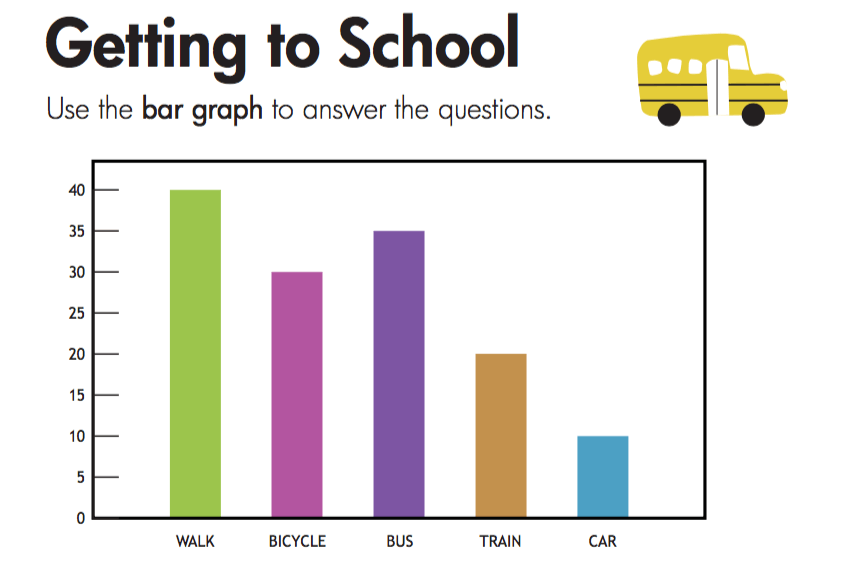




Which two animals are same in number?
Lions and ducks
whales and ducks
lion and tortoise

How many tortoises are there in this picture?
3
2
1
5

How many colours are there in this flag?
3
4
2

This pic is showing junk food
false
true

number of students in class 1_______
38
31
49
40
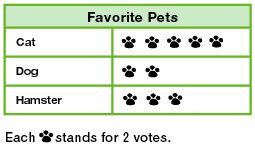
How many total votes were collected?
5
10
15
20

How many cupcake on Wednesday?
4
24
8
42

Which pet got the most votes?
Dog
Cat
Fish

Which fruit did most children choose?
Apple
Banana
Grapes

Tick one box below that shows all of the animals Dexter saw


Which tally chart shows the right number of each snack?


1. Step 1 Starting a computer
Turn on the main power switch
Switch on the UPS
Switch on the CPU button
Switch on the monitor
2. Step 2 Starting a computer
Turn on the main power switch
Switch on the UPS
Switch on the CPU button
Switch on the monitor
3. Step 3 Starting a computer
Turn on the main power switch
Switch on the UPS
Switch on the CPU button
Switch on the monitor
4. Step 4 Starting a computer
Turn on the main power switch
Switch on the UPS
Switch on the CPU button
Switch on the monitor
5. Step 1 Shutting down a computer
Click on the start button on the desktop
Click on the shut down option
Switch of the monitor
Switch of the UPS
Switch of the main power switch
6. Step 2 Shutting down a computer
Click on the start button on the desktop
Click on the shut down option
Switch of the monitor
Switch of the UPS
Switch off the main power button
7. Step 3 Shutting down a computer
Click on the start button on the desktop
Click the shut down option
Switch of the monitor
Switch of the UPS
Switch of there son er switch
8. Step 4 Shutting down the computer
Click on the start button on the desktop
Click on the shut down option
Switch of the monitor
Switch of the UPS
Switch of the main power button
9. Step 5 Shutting down a computer
Click on the start button on the desktop
Click on the shut down option
Switch on the monitor
Switch of the UPS
Switch of the main power switch
10. The start button is present on the _______________
Notification area
UPS
Icons
Taskbar
11. The ___________________ of the taskbar displays the clock and status of programs running on the computer
Notification area
UPS
Icons
Taskbar
12. Before switching off the main power button, you should switch of the ________________
Notification area
UPS
Icons
Taskbar
13. Small pictures on the desktop are called ______________
Notification area
UPS
Icons
Taskbar
14. The option to shut down a computer is present in the notification area
True
False
15. You switch on the monitor before switching on the UPS when starting a computer
True
False
16. Icons are shown on the desktop
True
False
17. The taskbar displays the names of all open windows as buttons
True
False
18. On the Taskbar you can add icons of frequently used programs
True
False
19. On the taskbar you can add icons or frequently used programs
True
False
20. There are _____________ steps to starting a computer and ________________ steps to shutting down a computer
1
2
3
4
5
Once the computer is on, you will see the screen. It is called _________________ .
icon
start button
desktop
window
When you start a computer, it is called _________
Booting
Shut down
Put on
Put off
When you turn off a computer, it is called _________
Booting
Shut down
Put on
Put off
A __________ keeps unwanted users out of your computer.
Padlock
Shut down
Password
Put off
The first thing you do before shutting down your computer is to
Save all your work and close all your programs
Press the Power button
Close the lid of your computer
It is important to shut down your computer system the proper way
True
False
Which is the last step in booting a computer system.
Power on the computer
Make sure the cables are plugged
Close the lid of your computer
Turn on the socket
When the computer starts , it shows a screen . It is called ___________
Desktop
Icons
The computer takes some time before you start working on it. This is called __________
folder
booting
You find many small pictures on the desktop. These are called ______________
icons
booting
The Start button is present at the _____________
bottom left corner
bottom right corner
The long horizontal bar next to the start button is called the ________________________
icons
taskbar
Press ctrl + ________ to make the text bold.
I
B
Press ctrl + ________ to italicize the text .
I
B
Press ctrl + ________ to underline the text .
I
U
___________ is a collection of files.
folder
taskbar
__________ is a word - processing program .
WordPad
taskbar
The process of starting up a computer to the desktop is called booting
True
False
The part where the computer loads up to after booting is called
windows
Desktop
Browser
None of the above
Warm booting means restarting the computer.
True
False
There are _________ types booting?
3
2
5
4
What do you do to start the boot process of a computer?
click the windows button
Push the power button
Press the Space bar
none of the above
on MS word a computer handwriting is called a ____________
Palette
font
ribbon
None of the above
Which of the following would you use to make a text darker than others in MS word
Italics
bold
underline
None of the above
Ojonimi is trying to make a text bold, which of the following symbols should he look out for
B
I
U
V
Erioluwa would use the ____ button to underline his text
B
I
U
None of the above
10. Microsoft Word is a program known as a word _____________
separator
manipulator
processor
Inspector

