
Font size
 Worksheets
How to Customize your Presentation Settings
Total questions: 16
Worksheet time: 15mins
What is it called to push one slide to the other with animation?
Animation
Transition
Insert
You click the (a) to give your presentation some cool pictures!
What do you click to see what work you've done in Power Point?
Review
View
Insert
Home
Design
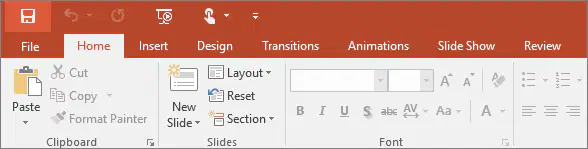
What is the button that allows you to restart your work?
Reset
File
Paste
Slide Show
Layout
Adding new slides to a presentation is a key feature for things like Power Point. How do you add more slides in Power Point?
Insert
New file
New Presentation
New slide
What do you go to when you want to save a presentation?
Design
Help
File
Insert
How do you change the background of a theme?
Themes are locked in and cannot be changed.
Ask your network administrator.
Delete the placeholders on the slide.
Click "format background" on the Customize command of the Design tab.

Which two buttons can you choose to Open a document that you have Saved?
1
2
3
4
5
In full screen mode, how can you get access to the toolbars and panels?
Pan to the left and right, respectively.
Use the F toggle.
Hover over the left and right sides of the screen, respectively.
Zoom out.
A user should be sure of the purpose and _____ for the presentation before customizing its composition.
Goals
Mission
Sponsors
Audience
How to select different presentations in power point?
Choose the File icon
Click the Front side
Hit F3
Click the scroll wheel on your mouse
Although you do not have to make eye contact with anyone in particular when presenting, you must (a) .
The PowerPoint is only an (a) of your presentation.
Which button do you choose to Undo the last step you took?
1
2
3
4
5
What's the full name of the program we use?
Office 365
Office
Word
Fusion 180
What does it mean when the Undo and/or Redo buttons are light grey instead of dark grey?
There is nothing to Undo/Redo
You chose too many tools
You already Saved your work
You need to make a new file

