
NEW
Font size
 Worksheets
ACA vocabulary Final
Total questions: 44
Worksheet time: 22mins
a scale or full-size model of a design or device, used for teaching, demonstration, design evaluation
comp mock up
comp
design
a type of intellectual property that protects original works of authorship as soon as an author fixes the work in a tangible form of expression
comp mock up
copyright
design analytics
a thing able to be provided, especially as a product of a development process
deliverable
copyright
comps
a legal doctrine that promotes freedom of expression by permitting the unlicensed use of copyright-protected works in certain circumstances
deliverable
copyright
Fair Use Doctrine
a work or invention that is the result of creativity, such as a manuscript or a design, to which one has rights and for which one may apply for a patent, copyright, trademark, etc.
Intellectual Property
copyright
Fair Use Doctrine
a detailed outline of all aspects of a project, including all related activities, resources, timelines, and deliverables,
Project Scope
copyright
Fair Use Doctrine
to how a project's requirements tend to increase over time.
Project Scope
Scope Creep
Fair Use Doctrine
a particular group at which a film, book, advertising campaign, etc., is aimed.
Project Scope
Scope Creep
Target Audience
the ratio of the width to the height of an image or screen
Project Scope
Aspect Ratio
Target Audience
a representation in which each item corresponds to one or more bits of information, especially the information used to control the display of a computer screen.
Project Scope
Aspect Ratio
Bitmap
an unprocessed photograph captured with a digital camera
Camera Raw
Aspect Ratio
Bitmap
color model (also known as process color, or four color) is a subtractive color model, based on the CMY color model, used in color printing,
Camera Raw
CMYK
Bitmap
To make a digital audio signal smaller by lowering its sampling rate or sample size (bits per sample).
Camera Raw
Downsampled
Bitmap
Dots per Inch, referring to the number of ink droplets a printer will produce per inch while printing an image.
DPI
Downsampled
Bitmap
the open, observable area a person can see through their eyes or via an optical device, such as a camera.
DPI
Downsampled
Field of View (FOV)
the part of a view that is nearest to the observer, especially in a picture or photograph
DPI
Foreground
Field of View (FOV)
the complete range or scope of something
Gamut
Foreground
Field of View (FOV)
is simply the range of the lightest tones to the darkest tones within a photo. Put another way — it's a measure of the light intensities from the highlights to the shadows.
Gamut
High Density Range
Field of View (FOV)
is simply the range of the lightest tones to the darkest tones within a photo. Put another way — it's a measure of the light intensities from the highlights to the shadows.
Gamut
High Density Range
Field of View (FOV)
how the elements of a photo are arranged.
Image composition
High Density Range
Field of View (FOV)
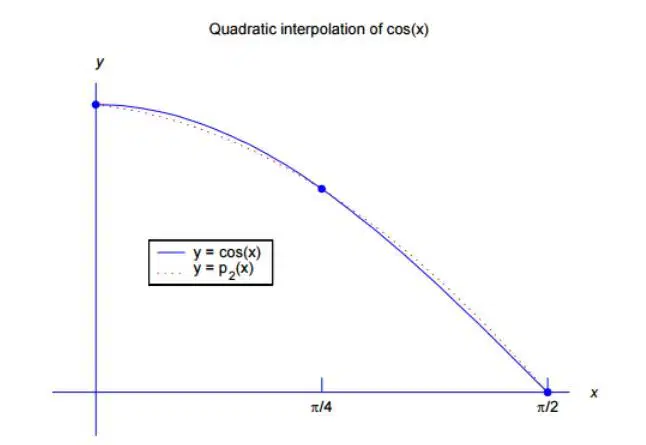
a process of determining the unknown values that lie in between the known data points.
Interpolation
High Density Range
Field of View (FOV)
acts as the skeletal support to build an application
Image composition
Application Frame
Field of View (FOV)
an effect you can add to a layer to change how the colors blend with colors on lower layers.
Image composition
Application Frame
Blending Mode
a piece of photographic paper featuring a set of thumbnail images
Image composition
Application Frame
Contact Sheet
taking the surroundings into consideration when making planning or infrastructure decisions.
Context sensitive
Application Frame
Contact Sheet
you're changing the original image—once you exceed the History panel's limit (Changing How Far Back You Can Go) and save your document, those changes are (gulp) permanent. Nondestructive editing means you're not changing the original file and you can go back to it at any time.
Context sensitive
Destructive Editing
Contact Sheet
a nondestructive way to hide parts of an image or layer without erasing them.
Context sensitive
Destructive Editing
Layer Mask
a method of converting colors from one ICC profile to another.
Rendering Intent
Destructive Editing
Layer Mask
adds management control to Internet servers, firewalls and proxy servers
Rendering Intent
Smart Filter
Layer Mask
uses a monitor to preview the outcome of the printout before printed
Rendering Intent
Smart Filter
Soft proofing
a path where the object clips out the contents of the layer. We can also use the Adobe Photoshop properties panel to refine the mask with the same options as the layer (pixel) mask.
Rendering Intent
Smart Filter
Vector Mask
separate layers of color information
Anti-aliasing
Smart Filter
Channels
small "desktop" applications in Adobe Photoshop®, that automatically process files dragged onto their icon
Droplets
Smart Filter
Channels
a bright band of pixels outlining a high contrast edge.
Droplets
Edge halo
Channels
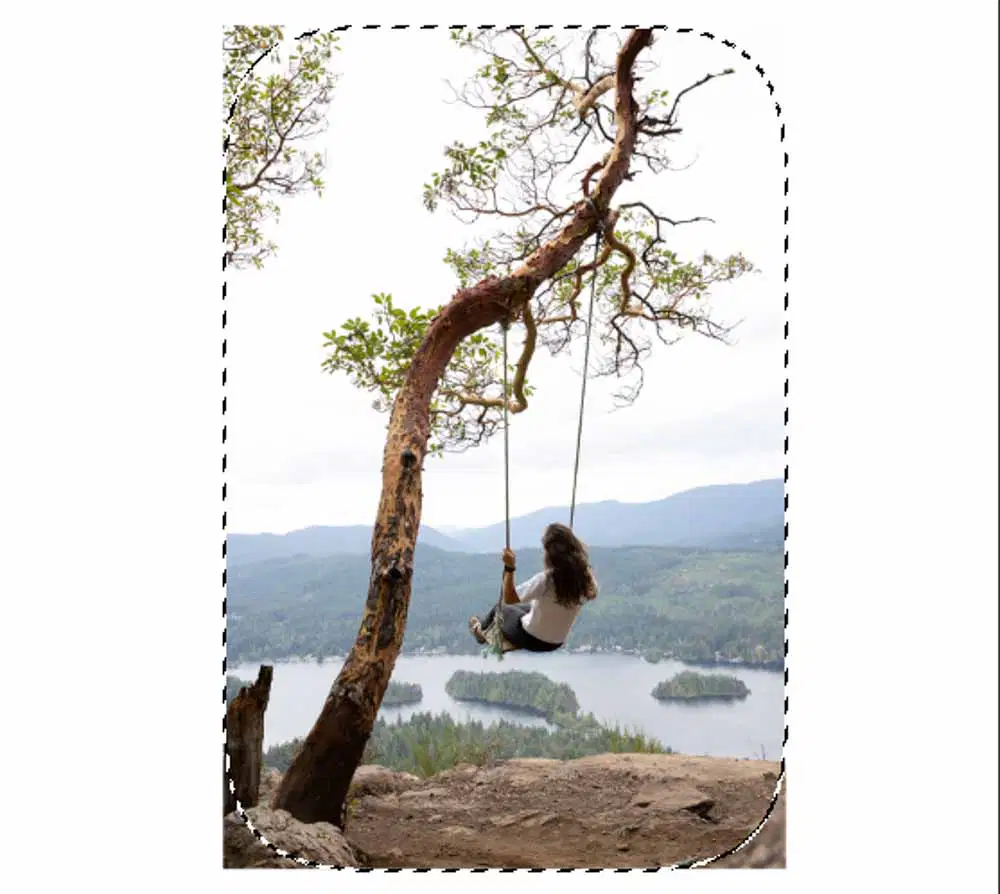
a way to soften the hard edges of an object in your image
Droplets
Edge halo
feather
an animation technique often found in selection tools of computer graphics programs. It helps the user to distinguish the selection border from the image background by animating the border. The border is a dotted or dashed line where the dashes seem to move slowly sideways and up and down.
marching ants
Edge halo
feather
selects shapes such as hair, branches, or any part of an image with edges, especially complex ones. It allows you to precisely select these areas of the picture you want to crop out, such as your friend or family member.
Edge refine
Edge halo
feather
a recipe for how to work out an answer from a problem, using very simple steps.
Edge refine
Edge halo
Algorithm
uses adjacent pixels of different colors to give the appearance of a third color. For example, a red color and a yellow color may dither in a mosaic pattern to produce the illusion of an orange color that the 8‑bit color panel doesn't contain. Dithering simulates continuous tones.
Edge refine
Edge halo
Dithering
Photoshop Elements builds a color lookup table (CLUT), which stores and indexes the colors in the image.
Edge refine
Edge halo
Indexing
a fancy way of saying what the length of one side of a pixel is in relation to the length of the other
Pixel Aspect ratio
Edge halo
Indexing
The number of pixels that make up an image as well as how many of those pixels are displayed per inch, both determine the quality of an image.
Pixel Aspect ratio
Resolution dependent
Indexing
those parts that won't be cropped out regardless of the size or shape of the screen on which they are read.
Pixel Aspect ratio
Resolution dependent
Safe Zones

