
 Worksheets
Character Animation in After Effects
Total questions: 17
Worksheet time: 26mins
To start doing motion graphics in Adobe After Effects, what is the first basic technique needed to do?
Export a File
Determine the duration timeline
Choosing the right Frame Per Second (FPS)
Create a New Composition
What method is used when rendering out a composition?
File > Add to Adobe Media Encoder Que
File > Render > Composition
Composition > Add to Adobe Media Encoder Que
How do you edit the time of your composition?
Composition Settings > Duration
File > Composition Settings > Duration
Composition > Composition Settings > Duration

In After Effects you can add keyframes to the layer by opening the properties stack and clicking on the stopwatch Icon.
True
False
In your composition settings you can change the following.
Name, Width, height, Frame Rate
Width, height, Frame Rate, Duration
Name, Width, height, Frame Rate, Duration
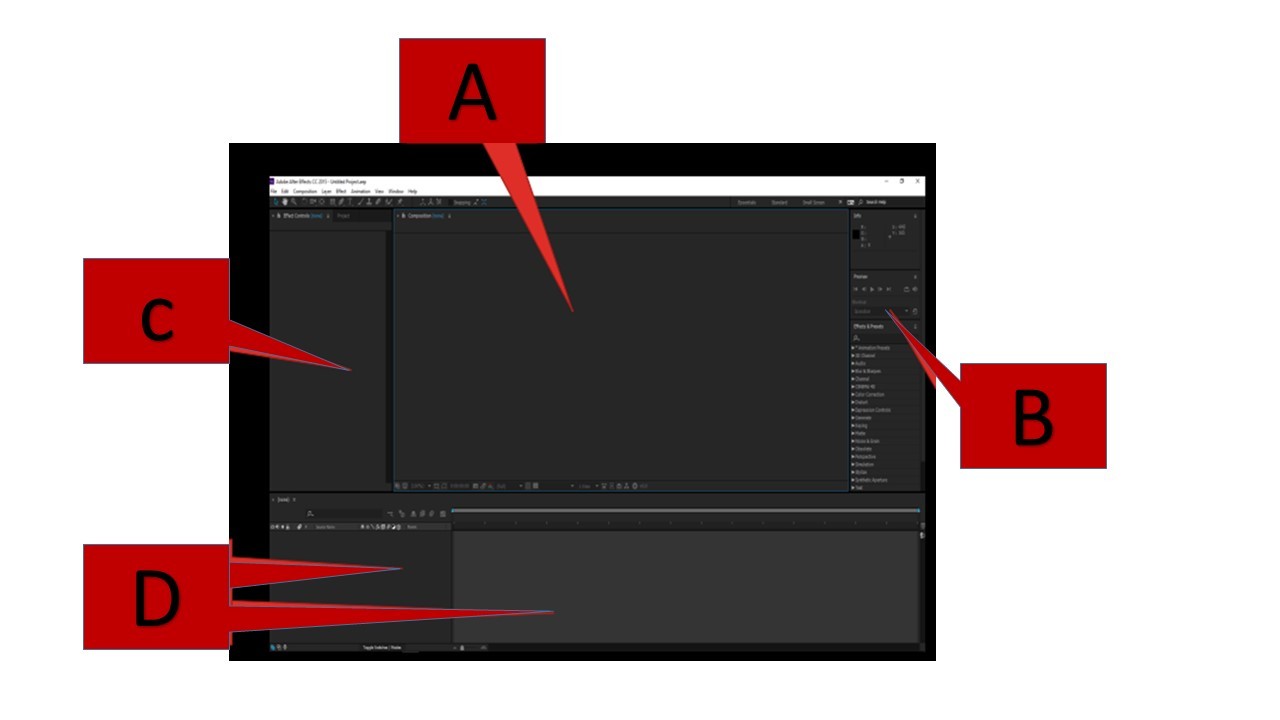
Which one is Composition Window?
A is Composition Window
B is Composition Window
C is Composition Window
D is Composition Window
What do you press to start an animation playing in After Effects?
Space Bar
Ctrl
Click on the Green Play button on the timeline
F2
How can you delete a single keyframe?
By changing the anchor point property
Edit-Delete
Select it and press the Delete key
Once created keyframes cannot be deleted
What needs to be done to create the first keyframe when animating a property or text or a shape?
Select the object
Set the Playhead time to 0:00:00:00
Click on the stopwatch in front of the Property
Click Insert-Keyframe
This tool is used to add animated movements to a static image. The user can manipulate the animation controls in After Effects using pins.
Animation Tool
Puppet Pin Tool
Rotation Tool
Blending Tool
This is how animators get things from one point to another. This is done digitally in between each frame now instead of drawing each frame separately.
Adjusting
Moving
Tweening
Changing
This term comes from the rig being the skeleton structure built to identify the virtual bones that allow the model to move. An easy way to envision it is like creating a virtual puppet.
Tweening
Working
Fitting
Rigging
This is the process of setting up multiple layers so that the movement of one layer follows the movement of another layer. (Like the Parts of a character)-There is a distinct order to this.
Parenting
Keying
Adjusting
Lining
These are the 5 type of Puppet Pin Tools:
Puppet Position Pin Tool
Stiff Position Pin Tool
Puppet Warp Pin Tool
Puppet Advanced Pin Tool
Puppet Overlap Pin Tool
Puppet Position Pin Tool
Starch Position Pin Tool
Puppet Slant Pin Tool
Puppet Perfect Pin Tool
Puppeteer Pin Tool
Puppet Position Pin Tool
Starch Position Pin Tool
Puppet Bend pin Tool
Puppet Advanced Pin Tool
Puppet Overlap Pin Tool
Puppet Position Pin Tool
Still Position Pin Tool
Puppet Arch Pin Tool
Puppet Super Pin Tool
Puppet Overlap Pin Tool
What type of Puppet Pin Tool helps to keep parts of the object you are animating still?
Puppet Stiff Pin Tool
Puppet Starch Pin Tool
Puppet Bend Pin Tool
Puppet Overlap Pin Tool

If a 3D Cube is created in Adobe After Effects, under which graphical element it falls in?
Space
Shape
Line
Form

This is the...
Workspace Bar
Tools Panel
Time Graph

