
 Worksheets
CADD Exam
Total questions: 42
Worksheet time: 41mins
Which AutoCAD command is used to create a closed polyline?
PL
PLINE
CIRCLE
ARC
What is the AutoCAD command used to rotate an object around its own axis?
(a)
What is the AutoCAD command used to rotate an object around its own axis?
(a)
Which AutoCAD command is used to create an arc with a specific radius and angle?
ELLIPSE
CIRCLE
ARC
SPLINE
Which AutoCAD command is used to create a block or group of objects that can be reused?
(a)
What is the AutoCAD command used to measure the distance between two points?
DLI
MEASURE
LINE
LENGTHEN
What is the AutoCAD command used to trim an object to a specific boundary?
(a)
Which AutoCAD command is used to create a hatch pattern inside a closed object?
(a)
What is the AutoCAD command used to change the properties of an object, such as its color or line weight?
PROPERTIES
MATCHPROP
LAYER
COLOR
Which AutoCAD command is used to create a rectangular viewport in a layout?
(a)
Which AutoCAD command is used to create a single point object?
POINT
ARC
CIRCLE
PLOT
What is the AutoCAD command used to create a new layer and set its properties?
L
LAYER
LAYERSTATE
MATCHPROP
What is the AutoCAD command used to create a dimension that measures the distance between two points?
DIMLINEAR
DIMRADIUS
DIMDIAMETER
DIMANGULAR
Which AutoCAD command is used to create a new layout in a drawing?
PLOT
PAGESETUP
LAYOUT
TAB
What is the AutoCAD command used to create a new text style with a specific font and height?
DIMSTYLE
MTEXT
TEXTSTYLE
STYLE
What is a dimstyle in AutoCAD?
A way to save and reuse dimension settings
A command to create a new dimension style from scratch
A command to create a new dimension style from scratch
A tool for customizing the appearance of individual dimensions
What does the AutoCAD command OFFSET do?
Draws a circle of a specified radius
Creates a copy of an object at a specified distance and direction
Draws a line segment between two points
None of the above
What does the AutoCAD command MIRROR do?
Creates a copy of an object at a specified distance and direction
Draws a line segment between two points
Reflects an object about a specified line or plane
None of the above
What does the AutoCAD command TRIM do?
Removes parts of one or more objects that intersect with a selection set
Draws a line segment between two points
Draws a circle of a specified radius
None of the above
What does the AutoCAD command FILLET do?
Rounds the corners of two intersecting lines or arcs
Draws a line segment between two points
Draws a circle of a specified radius
None of the above
What does the AutoCAD command EXPLODE do?
Draws a line segment between two points
Breaks down a complex object into its component parts
Draws a circle of a specified radius
None of the above
What does the AutoCAD command HATCH do?
Fills an enclosed area with a pattern or gradient
Draws a line segment between two points
Draws a circle of a specified radius
None of the above
What does the AutoCAD command ALIGN do?
Moves, rotates, or scales objects to match a specified alignment
Draws a line segment between two points
Draws a circle of a specified radius
None of the above
What does the AutoCAD command LAYER do?
Draws a line segment between two points
Controls the visibility and properties of objects in a drawing
Draws a circle of a specified radius
None of the above
What does the AutoCAD command PLINE do?
Draws a series of connected line segments
Draws a line segment between two points
Draws a circle of a specified radius
None of the above
What does the AutoCAD command CHAMFER do?
Cuts the corners off of two intersecting lines or arcs
Draws a line segment between two points
Draws a circle of a specified radius
None of the above
What is the difference between the AutoCAD commands LINE and PLINE?
The LINE command is used for 2D drawings, while the PLINE command is used for 3D drawings.
The LINE command creates individual line segments, while the PLINE command creates a continuous series of connected line segments.
The LINE command is used for creating straight lines, while the PLINE command is used for creating curved lines.
The LINE command is used for creating lines of a specific length and angle, while the PLINE command is used for creating lines of a specific shape.
What is the purpose of the AutoCAD command HATCH?
To create a pattern of lines or symbols within a specified boundary.
To create a 3D model from a set of 2D profiles.
To adjust the properties of selected objects, such as color or linetype.
To create a block or group of selected objects.
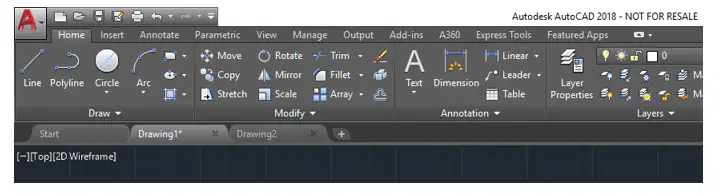
It is a user interface element that that displays a series of tabs, each of which contains a group of related tools and commands. It is designed to make it easier and more efficient for users to find and access the commands they need.
(a)
Size of A3 Paper.
420mm x 297mm
8.5"x11"
420 m x 297 m
420 inches x 297 inches
Which AutoCAD command is used to create a new object that is tangent to two existing objects?
(a)
Which AutoCAD command is used to create a new layout in a drawing?
NEWLAYOUT
LAYOUT
ADDLAYOUT
CREATETAB
Short cut keys of M.
(a)
Short cut keys of E.
(a)
Short cut keys of X.
(a)
Short cut keys of B.
(a)
Short cut keys of L.
(a)
Short cut keys of O.
(a)
Short cut keys of H.
(a)
Short cut keys of E.
(a)
Short cut keys of D.
(a)
Short cut keys of F.
(a)

