
Font size
 Worksheets
Excel Quiz
Total questions: 25
Worksheet time: 13mins
The intersection of a row and a column is called a ________.
worksheet
chart
sum
cell
A group of cells is called a ________.
cell range
multicell
cell cluster
chart
Where is the fill handle located?
at the beginning of any formula or function
on the right side of the Home tab on the Ribbon
in the bottom-right corner of the selected cell
in Backstage view
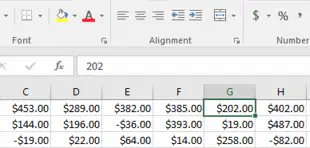
In this image, why does the value in cell G1 look slightly different from the value in the formula bar?
It’s using the Currency number format.
It’s using conditional formatting.
It’s using an absolute cell reference.
It’s using a formula.
You can click the tabs at the bottom of a workbook to switch between ________.
worksheets
permissions
number formats
formulas
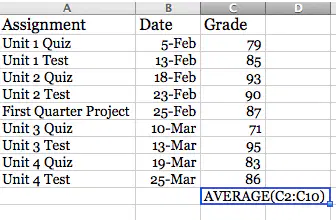
Let’s say you’re trying to find your average grade. What’s wrong with the formula shown in the image?
There is nothing wrong with the formula.
It should have an equals sign (=) at the beginning.
It should use quotation marks instead of parentheses.
It should use the COUNT function instead.
True or False: You can view a formula by double-clicking the cell that contains the formula.
True
False
Which of the following is an absolute cell reference?
A2
$A$2
#A2
A:2
Which of the formulas below are valid? Select all that apply.
A3+100
=R2*D2
=5B+6B
=F2+F3+F4-53
What value would Excel return for this formula? =(82-32)/5+8*2
26
91.6
7.69
36

What feature did we use to quickly apply the formatting shown in this image?
What-if analysis
PivotTables
Conditional formatting
Data scenario formatting
What is the main advantage of selecting the Mark as Final option?
It prevents other users from viewing the workbook.
It prevents other users from editing the workbook.
It ensures that the workbook is free of errors.
It discourages other users from editing the workbook.
The four areas in this image are used to create a ________.
complex formula
PivotTable
subtotal
custom filter
What is a workbook in Excel?
a type of chart
a file that stores one or more worksheets
a sheet of paper with printed data on it
a collection of files in a folder
How can you select multiple cells at once in Excel?
Click and drag over the cells you want to select.
Hold down the Shift key while clicking the cells you want to select.
Hold down the Ctrl key while clicking the cells you want to select.
all of these ways
How do you resize a column or row in Excel?
Double-click the border of the column or row.
Use the Format Cells dialog box.
Click and drag the border of the column or row.
none of these ways
How do you merge two or more cells in Excel?
Right-click the cells you want to merge, then select "Merge Cells" from the context menu.
Use the Format Cells dialog box.
none of these ways
Select the cells you want to merge, then click the "Merge & Center" button on the Home tab.
What number format(s) can you use in Excel?
decimal
percentage
fraction
all of these formats
How do you apply a cell style to a range of cells in Excel?
Use the Insert tab.
Click the "Cell Styles" button on the Home tab, then select the style you want to apply.
Use the Format Cells dialog box.
none of these
Which of the following is NOT a type of alignment in Excel?
center
right
forward
left
What is the purpose of grouping worksheets in Excel?
to perform calculations across multiple worksheets at once
to apply formatting changes to multiple worksheets at once
to move or copy data between multiple worksheets at once
all of these functions
What symbol is used in Excel formulas to represent multiplication?
-
/
+
*
What is the formula to calculate the sum of cells A1 through A5?
SUM(A1, A5)
A1+A5
A1:A5
SUM(A1:A5)
What is an example of a relative cell reference?
$A1
A$1
$A$1
A1
Which option allows you to lock certain rows or columns in place while scrolling through a large worksheet?
Split Panes
Lock Panes
View Options
Freeze Panes

