
 Worksheets
EmpTech_W3_ACT#3_HE10
Total questions: 17
Worksheet time: 1hrs 15mins
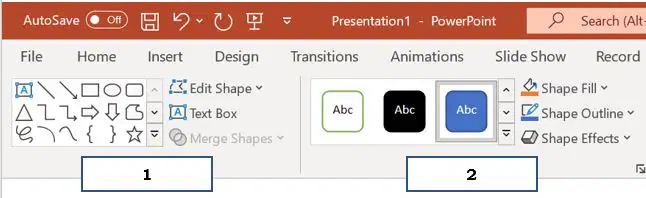
Label the following tools.
(Sample answers: ____ ____, ____ ____)
(a)
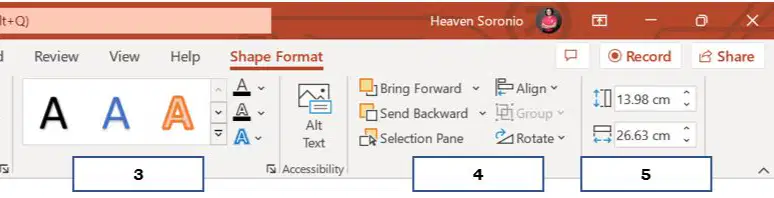
Label the following tools.
(Sample answers: ____ ___ ____, ____ ____, _____)
(a)
Choose an item from the drawing menu, then your cursor will turn into a _______.
Green Dot
Crosshair
What group in the drawing tools does bring backward command belong?
Arrange
Insert shapes
What drawing tools command shows the Format Text Effects task pane to change text properties?
Word Art Styles
Shape Styles
Which command shows a palette of colors that opens for you to choose from and then apply to the inside of your shape?
Shape Fill
Shape Outline
Which command that will allow the user to change thickness of the outline and styles of the lines into dotted or dashed?
Shape Fill
Shape Outline
The green dot will allow you for a free hand rotation
True
False
Shape Fill adds a 3D-type effects to your shape, such as adding a glow or a shadow.
True
False
Shape styles shows the Format Text Effects task pane to change text properties.
True
False
Textbox is where you can type your text and floats over a slide.
True
False
Text in the textbox cannot be placed anywhere within the slide.
True
False
Sizes make fine – tuned adjustments to the look of your shape using the Format Shape task pane.
True
False
By clicking the object to select, cursor should turn into a crosshair and you will be able to move the object anywhere on the slide.
True
False
Choose an item from the drawing menu then cursor will turn into a crosshair.
True
False
You can insert shapes easily by using the built-in shapes categorized as Lines, Rectangles, Basic shapes, Block arrows, Equation Shapes, Flowchart, Stars and Banners, Callouts and Action buttons.
True
False
Gradient option gives you several variance choices for editing the color, instead of a solid fill.
True
False

