
 Worksheets
Touch Systems Data Entry Final Exam
Total questions: 45
Worksheet time: 23mins
Name
Class
Date
1.
In order to type the Symbol ($) Dollar Sign and (%) Percent Dollar Sign, you need to use your left index finger.
a)
True
b)
False
2.
Which keyboard shortcut will PASTE information from the clipboard?
a)
Ctrl + C
b)
Ctrl + V
c)
Ctrl + P
d)
Ctrl + X
3.
What menu do you use to create columns?
a)
Insert
b)
File
c)
Edit
d)
View
e)
Format
4.
If I am adding a text box, where do I find the option create the text box?
a)
Drawing
b)
Format Menu
c)
The Text Box Icon
d)
Edit Menu
5.
To cut text, what is the shortcut we can use?
a)
Ctrl + B
b)
Ctrl + I
c)
Ctrl + X
d)
Ctrl + U
6.
To change margins, what menu do you select?
a)
Edit
b)
File
c)
Format
d)
Insert
7.
For the Google Docs assignments, when we started a new assignment, what did we do first?
a)
Open a New Google Doc
b)
Make a Copy of the Previous Assignment
c)
Begin Following the Instructions on the Assignment
d)
Change the Page Margins
8.
When changing margins, where do you find this setting?
a)
Page Margins
b)
Insert Menu
c)
Page Setup
d)
The Margins Icon
9.
When creating a table, what information do you need to know?
a)
The Title of the Table
b)
The Number of Rows and Columns
c)
The Size (# of inches) of the Table
d)
How big each row should be.
10.
When creating shapes, how do I find the shapes option?
a)
Drawing Menu
b)
View Menu
c)
Edit Menu
d)
File Menu
11.
To Change Line Spacing, what menu do I choose?
a)
File Menu
b)
Edit Menu
c)
View Menu
d)
Format Menu
12.
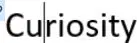
In the image below, what will be the result pressing the Backspace key TWO times?
a)
riosity
b)
Cuosity
c)
Ciosity
d)
urosity
13.
If you need a font, not found in the list where do you find it?
a)
Add a Font
b)
More Fonts
c)
You can't add a font.
d)
All of the fonts available are listed.
14.
You want to substitute one word with another throughout your document. What tool(s) should you use?
a)
Define
b)
Cut and Paste
c)
Find and Replace
d)
Copy and Cut
15.
What happens when you add a hyperlink?
a)
It links to another part of the document.
b)
It provides a clickable link to a website.
c)
A hyperlink can't be added in Google Docs.
d)
What's a hyperlink?
16.
Which keyboard shortcut will open the Find tool?
a)
Ctrl + S
b)
Ctrl + Q
c)
Ctrl + F
d)
Ctrl + H
17.
Hughes Printing Company arranged the keyboard like a what?
a)
Typewriter
b)
Piano
c)
Keyboard
d)
One Straight Line
18.
Who designed the keyboard?
a)
Christopher Latham Sholes
b)
Katie Greenwood
c)
Amos Densmore
d)
Joseph Marie Jacquard
19.
What keyboard shortcut is used to underline text?
a)
Ctrl + X
b)
Ctrl + T
c)
Ctrl + U
d)
Ctrl + V
20.
When was the keyboard first created?
a)
1870s
b)
1970s
c)
2000s
d)
1990s
21.
What device was the first keyboard used on?
a)
Typewriter
b)
Laptop
c)
Computer
d)
Cell Phone
22.
The home keys for the left hand are
a)
F, J, A, S
b)
A, S, D, F
c)
D, A, S, F
d)
F, D, S, A
23.
The home keys for the right hand are
a)
J, L, K, :
b)
A, S, D, F
c)
J, K, L, ;
d)
', L, K, J
24.
The Numeric Keypad is located on the _________ side of the keyboard of your desktop computer.
a)
Left
b)
Right
25.
The two keys that have the small bump on your keyboard are ____ and ____.
a)
J and F
b)
A and Semi-Colon (;)
c)
D and K
d)
S and L
26.
What is the correct way to sit at the computer?
a)
Hands Curved
b)
Feet on the Floor
c)
Sit Straight
d)
All of the Above
27.
What is the name of the numbers and symbols that are above the letters?
a)
Numeric Numbers
b)
Alphanumeric Numbers
c)
Neither of the Answers
28.
It is important to use the Shift key in order to key a symbol from the Alphanumeric Keyboard.
a)
True
b)
False
29.
When you place your hands on the keyboard, your fingers should be
a)
In the "home plate" position
b)
In the "home row" position
c)
It doesn't matter.
30.
Which letters do you type with your left hand?
a)
jkl;
b)
dfs;l
c)
asdlk
d)
asdfxe
31.
Which letters do you type with your right hand?
a)
jklsa
b)
jkl;mi
c)
asdfmi
d)
asdf
32.
The viewing distance from the person to the computer monitor should be about an arm's length.
a)
True
b)
False
33.
Your fingers need to be flat (not curved) on the keyboard when typing.
a)
True
b)
False
34.
Your fingers should rest on the ______________ of the keyboard.
a)
home row
b)
top row
c)
sides
d)
bottom row
35.
What finger do I use to strike the space bar?
a)
Middle Finger
b)
Thumb
c)
Index Finger
d)
Pinky
36.
It's important to look straight down at the keyboard while typing in order to make less mistakes.
a)
True
b)
False
37.
True or False: when you make a mistake while typing, you have to start all over.
a)
True
b)
False
38.
What is the layout of your keyboard called?
a)
QWERTY
b)
DVORAK
c)
Home Row
d)
Keyboard
39.
What finger do you use to type the question mark?
a)
Right Pointer finger
b)
Right Ring finger
c)
Right Pinky Finger
d)
Any finger
40.
To make a capital letter, you need to hold the ___________.
a)
Enter Key
b)
Space Key
c)
Shift Key
d)
Any Key
41.
To create a new line, you need to press the _______.
a)
Doesn't Matter
b)
Enter Key
c)
Shift Key
d)
Any Key
42.
Which statement is INCORRECT about sitting at the keyboard?
a)
You must sit with your feet on the ground.
b)
You can type with one hand.
c)
You must sit up straight with your back to the chair.
d)
You must place you hands on the home keys.
43.
At the top of a friendly letter, how many addresses will you find?
a)
0
b)
1
c)
2
44.
At the top of a business letter you will find...
a)
Inside Address
b)
Return Address
c)
Date
d)
Salutation
45.
The purpose of a business letter is found in the...
a)
complimentary closing
b)
salutation
c)
body
d)
inside address
100 %

