
Font size
 Worksheets
Review for Final Exam - GTT1 DM
Total questions: 60
Worksheet time: 5hrs 0mins
What is a foot orthosis?
Brace
Cast
Splint
All of the choices
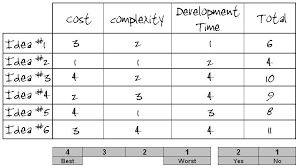
Using one of these will help your group decide on which model to build:
Design Brief
Design Evaluator
Decision Matrix

Based on this decision matrix, which idea was best?
Idea 2
Idea 6
Idea 3
Idea 4
Steve and Pamela are developing a new pair of socks for Hanes. They have determined that the socks should have the following:
1. Socks shall be water resistant
2. Socks shall be machine washable
3. Socks shall be ankle height
4. Socks shall be multi-colored
These items are considered:
Assesments
Criteria
Design Breif
Design Statement
A medical professional who helps patients who require body braces, called orthoses, to support their backs, legs, or feet.
Orthotist
Decision Matrix
Team Norms
Collaboration
A tool for comparing design solutions against one another, using specific criteria that are based on project requirements.
Design Process
Decision Matrix
Model
Prototype
A condition that affects body movement and coordination. It is caused by brain injury or brain malformation that occurs before, during, or immediately after birth when an infant’s brain is still developing.
Cerebral Palsy (CP)
Model
Decision Matrix
Solution
A brace that corrects alignment or provides support to correct a disorder of the limbs or spine
Orthosis
Model
Prototype
Solution
What is engineering?
designing a controlled experiment
designing and building a solution to a problem
reviewing and critiquing a scientist's research
asking questions about the natural world
The design process is....
a systematic way to rule out group ideas
a ranking system where a score is given for categories
a systematic method used by engineers to solve problems
Which step of the design process includes "Brainstorming"?
Define problem
Generate concepts
Build a prototype
When you build your prototype it is really important to do this...
Rebuild it
Test it many times
Present it
Designing a solution means to...
Come up with a detailed plan
Brainstorm
Present your findings
When designing a solution you should also create this:
A built selected model
An assessment of your model
A technical drawing
Presenting your solution is like:
Looking for flaws
Pitching your sales idea
Brainstorming
Asking things like "What is the issue we need to solve?", or "What are my criteria/constraints?"...would be which step?
Design a solution
Generate Concepts
Define Problem
When I look for ways to improve and make it the OPTIMAL design and record recommendations, I am at this step:
Design a solution
Build/Test prototype
Evaluate solution
Using one of these will help your group decide on which model to build:
Design Brief
Design Evaluator
Decision Matrix
We usually draw a rough sketch during this step:
Generate Concepts
Build/Test Prototype
Evaluate Solution
If I find flaws in my solution I should....
Create a technical drawing instead
Be formal and perfect
go back and make modifications before moving forward
What do we call limitations like "time, cost and/or materials" within a challenge?
Complications
Constraints
Criteria
What are the requirements that could be measurable in a project or challenge called?
Criteria
Constraints
Brainstorming
Adding a detailed drawing of the group's idea is completed at this step of the design process.
Define the problem
Design a solution
Evaluate solution
Even though we can "always" go back and fix a flawed solution, at what step would it be hardest to "go backwards"?
When you are building/testing a prototype
When you are evaluating a solution
When you are presenting your solution
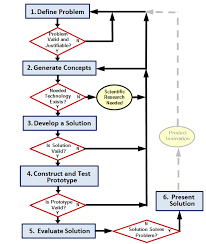
Why are there arrows going in all directions here?
To show that many ideas come from everyone
To show that the chart is incomplete
To show that you can go back to previous steps if needed
Based on this chart, which idea was best?
Idea 2
Idea 6
Idea 3
Idea 4

Which Idea was "WORST" for development time?
Idea 5
Idea 3
Idea 2
Idea 1

Which step is most likely represented here?
Define Problem
Design A Solution
Build and Test
Often times creating a Design Brief takes place during this step:
Design solution
Build/Test prototype
Define Problem
Which of Ms Bean's Pet Peeves does she HATE?
Cell phone use without permission
Misbehavior with a guest
No effort put into work
Chewing gum
Ms Bean's daughters name is
Faith
Hope
Joy
Love
Ms Bean's parents are deceased due to
Cancer
Car accident
Corona Virus
COVID
Ms Bean's first career was
Acting
Teaching
Office
Computer Programming
Name 1 thing you enjoyed in class this year.

What measurement is marked on the ruler?
1 5/16"
1 3/8"
2 5/16"
2 3/16"

What measurement is marked on the ruler?
1 3/4"
2 3/16"
1 11/16"
1 13/16"

What measurement is marked on the ruler?
1 8/16"
2 8/16"
2 1/2"
2 1/4"

What measurement is marked on the ruler?
2 1/2"
2 1/4"
3 3/4"
1 5/4"

What measurement is marked on the ruler?
2 3/4"
2 6/8"
2 1/4"
2 12/16"

What measurement is marked on the ruler?
3 1/10"
3 1/8"
3 1/16"
3 1/4"

What measurement is marked on the ruler?
33
3 3/16"
1 3/16"
3 3/8"

What measurement is marked on the ruler?
3 5/8"
4 3/8"
3 3/18"
3 1/2"

What measurement is marked on the ruler?
3/16"
3/8"
3/4"
38

What measurement is marked on the ruler?
3 1/4"
3 1/8"
3 1/6"
4 1/3"

What measurement is marked on the ruler?
4 7/8
4 7/8"
4 3/4"
4 15/16"

What measurement is marked on the ruler?
5/8"
9/16"
1 1/14"
1 1/8"

What measurement is marked on the ruler?
3/8"
5/16"
10/8"
4/16"

What measurement is marked on the ruler?
8/16"
9/16"
5/16"
7/16"
What does Mrs. Bennett say to open or close an announcement?
Beautiful People
Pretty Girls
Shiny GEMS
Sparkling Scholars
What is the name of the floor in Tinkercad?
The ground.
The square.
The workplane.
The surface.
What button do you use to join or combine objects together?
Ungroup
Join
Combine
Group
What tool would you use to center objects perfectly?
Group
Mirror
Align
Undo
How do you subtract material from a shape? (i.e. make a hole).
Group two solid shapes.
Group two hole shapes.
Group a solid shape with a hole shape.
Delete key.

The curved arrows allow you to do what?
rotate the object
change the color of the object
change the size of the object
duplicate the object
How do you raise/lower an object?
Use the corner handles
Use the top cone
Use the rotation arrows
Right click the shape

Which one of the following would you use to move an object vertically (up/down) in TinkerCAD?
1
2
3
Which one of the following would you use to resize an object in TinkerCAD?
1
2
3

In TinkerCAD the above image is for:
Group
Ungroup
Delete
Align

