
 Worksheets
G6-L11& L12
Total questions: 15
Worksheet time: 8mins
Which is the correct?
function draw()
{
}
function draw()
[
]
function draw{}
(
)
function draw();
{
}
Which one can randomly move?
function draw()
{
rect(randomNumber(200,400),randomNumber(200,400));
}
function draw()
{
rect(200,400);
}
function draw()
{
}
rect(randomNumber(200,400),randomNumber(200,400));
function draw()
{
}
rect(200,400);

How can I make an animation rotate?
function draw()
{
var sunny=createSprite(200,200);
sunny.setAnimation("sun");
sunny.rotation=randomNumber(0,360);
}
var sunny=createSprite(200,200);
sunny.setAnimation("sun");
function draw()
{
sunny.rotation=randomNumber(0,360);
drawSprites();
}
var sunny=createSprite(200,200);
sunny.setAnimation("sun");
function draw()
{
sunny.rotation+1=sunny.rotation;
drawSprites();
}
var sunny=createSprite(200,200);
sunny.setAnimation("sun");
function draw()
{
sunny.rotation+1=sunny.rotation;
}
drawSprites();
Which is the correct(Make the animation can move)?
sprite.x=sprite.y+1;
sprite.x-1=sprite.y;
sprite.x-1=sprite.x
sprite.x=sprite.x+2;

Which group of codes is for making the animation rotate regularly?
var sprite=createSprite(100,100);
sprite.setAnimation("sun");
function draw()
{
sprite.rotation=sprite.rotation+1;
drawSprites();
}
var sprite=createSprite(100,100);
sprite.setAnimation("sun");
function draw()
{
sprite.rotation-1=sprite.rotation;
drawSprites();
}
var sprite=createSprite(100,100);
sprite.setAnimation("sun");
function draw()
[
sprite.rotation=sprite.rotation+1;
drawSprites();
]
var sprite=createSprite(100,100);
sprite.setAnimation("sun");
function draw{}
(
sprite.rotation=randomNumber(0,200);
drawSprites();
)

This sprite is located at (0,400) originally. It will head to (400,0). Which following group of codes is correct.
var cycle = createSprite(0, 400);
cycle.setAnimation("motorcycle");
cycle.rotation = 45;
function draw() {
background("lightgrey");
cycle.x = cycle.x + 10;
cycle.y = cycle.y -10;
drawSprites();
}
var cycle = createSprite(0, 400);
cycle.setAnimation("motorcycle");
cycle.rotation = 45;
function draw() {
background("lightgrey");
cycle.x = cycle.x -10;
cycle.y = cycle.y +10;
drawSprites();
}
var cycle = createSprite(0, 400);
cycle.setAnimation("motorcycle");
cycle.rotation = 45;
function draw() {
background("lightgrey");
cycle.x = cycle.x + 10;
cycle.y = cycle.y +10;
drawSprites();
}
var cycle = createSprite(0, 400);
cycle.setAnimation("motorcycle");
cycle.rotation = 45;
function draw() {
background("lightgrey");
cycle.x = cycle.x -10;
cycle.y = cycle.y -10;
drawSprites();
}

How can the oranage fish swim forward (to the correct side)?
var orangeFish = createSprite(400, randomNumber(0, 100));
orangeFish.setAnimation("orange_fish");
function draw() {
background("navy");
orangeFish.x = orangeFish.x - 2;
drawSprites();
}
var orangeFish = createSprite(400, randomNumber(0, 100));
orangeFish.setAnimation("orange_fish");
function draw() {
background("navy");
orangeFish.x = orangeFish.x +2;
drawSprites();
}
var orangeFish = createSprite(400, randomNumber(0, 100));
orangeFish.setAnimation("orange_fish");
function draw() {
background("navy");
orangeFish.x+2 = orangeFish.x;
drawSprites();
}
var orangeFish = createSprite(400, randomNumber(0, 100));
orangeFish.setAnimation("orange_fish");
function draw() {
background("navy");
orangeFish.x-2= orangeFish.x;
drawSprites();
}
Which one is correct.
draw function();
draw function() {
}
function draw()
{
}
function draw()
{};
Which code is for rotating as anti-clockwise?
sprite.rotation=sprite.rotation-1;
sprite.rotate=sprite.rotate-1;
sprite.rotation=sprite.rotation+1;
sprite.rotate-1=sprite.rotate;

Which group of codes can make this mouse move?
(Animation name is mouse.)
var mouse = createSprite(50, 50);
mouse.setAnimation("mouse");
mouse.scale = 0.5;
function draw() {
background("lightgreen");
mouse.y = mouse.y + 2;
drawSprites();
}
var mouse = createSprite(50, 50);
mouse.setAnimation("mouse");
mouse.scale = 0.5;
mouse.y = mouse.y + 2;
function draw() {
background("lightgreen");
drawSprites();
}
var mouse = createSprite(50, 50);
mouse.setAnimation("mouse");
mouse.scale = 0.5;
mouse.y-1 = mouse.y;
function draw() {
background("lightgreen");
drawSprites();
}
var mouse = createSprite(50, 50);
mouse.setAnimation("mouse");
function draw() {
background("lightgreen");
mouse.scale+1 = mouse.scale;
mouse.y-1 = mouse.y;
drawSprites();
}
Which one is correct?
function draw()
{
if(sprite.x>0)
{
sprite.x+1=sprite.x;
}
drawSprites();
}
function draw(if(sprite.x>0)
)
{
{sprite.x=sprite.x+1;}
drawSprites();
}
function draw()
{
if(sprite.x>0)
{
sprite.x=sprite.x+1;
}
drawSprites();
}
function draw()
{
if(sprite.x>0)
{
sprite.x=sprite.x+1;
}
}
drawSprites();
Which code structure is correct:
if( conditions)
{
results
}
if( )
{
conditions and results
}
if( conditions and results)
{
}
if( results)
{
conditions
}

If we want the melon to roll back, which of the following codes is correct?
var melon=createSprite(0,200);
melon.setAnimation("m.png_1");
melon.tint=255;
function draw() {
background("lightblue");
melon.x=melon.x+1;
melon.rotation=melon.rotation+10;
if (melon.x>400)
{
melon.x=0;
}
drawSprites();
}
var melon=createSprite(0,200);
melon.setAnimation("m.png_1");
melon.tint=255;
function draw() {
background("lightblue");
melon.x=melon.x+1;
melon.rotation=melon.rotation+10;
if (x>400)
{
x=0;
}
drawSprites();
}
var melon=createSprite(0,200);
melon.setAnimation("m.png_1");
melon.tint=255;
function draw() {
background("lightblue");
melon.x=melon.x+1;
melon.rotation=melon.rotation+10;
if (x<400)
{
x=0;
}
drawSprites();
}
var melon=createSprite(0,200);
melon.setAnimation("m.png_1");
melon.tint=255;
function draw() {
background("lightblue");
melon.x=melon.x+1;
melon.rotation=melon.rotation+10;
if (sprite.x<400)
{
sprite.x=0;
}
drawSprites();
}

If we want the melon to roll towards the ocean when it reappears after going off the screen, which code is correct?


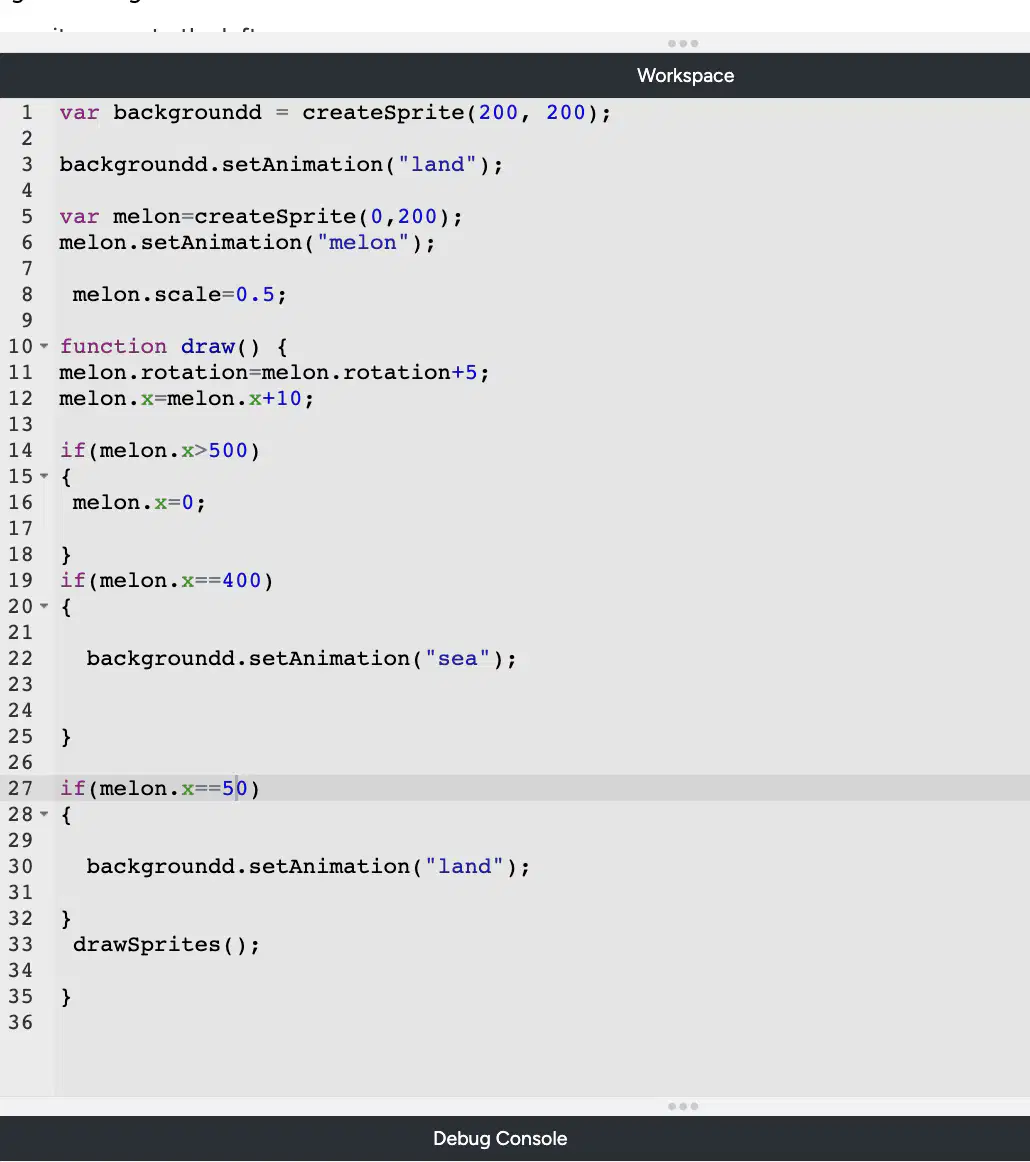
What is the result of running?
1. When the melon walks out of the screen, it will come back.
2. When the melon's horizontal coordinate is equal to 400, it will enter the sea.
3. When the melon's horizontal coordinate is equal to 50, it will return to the land.
1. When the melon walks out of the screen, it will NOT
come back.
2. When the melon's horizontal coordinate is equal to 400, it will enter the sea.
3. When the melon's horizontal coordinate is equal to 50, it will return to the land.
1. When the melon walks out of the screen, it will come back.
2. When the melon's horizontal coordinate is greater than 400, it will enter the sea.
3. When the melon's horizontal coordinate is smaller than 50, it will return to the land.
1. When the melon walks out of the screen, it will NOT come back.
2. When the melon's horizontal coordinate is greater than 400, it will enter the sea.
3. When the melon's horizontal coordinate is smaller than 50, it will return to the land.

