
 Worksheets
ICSN DLCS G6 Quiz
Total questions: 27
Worksheet time: 2hrs 15mins
What is the name of the of the drone we are using?

Codrone Light

Codrone EDU

Codrone Mini
All of them
What coding platform are we using?

Blockly

Python

Arduino
All of them
What web browser can we use to code the drone?

Google Chrome

Safari

Firefox
All of them
Can we use iPad device to code the drone?

NO

YES
Can we use a computer / laptop device to code the drone?
NO
YES
calibrating the drone is the process that we have to do whenever the drone is flying awkwardly.
NO
YES
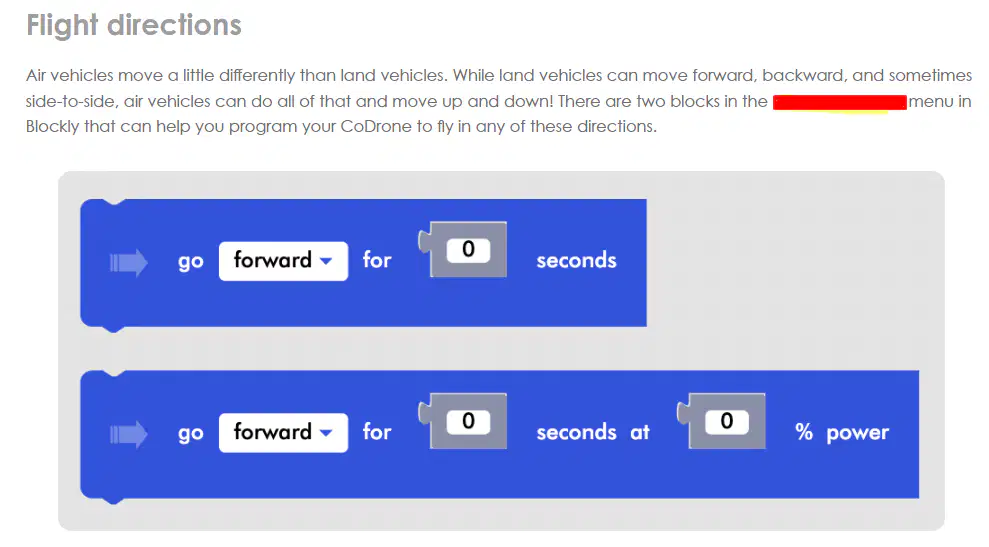
Where in the blockly menu can you locate the blocks seen in the image?


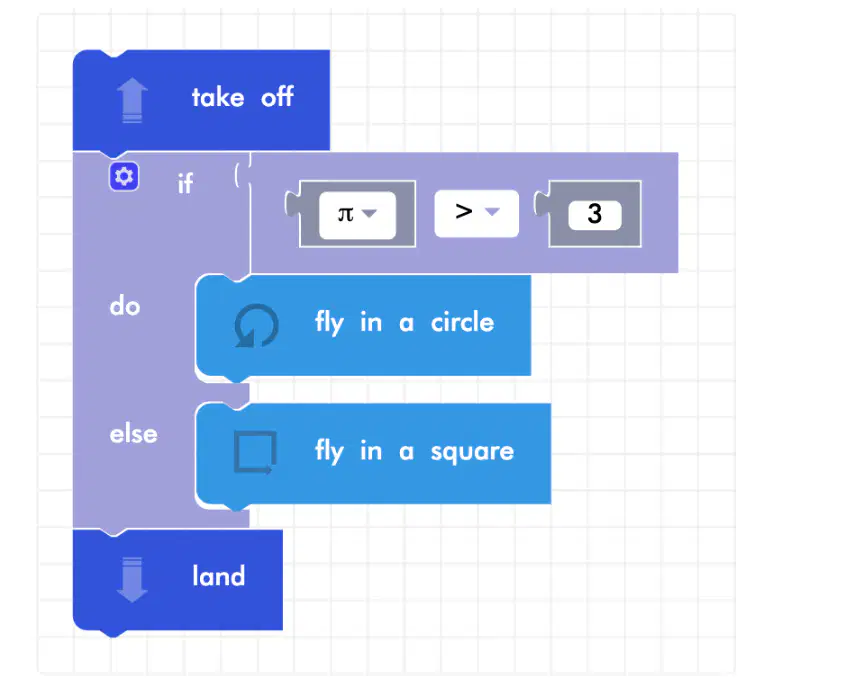
How can you code the block similar to the one in the image?
Click the setting icon, click and hold the else block and then drag it under the if block.
Click the else block and drag it to the left
Click and hold the if block and drag it to the else block
None of them
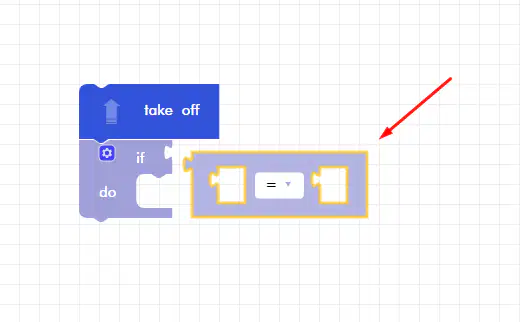
Where can you locate the block seen in the picture?


None of them
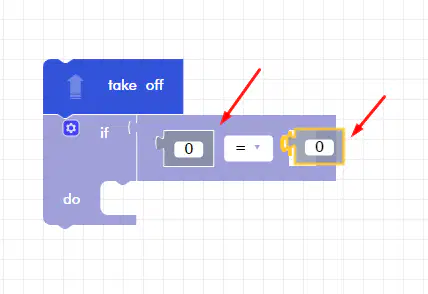
Where can you locate the blocks seen in the picture?
None of them
Where can you locate the block seen in the picture?
None of them
If at any point you need to (a) your CoDrone, watch the video and follow the steps carefully! Also make sure that you are in a flat, spacious, and well-lit area as the CoDrone may not calibrate correctly otherwise. The technical explanation for that: your CoDrone has two sensors that it uses with the gyro and accelerometer to figure out if it is driving.
Conditionals are statements that help programs make decisions depending on if the statement is ____ or _____.
(a)
In Blockly, conditionals include (a) , else if, and else statements.
To create a variable, go to the pink ________ ____ in Blockly and click on the gray Create variable… block.
(a)
(a) let you repeat sections of your code. They’re a great shortcut — without them, you might have to connect the same blocks over and over again! Blockly has three different types of loops:
___ _____ will repeat the code inside them for the number of times you choose. There are two blocks that do this!
(a)
_____ _____ will repeat the code inside them while a certain condition that you set is true.
(a)
_____ _____ will repeat the code inside them until a certain condition that you set is true.
(a)
What is an LED?
LED stands for “_____-________ _____”.
(a)
Can we use a computer / laptop device to control the flight of the drone?
NO
YES
Can we use a computer / laptop device to control LED lights of the drone?
NO
YES
We don't need a safety glasses to protect our eyes in flying the drone.
NO
YES
We can fly the drone without a count down or informing others for safety flights.
NO
YES
can we change the propeller of the codrones?
NO
YES

Write down the name(s) of your team members, then give them a rating based on how well they performed when constructing the digital engineering notebook.
Rate 10 if they are amazing
Rate 5 if they are doing just fine
Rate 3 if they are not interested of they dont care at all.
Try out your sketching talents with the codrone (Bonnus Round).


