
 Worksheets
Isometric Projection
Total questions: 10
Worksheet time: 5mins
Isometric projection is classified as a _____________ drawing.
Multiview
Pictorial
Mechanical
Architectural
Isometric drawings are drawn at _____ degrees.
60
30
45
90
To draw isometric circles. The _______ command is used.
Ellipse
Circle
Polygon
Rectangle
When drawing isometric circles the crosshair must be change to either top, left or right position using the ________ keys.
U + enter
Enter
Shift + E
Ctrl + E
The ______ must be establish to draw isometric circles in AutoCAD.
End
Start
Center
Circumference
After selecting Ellipse end command, the user must select _______ from the options given before selecting the center point of the Isometric circle.
Center
Arc
Isocircle
Endpoint
To draw a circle or change the crosshair in Isometric projection the user must set the isometric through the _______ command.
Grid settings
Orthomode
Polar tracking settings
Object snap settings

To draw the isometric circle for the clock face shown. The crosshair must be change to _______ position.
Top
Left
Right
Bottom
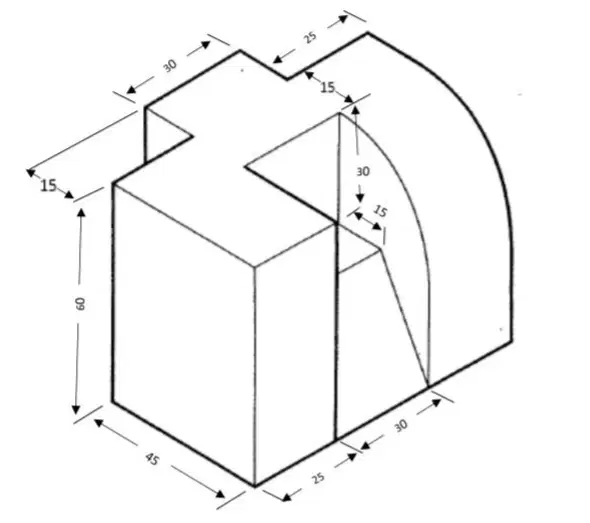
To draw the isometric arc in the figure shown. The crosshair must be change to _______ position.
Top
Left
Right
Bottom

To draw the isometric circle in the figure shown. The crosshair must be change to _______ position.
Top
Left
Right
Bottom

