wayground logo

Free Printable Worksheets

Font size

S
M
L
XL
Worksheets

Year 7 Term 3 Assessment

Total questions: 53

Worksheet time: 27mins

Name
Class
Date
1.
What is a variable? 
a)
A value that can change
b)
A number
c)
A value that can never change
d)
A letter
2.

What does t.forward(300) do?

a)

Moves in the direction it is facing 300 steps

b)

Moves down the screen 300 steps

c)

Moves up the screen 300 steps

3.

How do you tell that Python that you are going to use the turtle library?

a)

import turtle

b)

turtle import

c)

from turtle import *

d)

from turtle import

4.
To repeat a fixed number of times use a
a)
while loop
b)
for loop
c)
if loop
d)
indentation
5.

What does turn(90) do?

a)

Turns right 90 degrees

b)

Turns left 90 degrees

c)

Moves forward 90

d)

Does nothing as 'turn' is not a turtle instruction

6.
Look at this code, what shape will it make?
a)

Square

b)

Triangle

c)

Rectangle

d)

Hexagon 

7.
This code should draw a square with an orange outline but it is not correct. How many errors are there?
a)
1
b)
2
c)
3
d)
4
8.

To make the turtle move forward, which command is used?

a)

turtle.penup()

b)

turtle.forward()

c)

turtle.left()

d)

turtle.backward()

9.

In order to move the turtle 120 forward without drawing on the screen, which order is correct?

a)

turtle.forward(120)

turtle.penup()

turtle.pendown()

b)

turtle.pendown()

turtle.forward(120)

turtle.penup()

c)

turtle.penup()

turtle.forward(120)

turtle.pendown()

10.
When using a command to move the turtle to a specific position on the drawing canvas, the middle of the canvas is represented by which coordinates?
a)
1, 1
b)
100, 100
c)
0, 0
d)
500, 500
11.
Look at this code, what shape will it make?
a)
Square
b)
Triangle
c)
Rectangle
d)
Hexagon 
12.

Which of these commands would create a turtle named Alice?

a)

Alice = turtle.pen()

b)

Alice = Turtle.pen()

c)

Alice = Turtle.turtle()

d)

Alice = turtle.Turtle()

13.

What does this code do?


hunter.color("yellow")

hunter.begin_fill()

hunter.circle(100)

hunter.end_fill()

a)

Makes a yellow-filled circle

b)

Makes a yellow circle that is not filled in

c)

Makes a black circle that is not filled in

d)

Makes a white (invisible) circle

14.

When creating a rectangle with the turtle, what angle is needed when turning?

a)

120

b)

180

c)

45

d)

90

15.

To move the turtle to a specific position on the drawing canvas you need to use which of the following commands?

a)

set_pos( )

b)

setpos( ):

c)

setpos

d)

setposition( )

16.
To stop the turtle drawing you need to use which of the following commands?
a)
penup:
b)
pen_up( )
c)
penup( )
d)
penup( ):
17.
Define the term spreadsheet:
a)
A file that is used to store data and carry out simple and complex calculations
b)
A document where images and data can be stored
c)
A document that creates graphs
d)
A document that has cells and rows
18.
There are many versions of spreadsheet software. Select TWO of the most commonly used versions below:
a)
Microsoft Excel
b)
Google Sheets
c)
Microsoft Access
d)
Google Docs
19.
Identify an advantage of a spreadsheet:
a)
Teachers can use them for creating there shopping lists
b)
Automatic calculation and recalculation
c)
Creating reports
d)
Creating columns and rows of data entry
20.
Select the symbol that represents division in a spreadsheet:
a)
+
b)
/
c)
x
d)
*
e)
<
21.
Select the symbol that represents multiply in a spreadsheet:
a)
x
b)
xx
c)
=
d)
+
e)
*
22.
Select the symbol that represents addition in a spreadsheet:
a)
x
b)
-
c)
=
d)
+
e)
*
23.
Select the symbol that represents subtraction in a spreadsheet:
a)
x
b)
-
c)
=
d)
+
e)
*
24.
Select the symbol that must be used at the start of every formula and function:
a)
=
b)
==
c)
++
d)
xx
e)
+
25.
In the below screenshot what is the correct term for area the highlighted in red?
a)
Row
b)
Column
c)
Line
d)
Arrow
26.
In the below screenshot what is the correct term for area highlighted in red?
a)
Column
b)
Line
c)
Record
d)
Row
27.
In the below screenshot. What is the correct term used for a cell that has the black box around it (A cell that you are currently working in or on)?
a)
Cell
b)
Cell Reference
c)
Row
d)
Column
e)
Active Cell
28.
In the below screenshot the arrow is pointing to which feature of a spreadsheet?
a)
Spreadsheet Name
b)
Worksheet Name
c)
Name of Student
d)
Cell Labels
29.
Define the term Data type?
a)
A data type is a form of data you enter into the spreadsheet.
b)
A data type is where you will add text into a spreadsheet into multiple columns
c)
The different types of data that can be stored in a cell e.g numbers, text, date
d)
A data type is a range of numbers 0-10
30.
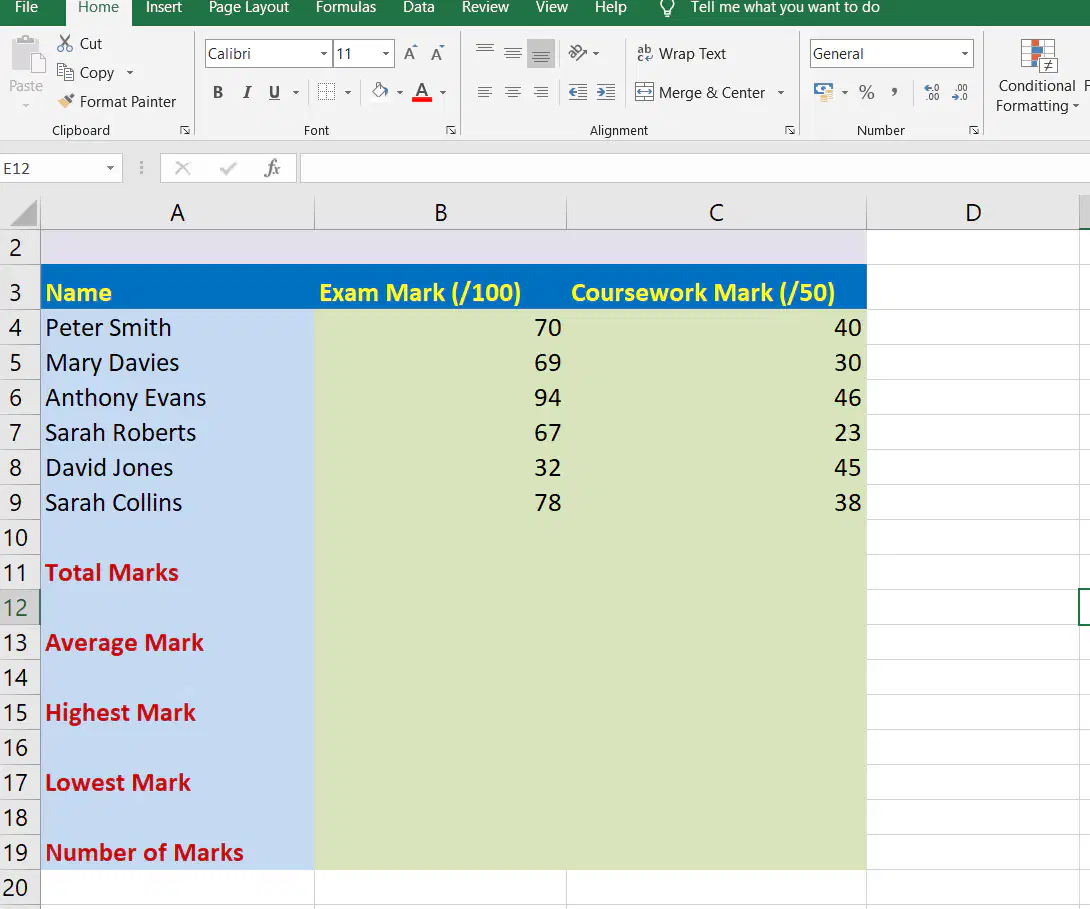
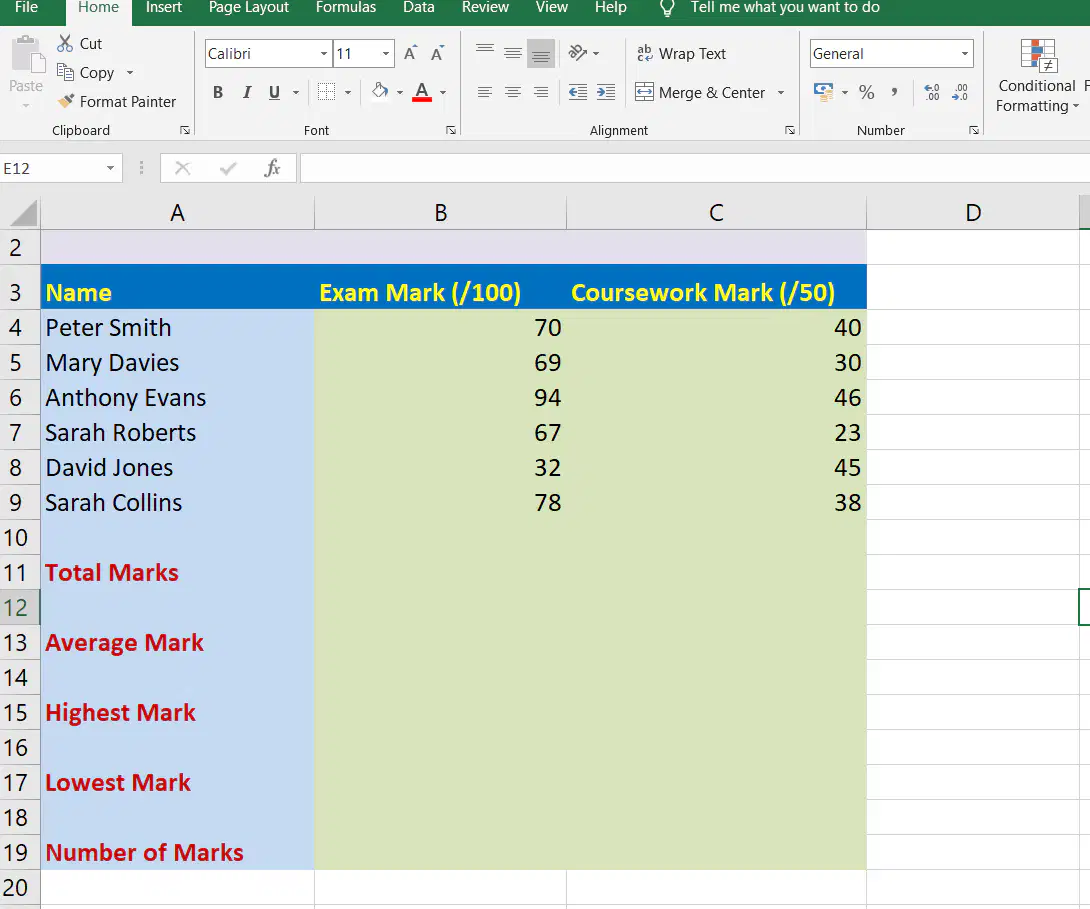
Review the spreadsheet below. Select the correct data type for the data stored in cells B4-B9:
a)
String
b)
Number
c)
Currency
d)
Text
31.
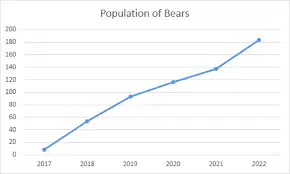
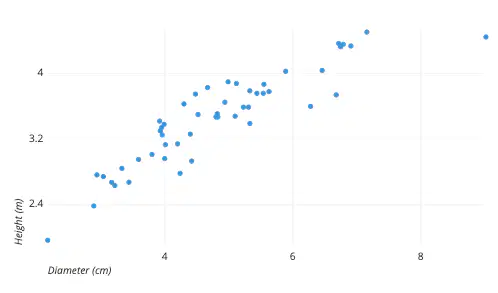
In the screenshot below identify what type of chart has been used.
a)
Line chart
b)
Circle Chart
c)
Oval Chart
d)
Pie Chart
e)
Scatter Chart
32.
In the screenshot below identify what type of chart is being used.
a)
Line chart
b)
Scatter chart
c)
Bar chart
d)
Pie Chart
33.
An example of a cell reference is
a)
B
b)
12A
c)
A12
d)
1233REF
34.
In a cell reference, for example A1, what does the letter refer to?
a)
The row the cell is in
b)
The column the cell is in
c)
The worksheet the cell is in
35.
In a cell reference, for example A1, what does the number refer to?
a)
The row the cell is in
b)
The column the cell is in
c)
The worksheet the cell is in
36.
In computer spreadsheet, a workbook is a group of
a)
Worksheets
b)
Spreadsheets
c)
Many Rows
d)
Many Columns
37.

What term describes changing the position of text in the spreadsheet?

a)

Alignment

b)

Paragraph

c)

Format

d)

Font

38.
In a spreadsheet, a preprogrammed Formula is called a:
a)
Function
b)
Automatic Formula
c)
Functional Formula
39.
When is it appropriate to use the SUM function?
a)
When adding together the values stored in two cells.
b)
When adding together the values stored in more than two cells.
c)
When subtracting the values stored in more than two cells.
d)
When dividing the values stored in two cells.
40.
Wrap text is an option which can be applied to cells in order to do what?
a)
Put a border around a cell containing text
b)
Put a background on a cell containing text
c)
Resize a cell to fit the text inside
41.
Review the spreadsheet below. Select the correct formula to use in cell B11:
a)
=total(b4:b9)
b)
=min(b4:b9)
c)
=max(b4:b9)
d)
=sum(b4:b9)
e)
=count(b4:b9)
42.
Review the spreadsheet below. Select the correct formula to use in cell B13
a)
=Sum(B4:B9)
b)
=Average(B4:B9)
c)
=Count(B4:B9)
d)
=Max(B4:B9)
43.
Review the spreadsheet below. Select the correct formula to use in cell B15.
a)
=Sum(B4:B9)
b)
=Average(B4:B9)
c)
=Min(B4:B9)
d)
=Max(B4:B9)
44.
Review the spreadsheet below. Select the correct formula to use in cell B17:
a)
=Sum(B4:B9)
b)
=Average(B4:B9)
c)
=Min(B4:B9)
d)
=Max(B4:B9)
45.
In the screenshot below identify what type of chart has been used.
a)
Bar Chart
b)
Line chart
c)
Scatter chart
d)
Pie Chart
46.
In the screenshot below what type of chart has been used.
a)
Line chart
b)
Scatter Chart
c)
Bar Chart
d)
Pie Chart
47.
The name of the tool to complete subsequent cells with the same / similar value or formula is:
a)
File handle
b)
Fill handle
c)
Fill cells
d)
Autoformula
48.
What word is used to describe re-organising the order of data in a spreadsheet?
a)
Search
b)
Sort
c)
Fill
49.
Explain the term absolute cell referencing
a)
It locks the cell reference used within the formula so that it does not change when replicated.
b)
A cell that changes when replicated.
c)
It allows the user to create formulas with calculations and recalculations
50.
Select the formula that shows absolute cell referencing correctly:
a)
=$A$3*D4
b)
=*A*3*D4
c)
=£A£3*D4
d)
=A3$*D4
51.
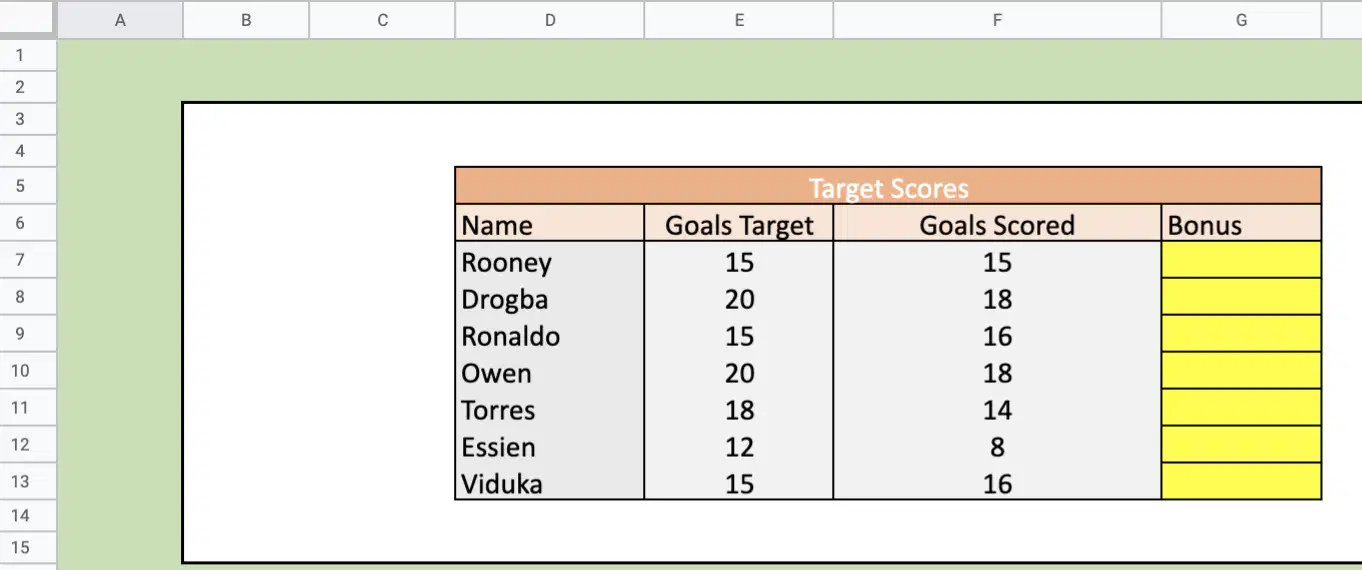
If a players Goals Scored meets or exceeds his Goals Target he receives a bonus equal to £1000 for each goal he has scored Otherwise he receives an encouraging message. Select the correct function to add to cell G7 to work this out from the options below:
a)
=IF(F7>=E7, 1000, "No Bonus")
b)
=IF(F7=E7, 1000, "No Bonus")
c)
=IF(F7<=E7, 1000, "No Bonus")
d)
=IF(F7>=E7, "No Bonus", 1000)
52.
Select the INCORRECT formula:
a)
=1A*10A
b)
=A1*A10
c)
=A1/A10
d)
=A1+A10
53.
Select the INCORRECT formula:
a)
MIN(A1:A10)
b)
=MAX(B1:B10)
c)
=MIN(D1:D10)
d)
=SUM(G1:G10)