
 Worksheets
Tux Typing + Scratch Jr
Total questions: 27
Worksheet time: 27mins
Fill in the Blank:
............................................ is a typing tutorial.
Tux Typing
Scratch Jr
Paint
Fill in the Blank:
Tux Typing enhances ............................................ skills.
typing
Drawing
Programming
Fill in the Blank:
Tux Typing is a game that divided into ............................................ parts.
two
three
four
Fill in the Blank:
The ………………………….………… is where the action take place in the project.
Stage
Palette
Programming Area
Fill in the Blank:
The ……………………….………… is the menu of programming blocks.
Stage
Palette
Programming Area
Fill in the Blank:
The …………………………….………… is where you connect programming blocks to create your script.
Stage
Palette
Programming Area
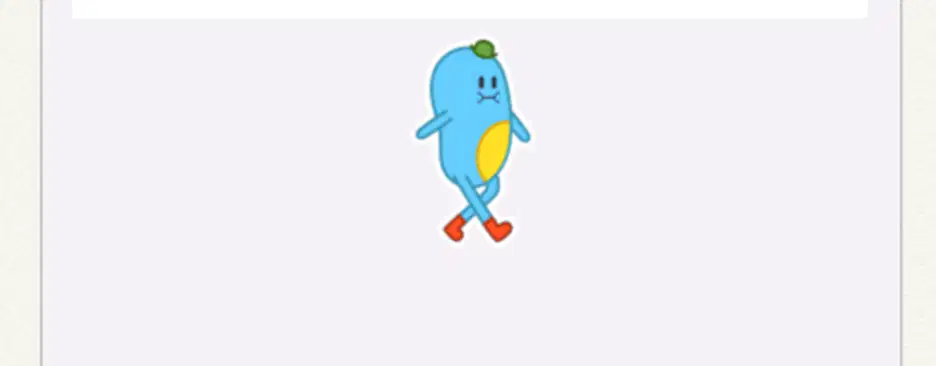
In ScratchJr, this part of the editor called
Stage
Palette
Programming Area

In ScratchJr, this part of the editor called
Stage
Palette
Programming Area

In ScratchJr, this part of the editor called
Stage
Palette
Programming Area

The blue palette of programming blocks called ……………………………….………… blocks.
Triggering
Motion
Looks
Which block will move the character to the right?
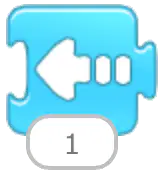
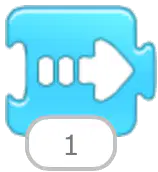
Which block will move the character to the left?
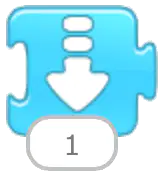
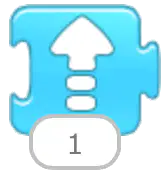
Which block will make the character hop?
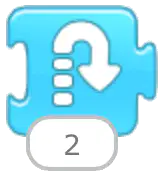
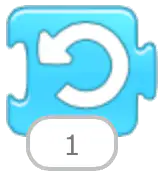
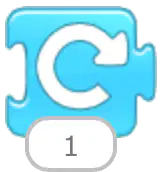
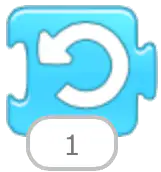
This block called
Hop
Turn Left
Turn Right
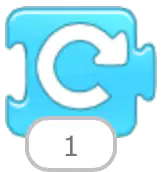
This block called
Move Right
Turn Left
Turn Right
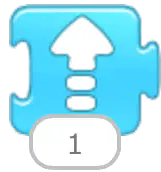
This block called
Move Up
Move down
Turn Right
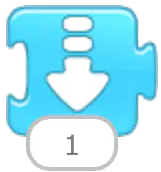
This block called
Move Up
Move down
Hop
Which button for change background?


Which button for create new?
Which button for add text

This button called
Character
Green Flag
Change Background

This button called
Character
Green Flag
Add Text
State whether True (✔︎) or False (✖):
ScratchJr is a free and open-source program.
True (✔︎)
False (✖)
State whether True (✔︎) or False (✖):
ScratchJr has 6 different kinds of blocks.
True (✔︎)
False (✖)
State whether True (✔︎) or False (✖):
ScratchJr has 4 different kinds of blocks.
True (✔︎)
False (✖)
State whether True (✔︎) or False (✖):
In ScratchJr, You can add only 1 character.
True (✔︎)
False (✖)
State whether True (✔︎) or False (✖):
In ScratchJr, You can add more than 1 character.
True (✔︎)
False (✖)

