
 Worksheets
HTML YEAR 7 CAT
Total questions: 50
Worksheet time: 28mins
Which internet browser is popular?
Microsoft Edge
Google Chrome
Internet Explorer
Safari
Choose the correct HTML element to define bold text
<b>
<i>
<bold>
What does HTML stand for?
Hyper Text Markup Language
Hometool Markup Language
Hyperlink and Text Markup Language
Choose the correct HTML element for the largest heading:
<h6>
<h1>
<heading>
<head>
What is the correct HTML element for inserting a line break?
<break>
<lb>
<br>
How can you make a numbered list?
<dl>
<list>
<ol>
<ul>
Which section of HTML contains the visible portion of the webpage?
<head>
<body>
Choose the element below that is considered a closing tag?
</p>
<p>
<h1>
What is the opening element for a paragraph?
<p>
</p>
<opening paragraph>
What is the name of the two sections associated with HTML?
face and feet
head and body
neck and stomach
top and bottom
HyperText Markup Language, a language used to create web pages, is better known as?
Website
Internet Explorer
HTML
Hyperlink
The parts of HTML source code that mark the start and end of various parts of a webpage, and which consist of a command between the symbols '<' and '>' (< >) are called what?.
Tags
Elements
Sections
Labels
What goes in the <head> section?
A brain
the title
hair
the body
The largest size heading tag - often used to create the main heading of a web page - is ____ .
<h1> </h1>
<h2> </h2>
<h5> </h5>
<h6> </h6>
Which of these is a correct starting tag?
<H1>
</H1>
<H!>
</H/>
What should a HTML web page end with?
</html>
<head>
</end>
</body>
What should a HTML web page start with?
<b>
<li>
<html>
<start>
What is the correct syntax for defining a hyperlink in HTML?
<a href=”url”> Link text </a>
<a href=”url”> Link text <a>
<a=”url”> Link text <a>
<ref=”url”> Link text <a>
This tag shows up in the tab above the url bar
<!DOCTYPE>
<html>
<title>
<head>
To remove the parts that you do not want from an image.
Cropping an image
Resizing an image
Text wrapping
Page margin
To change the size of an image
Cropping an image
Resizing an image
Text wrapping
Page margin
Footer is the section at the top of a document.
True
False
When added, a header and a footer will be displayed on every page of your document
True
False
The section around the edges of a document is:
Print preview
Page orientation
Page margins
line spacing
A line that can be placed around an image or a block of text.
line spacing
Page border
Page margins
Header
You can add header and footer to your document, from the ………..Tab.
Home
Insert
Design
File
We can change the page margins from the……………….tab
Home
Insert
Design
Layout
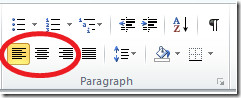


What is the name of this option?
Typeface
Line-spacing
Footer
Heading
Text box

What is the name of this option?
Typeface
Line-spacing
Footer
Heading
Text box
Keyboard Shortcut for New Document
CTRL + C
CTRL + D
CTRL + ENTER
CTRL + N
A keyboard is an example of a(n) ___ device.
Input
Output
Processing
Storage


Microsoft Excel is what kind of software?
Word Processing Software
Spreadsheet Software
Database Software
Presentation Software
The letters in Excel represent the...
Rows
Columns
Cells
Data
The numbers in Excel represent the...
Rows
Columns
Cells
Data
An Excel file format extension is
doc
xls
txt
mp3

