
NEW
Font size
 Worksheets
CONDITIONAL FORMATTING
Total questions: 15
Worksheet time: 8mins
A feature that allows you to change the font style in a spreadsheet.
A technique used to protect cells from accidental editing.
A tool that automatically calculates formulas in a spreadsheet.
A feature that applies formatting to cells based on specific conditions or rules.
A specific data value or range to be evaluated.
The overall formatting applied to a cell or range based on the condition.
The criteria used to determine if formatting should be applied.
The order in which multiple formatting rules are evaluated.
Microsoft Word
Adobe Photoshop
Microsoft Excel
Notepad
What is the main purpose of conditional formatting in spreadsheet software?
To perform calculations and formulas automatically.
To create charts and graphs based on data.
To visually highlight and emphasize specific data based on conditions.
To organize and sort data in different ways.
Streamlining data entry and validation processes.
Creating dynamic and interactive dashboards.
Enhancing data visualization and analysis.
Enabling collaboration and sharing of data.
Students and educators for academic projects.
Business professionals for data analysis and reporting.
Researchers for organizing and visualizing research data.
All of the above.
Tracking student attendance and tardiness.
Highlighting students' grades and performance.
Analyzing assessment results and identifying trends.
All of the above.
Sorting data
Changing font size
Applying formatting based on specific rules
Creating charts
In the ribbon of spreadsheet software.
In the file menu of spreadsheet software.
In the print settings of spreadsheet software.
In the help documentation of spreadsheet software.
Which is NOT a type of conditional formatting?
Data Bars
Color Scales
Fill Color
Font Size
Greater Than
Less Than
Equal To
Above Average
Greater Than
Less Than
Equal To
Top/Bottom Rules

1
2
3
4
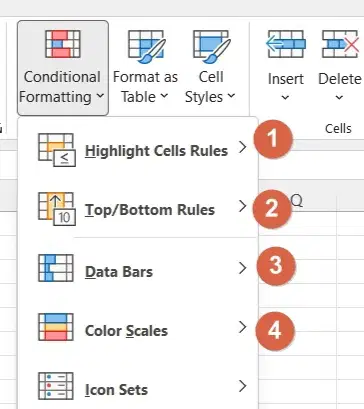
1
2
3
4

Color Scales
Icon Sets
Data Bars
Top/Bottom Rules

