
 Worksheets
computer viva
Total questions: 35
Worksheet time: 18mins

Which group of blocks include the "Broadcast" block?
Events
Motion
Control
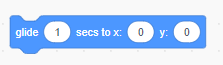
Which group of blocks include the "Glide" block?
Motion
Looks
Control
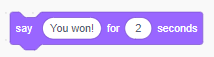
Which group of blocks include the "Say" block?
Sound
Looks
Control
What is the backdrop area called in Scratch?
Ground
Paint
Area
Stage
What group of blocks controls movement of the Sprite?
Control
Sensing
Motion
Look

Which group of blocks include the "When Flag Clicked" command?
Motion
Looks
Events
Control
I go to add a script to my character and find that my blocks have disappeared. Why is this?
Scratch Malfunctioned
I have stage selected
I have exceeded the block limit
Where do you find the background images to insert in Scratch?
Costumes
Backdrops
Gallery
Script
What do you call a character in Scratch?

Number 6?
Sensing
Operation
Variables
Motion
Looks
Number 4?
Events
Control
Sensing
Operation
Variables
Number 3?
Sound
Events
Control
Sensing
Operation
Number 2?
Looks
Sound
Events
Control
Sensing
Number 1?
Motion
Looks
Sound
Events
Control

Number 5?
Script Groups
Script Blocks
Script Area
Stage
Sprite
Number 4?
Script Groups
Script Blocks
Script Area
Stage
Sprite
Number 3?
Script Groups
Script Blocks
Script Area
Stage
Sprite
Number 2?
Script Groups
Script Blocks
Script Area
Stage
Sprite
Number 1?
Script Groups
Script Blocks
Script Area
Stage
Sprite
the objects that perform actions(moves) in a project
Sprite
Script
Loops
_________is a programming language that is perfect for making games, animations, interactive stories and other visually rich programs.
Pane
Scratch
Blocks
If you needed some code that would change the background, make a sprite say something, or change the costume for a sprite, you would look under which section?
Events
Looks
Motion
Control
The stop button is placed on the _______ left corner of the Stage.
Bottom
Right
Left
Top
You can repeat the actions of the sprite as many times as needed.
True
False
_____________ block allows the sprite to wait for the specified number of seconds.
Wait (1) secs
Say (Hello)
The Scripts tab and the Costumes tab share the ___________ space.
Entire
Different
Same
____________ block controls the looks of the sprite.
Control
Sound
Motion
Looks
The stop button is green in colour.
True
False
A sprite cannot speak in a Scratch project.
True
False
When you start a new Scratch project, it begins with a _____________ sprite.
Cat
Abby
Bat
Dog 1

