
 Worksheets
Blender Fundamentals Quiz
Total questions: 25
Worksheet time: 13mins
What is 3D modeling?
The process of creating a three-dimensional representation of an object using specialized software
The process of creating moving three-dimensional images in a digital context
A free, open-source software that allows a user to create 2D and 3D images, movies, etc.
The process of creating a two-dimensional representation of an object using specialized software
What is Blender?
The process of creating a three-dimensional representation of an object using specialized software
The process of creating moving three-dimensional images in a digital context
A free, open-source software that allows a user to create 2D and 3D images, movies, etc.
The process of creating a two-dimensional representation of an object using specialized software
What does the splash screen in Blender display?
The version of Blender being used
The names and relationships of objects in the scene
The active data, including the active scene and object
The options available to modify the digital file
What does the outliner in Blender show?
The version of Blender being used
The names and relationships of objects in the scene
The edits of many active data, including the active scene and object.
The options available to modify the digital file
What does the properties panel in Blender allow editing of?
The version of Blender being used
The names and relationships of objects in the scene
The active data, including the active scene and object
The options available to modify the digital file
What is the purpose of the layout menu in Blender?
To create a new project
To display or hide the quick tools menu
To change layouts, menus, viewpoints, etc.
To select and rotate the view
What does the T key do in Blender?
Displays or hides the quick tools menu
Opens the layout menu
Selects and rotates the view
Displays the properties panel
What does the hand icon in Blender do?
Allows you to change perspective, focal length, and more
Lets you go back and forth between orthographic and perspective views
Zooms in and out
Moves the cursor to a specific spot in the workspace
What does the S key do in Blender?
Moves the object
Rotates the object
Scales the object
Switches to wire mode
What does the S key do in Blender?
Switches to wire mode
Scales the object
Moves the object
Rotates the object
What is the primary use of Blender software?
Making flyers
Editing photos
Creating 3D models and animations
Designing websites
What is the function of the 'Tab' key in Blender?
It switches between object mode and edit mode
It saves the current project
It deletes the selected object
It opens the render settings
What does the 'G' key do in Blender?
It scales the object
It moves the object
It rotates the object
It switches to wire mode
What does the N key do in Blender?
Opens the properties panel
Displays or hides the quick tools menu
Selects and rotates the view
Displays the outliner
Press the A key to select all objects, and (a) to deselect all objects.
To select more than one item at a time, click and object and hold down the ____ key while clicking other objects.
tab
shift
ctrl
alt
The ____ _____ is shaded or highlighted slightly brighter than the other objects. You will also see your scene view and properties for the highlighted object.
selected object
camera viewpoint
active object
selected vertex
_____ refers to moving things, rotating things, or scaling things.
editing
transformation
selection
modifying
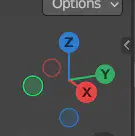
What does this image show?
The X, Y and Z gizmos
The movement tool
The selection tool
The Edit Mode
These are keyboard keys that complete an action instead of having to use the menu.
shortcuts
smart keys
function keys
hotkeys
In Blender, there is usually more than one way to complete an action.
True
False
If you make a mistake, go to Edit, Undo or use these hotkeys.
Shift+A
Crtl+A
Crlt+Z
S+X
This mode allows you to make changes to, or transform, an object.
edit
object
layout
add
To select multiple objects, ______ a box around the objects, and to hold the Ctrl key while clicking and dragging.
select
hold down the shift key while clicking
click and drag
edit
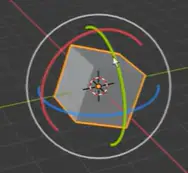
What does this image represent?
the gizmos
edit mode
move tool
rotation tool

