
 Worksheets
IT Essentials Ch 1-3 Review - Introduction to the PC
Total questions: 75
Worksheet time: 2hrs 53mins


The adapter card pictured would be installed to improve this output from the computer.
Sound
Video
Data Fault Tolerance
Network bandwidth

This is a picture of what?
USB Connector
VGA Connector
HDMI Connector
FireWire Connector

This is a picture of what?
Graphics Card
MotherBoard
Hard Drive
Heat sink
CPU

This is a picture of what?
Power Supply
MotherBoard
RAM
Graphics Card
NIC Card

Which tool is used for hardware to stand on to prevent static electricity from building up?


part retriever
part organizer

Multimeter
Loopback adapter

Needle nose plier
Wire cutter

Antistatic mat
Antistatic wrist strap

Cable ties
Compressed air

Use to test network cables with RJ45 and RJ11 connectors.
Cable Tester
Multi-tester
multimeter
multicabletester
Which of the following computer hardware is used to prevent ESD?
anti static strap
compressed air
philip's screw driver
hex driver
ESD means....
Electro-static discharge
Electricity discharge
Electronic Discharge
Electric discharge
What is an input devices?
The devices that give data or instructions to the computer.
It is somebody you connect to a computer that sends information into the computer.
The devices that display result or information.
It is something you connect to a computer that has information sent to it.
What is an output devices?
The devices that give data or instructions to the computer.
It is somebody you connect to a computer that sends information into the computer.
The devices that display result or information.
It is something you don't connect to a computer that has information sent to it.

Choose the three output devices.
Printer
Joystick
Headphone
Monitor



The device shown is an example of an ______________ device. (Be carful, the first video was a little incorrect about this. The second video is correct)
input
output
both input and output
storage device (not considered input or output)

The device shown are an example of an ______________ devices
input
output
both input and output
storage device (not considered input or output)


The "BRAIN" of the computer. It executes the commands of the software installed on the device.
Desktop Computer
Browser
Software
CPU

This part supplies circuits with the power needed to run. In laptops this can also take the form of a built in battery.
Power Supply
RAM
Fan and Heat Sink
Hard Drive

This circulates air and draws heat away from the CPU to cool the entire computer system.
Fan and Heat Sink
Motherboard
Power Supply
RAM

These are on the motherboard to connect upgrades, such as sound cards, video cards, or network cards.
Expansion Slots
Fan and Heat Sink
RAM
Hard Drive
Identify the most common type of connector for a keyboard and mouse.
USB
VGA
RJ-45
DB-25
if you bring your backpack to the computer lab, where should you place it?
in the front of the room or in the hall
under your computer station
on one of the tables
on the back of your chair
When connecting cables to the computer system make certain the computer system is .
turned on and in safe mode
turned off and unplugged
.turned on and on standby
don't ever try to set up your computer by yourself
Where should food and drinks be placed when working on the computer or equipment?
behind the computer/equipment
to the side of the computer/equipment
It doesn't matter; the computer will dry out really quickly.
away from the computer/equipment
Which of the following devices can supply backup power to a PC when the electricity fails and provides for line conditioning as well?
SPS
UPS
Surge suppressor
Power Strip
Never touch the metal connectors on a circuit board.
True
False
Of the following choices, which action could be most physically harmful to you?
Looking into the end of a fiber optic cable.
Using a computer without a surge protector.
Wearing a grounding strap while installing a modem.
Force-ejecting a stuck DVD disc using a straightened paper clip.
Dramatic increase in voltage above the normal flow of electrical current.
Blackout
Brownout
Noise
Spike
Power Surge
Complete loss of AC power.
Blackout
Brownout
Noise
Spike
Power Surge
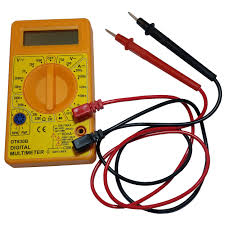
Identify this tool
Digital multimeter
Digital therometer
Digital pedometer
Digital weight scale
Once the initial diagnostics are performed and assigning system resources, the startup BIOS program will check for information about secondary storage devices that might contain the OS. This list of devices and the order in which they should be checked are found and arranged in the CMOS setup utility, and are commonly referred to as:
The Boot Record
The Boot sequence
The MBR (Master Boot Record)
The Disk Partition table
What is the name for the routine that tests the motherboard, memory, disk controllers, video, keyboard and other system hardware?
CSST
POST
CMOS
BIOS
Updating or replacing the BIOS contents in a PC is called:
Hard boot
Overclocking
Flashing the BIOS
Direct memory access (DMA)
Mike is looking at his BIOS settings and notices that his computer can start up using the following process:
1. USB Device
2. Internal Hard Drive
3. CD/DVD Drive
4. Network Interface Card (NIC)
What term would we use to describe this?
Boot Sequence/Boot Order
BIOS security
CMOS
None of the Above
What key to press to save and exit BIOS set up utility?
<enter>
<esc>
<F9>
<F10>
An employee complains that every time they turn their computer off, the computer's time is set to 12:00 pm, and the date is set back to January 1, 1990. Which of the following is the MOST likely cause of this anomaly?
The CMOS chip is failing
The CMOS chip on the motherboard is loose
The CMOS settings are not being saved before powering off the computer
The CMOS battery has failed

Which component is Removed in this picture during acomputer Disassembly?
Power Supply Unit
Hard Disk Drive
Optical drive
Central Processing Unit
What is the first step in disassembling a computer?
Unplug all cables
Remove the system fan
Open the case/outer shell
Remove the power supply unit
What is the purpose of heat sink?
To absorb heat from the CPU
To absorb heat of the motherboard
To blow away dust near inside the system unit
To regulate the supply of power into the CPU
How do you remove a CPU from a motherboard?
Turn off the computer, unlock the retention mechanism, and lift the CPU straight up and out of the socket.
Turn off the computer, unlock the retention mechanism, and twist the CPU counterclockwise to remove it.
Turn off the computer, unlock the retention mechanism, and push the CPU down into the socket to remove it.
Turn off the computer, unlock the retention mechanism, and slide the CPU horizontally to remove it.
How do you remove RAM from a motherboard?
Twist the RAM module counterclockwise to remove it from the motherboard.
Pull the RAM module straight out of the motherboard with force.
Use a screwdriver to pry the RAM module off the motherboard.
Gently push down on the clips on either side of the RAM module to release it.
What is the purpose of a motherboard in a computer?
To provide power to the computer components.
To store data and files.
To control the speed of the computer.
To provide a platform for component connection and communication.
What procedure comes next after unscrewing the side panels?

