
 Worksheets
Premiere tools and Interface
Total questions: 35
Worksheet time: 25mins
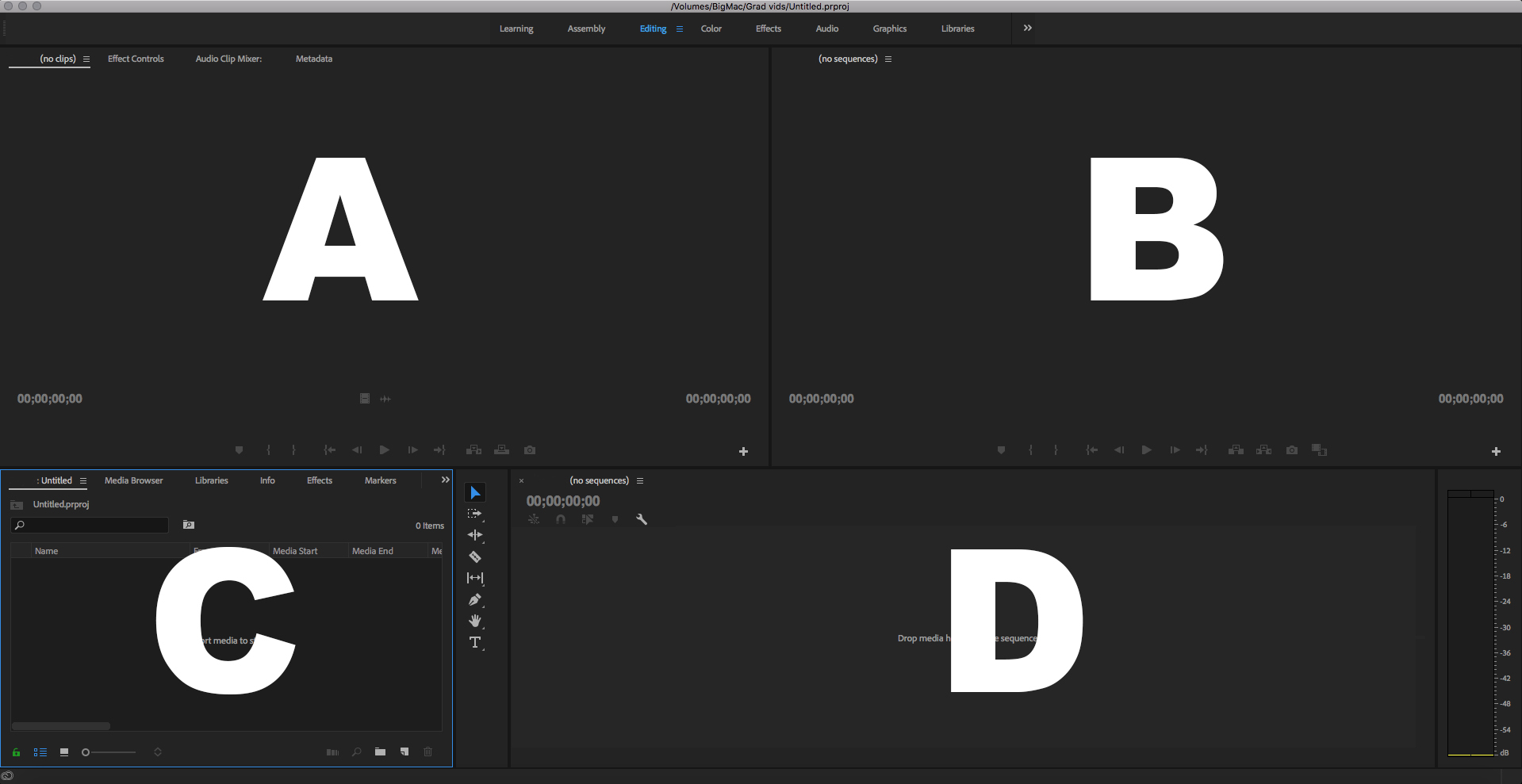
Which is the Program Panel?
A
B
C
D
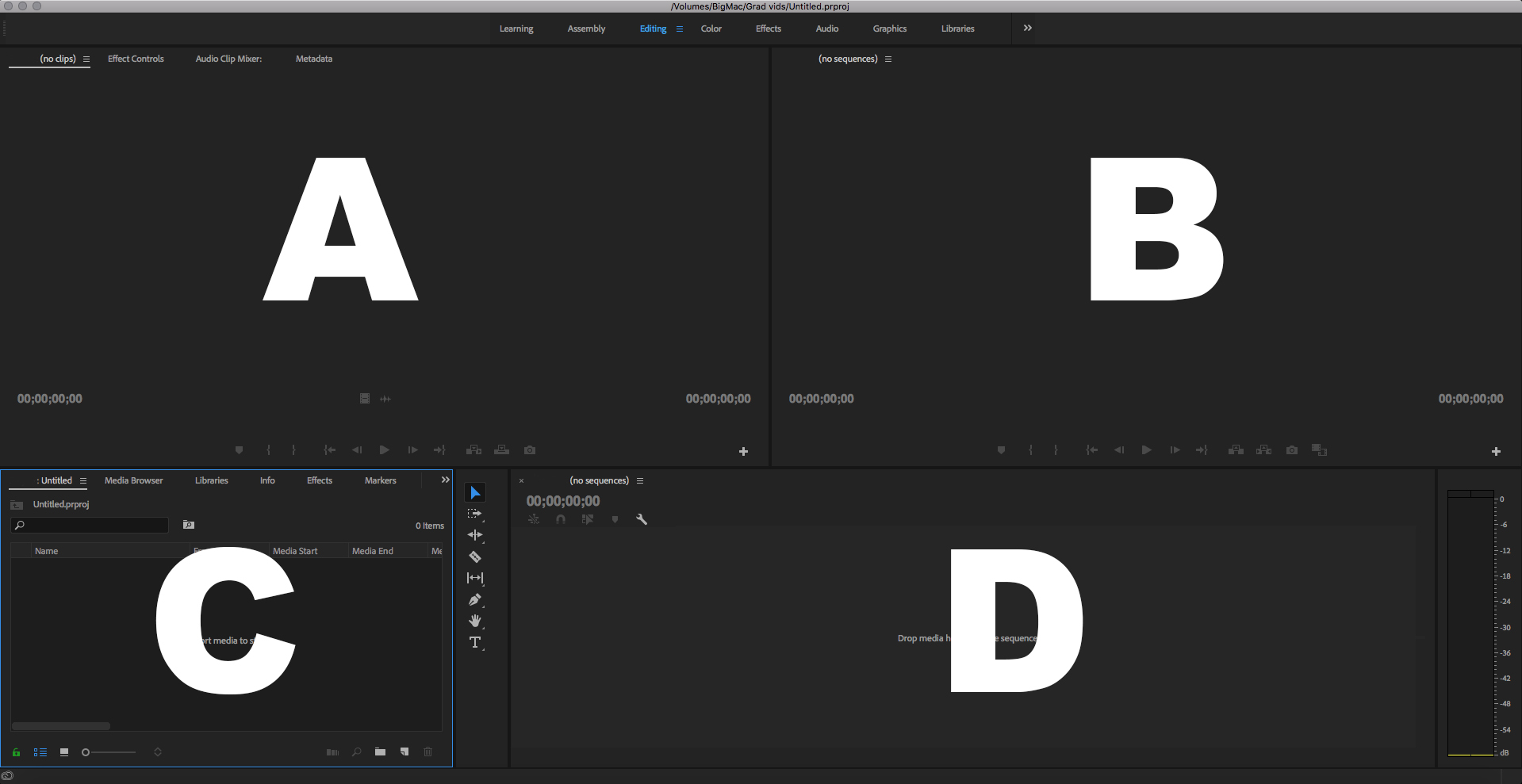
Which is the Source Panel?
A
B
C
D
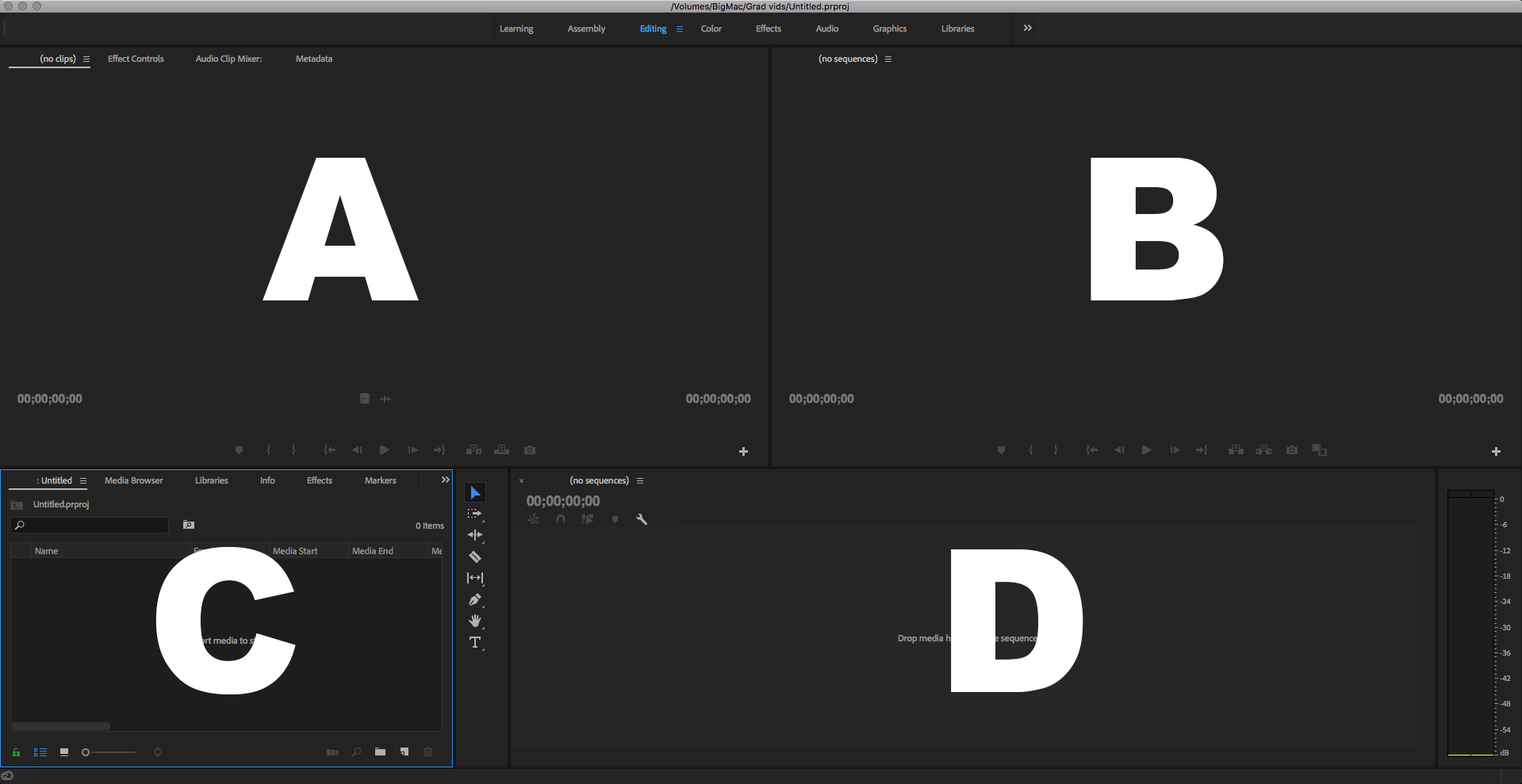
Which is the Timeline Panel?
A
B
C
D
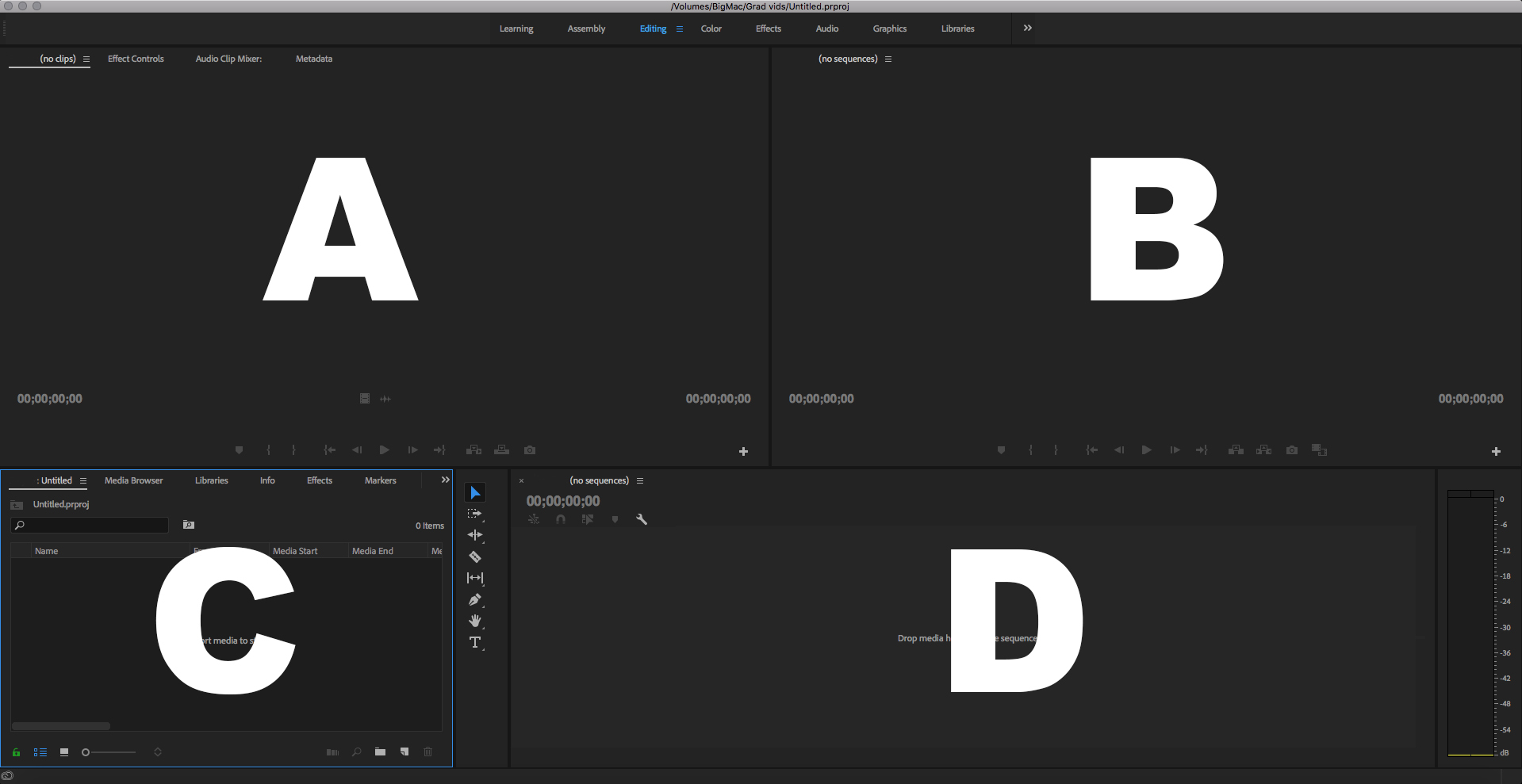
Which is the Project Panel?
A
B
C
D

Inside the Project panel, what does this Icon stand for?
A Clip
An Audio Clip
An Image
A Sequence

Inside the Project panel, what does this Icon stand for?
A Clip with Audio
An Audio Clip
A Sequence
A Subclip

Inside the Project panel, what does this Icon stand for?
A Sequence
A Subclip
An Audio File
A Clip with Audio

Inside the Project panel, what does this Icon stand for?
A Subclip
A Sequence
A Clip with Audio
An Image

Inside the Project panel, what does this Icon stand for?
A Clip with Audio
A Subclip
A Bin
An Audio Clip

Inside the Project panel, what does this Icon stand for?
A Subclip
A Folder
A Bin
A Sequence

In the Source Monitor, what does this Icon do?
Insert
Extract
Lift
Overwrite

In the Source Monitor, what does this Icon do?
Lift
Mark In
Export Still Frame
Overwrite

In the Source Monitor, what does this Icon do?
Play
Fast Forward
Go to Mark In
Move forward by 1 frame

In the Program Monitor, what does this Icon do?
Lift
Extract
Insert
Overwrite

In the Source Monitor, what does this Icon do?
Go to Mark Out
Extract
Mark In
Mark Out

In the Program Monitor, what does this Icon do?
Extract
Export Frame
Lift
Screenshot

What Workspace is this?
Editing
Color
Effects
Assembly

What Workspace is this?
Assembly
Color
Effects
Editing

In the Source Monitor, what does this Icon do?
Move 1 frame forward
Play
Export Frame
Insert

In the Source Monitor, what does this Icon do?
Out Point
Play
Go to out point
Export Frame
Define the Track Selection Forward Tool (shortcut A)
The standard tool for selecting clips
Select this tool to trim the In or Out point of a clip in a Timeline.
Select this tool to select all the clips to the right of the cursor in a sequence.
Select this tool to shorten a clip in a Timeline by speeding up its playback, or to lengthen it by slowing it down.
Which is the slide tool?


Which tool is the Rate Stretch Tool ( Shortcut R )


Which tool is the Rolling Edit Tool ( Shortcut N )


Which tool is the Ripple Edit Tool (Shortcut B)


Define the Slip Tool.
Select this tool to trim the In or Out point of a clip in a Timeline.
Select this tool to roll the edit point between two clips in a Timeline.
Select this tool to shorten a clip in a Timeline by speeding up its playback, or to lengthen it by slowing it down.
Select this tool to simultaneously change the In and Out points of a clip in a Timeline, while keeping the time span between them constant.
Define the Selection Tool.
Select this tool to select all the clips to the right of the cursor in a sequence.
The standard tool for selecting clips, menu items, and other objects in the user interface.
Select this tool to make one or more incisions in clips in a Timeline.
Select this tool to simultaneously change the In and Out points of a clip in a Timeline, while keeping the time span between them constant.
Which is the Slip Tool (Shortcut Y )


Define the Slip Tool.
Select this tool to simultaneously change the In and Out points of a clip in a Timeline, while keeping the time span between them constant.
Select this tool to move the viewing area of a Timeline to the right or left.
Select this tool to roll the edit point between two clips in a Timeline.
Select this tool to move a clip to the left or right in a Timeline while simultaneously trimming the two clips that surround it.
Define the Razor Tool.
Select this tool to shorten a clip in a Timeline by speeding up its playback, or to lengthen it by slowing it down.
Select this tool to set or select keyframes, or to adjust connector lines in a Timeline.
Select this tool to move the viewing area of a Timeline to the right or left.
Select this tool to make one or more incisions in clips in a Timeline.

What tool is this?
The Ripple Edit Tool
The Rolling Edit Tool
The Rate Stretch Tool
The Slip Tool

What tool is this?
The Slip Tool
The Razor Tool
The Rate Stretch Tool
The Slide Tool

What tool is this?
The Riddle Edit Tool
The Slide Tool
The Slip Tool
The Hand Tool

What tool is this?
The Frame Rate Tool
The Track Select Backwards Tool
The Undo Tool
The Backwards Type Tool

What tool is this?
None of these choices
The Cut Tool
The Selection Tool
The Razor Tool

